Triangle Collision (2D)

With some of the free time I had, I decided to remake a video game from my childhood. Though the game was rendered with 3D visuals, it was essentially a 2D game. I’ll need to detect collisions when two actors in the game occupy the same footprint. The footprints will usually be rectangular. But these rectangles could be oriented in any way. Detection of orthognal overlapping bounding boxes is a simple matter of checking if some pointes are within range. But if they are not oriented parallel/perpendicular to each other, then a different check must be done.

Rectangles can be constructed with two triangles. The solution to detecting overlapping rectangles is built upon finding intersection with a triangle. Let’s look at point-triangle intersection first. Let’s visualize some overlapping and non-overlapping scenarios.

Examining this visually, you can intuitively state whether any selected pair of triangles or points intersect with each other. But if I provided you only with the points that make up each triangle, how would you state whether overlap occurs? An algorithmic solution is needed. The two solutions I show here did not originate with me. I found solutions on StackOverflow and RosettaCode. But what I present here is not a copy and past of the solutions. They’ve been adapted some to my needs.

For my points and triangles, I’ll use the following structures.

struct Point
{
	float x;
	float y;	
};

struct Triangle
{
	Point pointList[3];
};

There are lots of ways to detect whether a point iw within a triangle. Before writing my own, I found a simple one on GameDev.net. This is an adjusted implementation.

float sign(Point p1, Point p2, Point p3)
{
	return (p1.x - p3.x) * (p2.y - p3.y) - (p2.x - p3.x) * (p1.y - p3.y);
}

bool pointInTriangle(Point pt, Triangle tri)
{
	float d1, d2, d3;
	bool has_neg, has_pos;
	d1 = sign(pt, tri.pointList[0], tri.pointList[1]);
	d2 = sign(pt, tri.pointList[1], tri.pointList[2]);
	d3 = sign(pt, tri.pointList[2], tri.pointList[0]);
	has_neg = (d1 < 0) || (d2 < 0) || (d3 < 0);
	has_pos = (d1 > 0) || (d2 > 0) || (d3 > 0);
	return !(has_neg && has_pos);
}

Usage is simple. Passing a point and a triangle to the function pointInTriangle results in the return of a bool value that is true if the point interacts with the triangle.

Point p1 = { 5, 7 };
Point p2 = { 3, 4 };
Point p3 = { 3, 3 };

Triangle t1 = { { { 2, 2 }, { 5, 6 }, { 10, 0 } } };

std::wcout << "Point p1 " << (pointInTriangle(p1, t1) ? "is" : "is not") << " in triangle t1" << std::endl;
std::wcout << "Point p2 " << (pointInTriangle(p2, t1) ? "is" : "is not") << " in triangle t1" << std::endl;
std::wcout << "Point p3 " << (pointInTriangle(p3, t1) ? "is" : "is not") << " in triangle t1" << std::endl;

Having Point-Triangle intersection is great, but I wanted Triangle-Triangle intersection. I decided to use an algorithm from RosettaCode. The code I present here isn’t identical to what was presented there, though. Some adjustments have been made, as I prefer to avoid using explicit pointers to functions. My definition of Triangle and Point are expanded to accomodate the implementation’s use of indices to access the parts of the triangle. By unioning the two definitions, I can use either notation for accessing the members.

struct Point
{
	union {
		struct {
			float x;
			float y;
		};
		float pointList[2];
	};
};

struct Triangle
{
	union {
		struct {
			Point p1;
			Point p2;
			Point p3;
		};
		Point pointList[3];
	};	
};

The algorithm makes use of the determinate function, an operation from matrix math. I’m going to skip over explaining the concept of determinants. Explanation of matrix operations deserves its own post.

inline double Det2D(const Triangle& triangle)
{
	return +triangle.p1.x* (triangle.p2.y- triangle.p3.y)
		+ triangle.p2.x * (triangle.p3.y - triangle.p1.y)
		+ triangle.p3.x * (triangle.p1.y - triangle.p2.y);
}

Another key attribute of this implementation is that it optionally usually enforces the angles of a triangle being provided in a counter-clockwise order. If they are always passed in the same order, there is an opportunity for faster execution of the code. I chose general usability over speed. But I did mark the code with attributes to suggest that the compiler optimize for them being passed in that order.

void CheckTriWinding(const Triangle t, bool allowReversed = true)
{
	double detTri = Det2D(t);
	[[unlikely]]
	if (detTri < 0.0)
	{
		if (allowReversed)
		{
			Triangle tReverse = t;
			tReverse.p1 = t.p3;
			tReverse.p3 = t.p1;
			tReverse.p2 = t.p2;
			return CheckTriWinding(tReverse, false);
		}
		else throw std::runtime_error("triangle has wrong winding direction");
	}
}

The original algorithm had a couple of functions that were used to check for boundary collisions or ignore boundary collisions. I have expanded them from 2 functions to 4 functions. Whereas the original structured often as three points that are arbitrarily passed to a function, I prefer to pass triangles as a packaged structure. There is a place in the algorithm where a calculation is formed on a triangle formed by two points of one triangle and one point of the other triangle. The second forms of these functions accept points and will create a triangle from them.

bool BoundaryCollideChk(const Triangle& t, double eps)
{
	return Det2D(t) < eps;
}

bool BoundaryCollideChk(const Point& p1, const Point& p2, const Point& p3, double eps)
{
	Triangle t = { {{p1, p2, p3}} };
	return BoundaryCollideChk(t, eps);
}

bool BoundaryDoesntCollideChk(const Triangle& t, double eps)
{
	return Det2D(t) <= eps;
}

bool BoundaryDoesntCollideChk(const Point& p1, const Point& p2, const Point& p3, double eps)
{
	Triangle t = { {{p1, p2, p3}} };
	return BoundaryDoesntCollideChk(t, eps);
}

With all of those pieces in place, we can finally look at the part of the algorithm that returns true or false to indicate triangle overlap. The algorithm checks each point of one triangle to see if it is on the interior or external side of each edge of the triangle. If all of the points are on the external side, then no collision has been connected. Then it does the same check swapping the roles of the triangles.If any of the points are not external to the opposing triangle, then the triangles collide.

bool TriangleTriangleCollision(const Triangle& triangle1,
	const Triangle& triangle2,
	double eps = 0.0, bool allowReversed = true, bool onBoundary = true)
{
	//Trangles must be expressed anti-clockwise
	CheckTriWinding(triangle1, allowReversed);
	CheckTriWinding(triangle2, allowReversed);	

	//For edge E of trangle 1,
	for (int i = 0; i < 3; i++)
	{
		int j = (i + 1) % 3;
		[[likely]]
		if (onBoundary)
		{

			//Check all points of trangle 2 lay on the external side of the edge E. If
			//they do, the triangles do not collide.
			if (BoundaryCollideChk(triangle1.pointList[i], triangle1.pointList[j], triangle2.pointList[0], eps) &&
				BoundaryCollideChk(triangle1.pointList[i], triangle1.pointList[j], triangle2.pointList[1], eps) &&
				BoundaryCollideChk(triangle1.pointList[i], triangle1.pointList[j], triangle2.pointList[2], eps))
				return false;
		}
		else
		{
			if (BoundaryDoesntCollideChk(triangle1.pointList[i], triangle1.pointList[j], triangle2.pointList[0], eps) &&
				BoundaryDoesntCollideChk(triangle1.pointList[i], triangle1.pointList[j], triangle2.pointList[1], eps) &&
				BoundaryDoesntCollideChk(triangle1.pointList[i], triangle1.pointList[j], triangle2.pointList[2], eps))
				return false;
		}

		if (onBoundary)
		{

			//Check all points of trangle 2 lay on the external side of the edge E. If
			//they do, the triangles do not collide.
			if (BoundaryCollideChk(triangle2.pointList[i], triangle2.pointList[j], triangle1.pointList[0], eps) &&
				BoundaryCollideChk(triangle2.pointList[i], triangle2.pointList[j], triangle1.pointList[1], eps) &&
				BoundaryCollideChk(triangle2.pointList[i], triangle2.pointList[j], triangle1.pointList[2], eps))
				return false;
		}
		else
		{
			if (BoundaryDoesntCollideChk(triangle2.pointList[i], triangle2.pointList[j], triangle1.pointList[0], eps) &&
				BoundaryDoesntCollideChk(triangle2.pointList[i], triangle2.pointList[j], triangle1.pointList[1], eps) &&
				BoundaryDoesntCollideChk(triangle2.pointList[i], triangle2.pointList[j], triangle1.pointList[2], eps))
				return false;
		}
	}
	//The triangles collide
	return true;
}

The basic usage of this code is similar to the point collision. Pass the two triangles to the function

Triangle t1 = { Triangle{Point{3, 6}, Point{6, 5}, Point{6, 7} } },
			t2 = { Triangle{Point{4, 2}, Point{1, 5}, Point{6, 4} } },
			t3 = { Triangle{Point{3, 12}, Point{9, 8}, Point{9, 12} } },
			t4 = { Triangle{Point{3, 10}, Point{5, 9}, Point{5, 13} } };

auto collision1 = TriangleTriangleCollision(t1, t2);
std::wcout << "Triangles t1 and t2 " << (collision1 ? "do" : "do not") << " collide" << std::endl;
auto collision2 = TriangleTriangleCollision(t3, t4);
std::wcout << "Triangles t3 and t4 " << (collision2 ? "do" : "do not") << " collide" << std::endl;
auto collision3 = TriangleTriangleCollision(t1, t3);
std::wcout << "Triangles t1 and t3 " << (collision3 ? "do" : "do not") << " collide" << std::endl;

With that in place, I’m going to get back to writing the game. I can now check to see when actors in the game overlap.

Finding the Code

You can find the code in the GitHub repository at the following address.

https://github.com/j2inet/algorithm-math/blob/main/triangle-intersection/triangle-intersection.cpp


Posts may contain products with affiliate links. When you make purchases using these links, we receive a small commission at no extra cost to you. Thank you for your support.

Mastodon: @j2inet@masto.ai
Instagram: @j2inet
Facebook: @j2inet
YouTube: @j2inet
Telegram: j2inet
Twitter: @j2inet

Graphing with the HTML Canvas

Among other places I went to Peru and saw Machu Picchu! The trip back home though was long and boring.  There’s lots of ways that one can keep their mind when busy when in a non-stimulating situation though. Reading, Sudoku , cross word puzzles, so on. Sometimes I like playing with code during these times. I had started off reading a math heave book though. I generally have a notebook with me, and my notebooks are generally graph ruled. But graphing polynomials can be tedious. But hey, I had a Chromebook  with me, plenty of battery life, and no Internet access. So I decided to see what I could do with the HTML canvas. I cam up with something that worked and was useful. It’s not something that I would package and call a library by any means. After all, this is something that was put together during a layover in an airport. But nonetheless I thought it to be something that is worthy of sharing.

Drawing with the Canvas

Let’s review how to draw with the HTML5 canvas. First a <canvas> element would need to be declared within a page. Within the page’s script we grab a reference to the canvas and get the 2d context and hold onto it; the context object will be the object used for most of our interaction with the canvas. Here I take a canvas
and draw a red rectangle in it.
<canvas id="myCanvas" width="320" height="200"></canvas>

    var canvas = document.getElementById('myCanvas');
    var ctx = canvas.getContext('2d');
    ctx.fillStyle="#FF0000";
	ctx.fillRect(10,10,100,100);

Cool, we can draw on the surface. But before graphing anything we need to be able to map the data that we are graphing to the coordinate space for the graph. That’s going to be a linear transformation. Linear transformations are easy but something that I’m sure I’ll want to do several times. So I’ve made a class to figure out the the transformation for me.

Linear Transformation

Given a pair of starting and ending values this class is able to convert from on value range to another. The class has two methods. the map() method will do the conversion and rmap will perform a reverse conversion. Given the the freezing and boiling points of water in Farenheit and Celcius it could perform conversions back and forth between the two.

function linearMapping(iMin, iMax, oMin, oMax) {
	this.slope =  (oMax - oMin) / (iMax - iMin);
	this.base = oMin - this.slope*iMin;
	this.map = function(x) {
		if(typeof x != 'number')
			return null;	
		return x*this.slope+this.base;
	}
	this.rmap = function(x) {
		if(typeof x != 'number')
			return null;
		return (x - this.base)/this.slope;
	}
}

I sat for a while and I thought about the parameters that I would want to pass when creating a graph. I first envisioned passing this information as individual parameters to a function. But I didn’t have to think for long before I realized this would be a lot of parameters most of which I probably would not feel like specifying. I took a slightly different approach and decided to instead pass a parameter object. The object would be initialized with a set of workable default values that could be changed as the graph needed to be customized.

Graphing Options

Some of the basic information needed is the the size of the graph within the HTML page and the ranges of the X and Y values being displayed. I allow these values to be optionally passed in when constructing the object. I’ve also defined a color palette to be used for the graph.

function graphOptions(width, height, minX, maxX, minY, maxY) {
	this.width = width || 300;
	this.height = height || 300;
	this.minX = minX || -10;
	this.maxX = maxX ||  10;
	this.minY = minY || -10;
	this.maxY = maxY ||  10;
	this.stepX = 2;
	this.stepY = 2;
	this.backgroundColor = '#F0F0F0';
	this.lineColor = '#C0C0FF'
	this.minorLineWidth = 1;
	this.majorLineWidth = 4;
	this.dataColors = [
		"#000000",
		"#ff0000",
		"#00ff00",
		"#0000FF",
		"#FF8000",
		"#ff0080",
		"#80FF00",
		"#8000FF"
	]
}

With that we are ready to start creating our graph. We need a way of specifying where in the page the graph should be generated. I’ve made a method named makeGraph() that will accept two arguments; the parent element for the graph and the parameter object for the graph options. If for some reason the parent element isn’t specified the function will just append the graph to the page’s DOM.

Creating the Graph

This class will take care of creating the canvas object. The canvas’s context will be retained along with the options and packaged in an object as both will be needed later for plotting graphs. When the graph is created I render the graph lines on it. The canvas object is added to the page

function makeGraph(parentElement, options) {
	options = options || new graphOptions();
	var graphElement = document.createElement('canvas');

	graphElement.width = options.width;
	graphElement.height = options.height;

	var ctx = graphElement.getContext('2d');
	var newGraph = new graph(ctx, options);
	ctx.fillStyle=options.backgroundColor;
	ctx.fillRect(0,0,options.width, options.height);

	ctx.strokeStyle = options.lineColor;
	ctx.beginPath();
	ctx.lineWidth = options.majorLineWidth;
	var xOrigin = newGraph.xMapping.map(0);
	var yOrigin = newGraph.yMapping.map(0);
	ctx.moveTo(xOrigin,0);
	ctx.lineTo(xOrigin, options.height);
	ctx.moveTo(0, yOrigin);
	ctx.lineTo(options.width, yOrigin)
	ctx.stroke();
	ctx.strokeStyle = options.lineColor;
	ctx.beginPath();
	for(var i = options.minX; i<options.maxX;i+=options.stepX) {
		var xPos = newGraph.xMapping.map(i);
		ctx.moveTo(xPos,0);
		ctx.lineTo(xPos,options.height);
		ctx.lineWidth = options.minorLineWidth;
	}
	for(var i = options.minY; i<options.maxY;i+=options.stepY) {
		var yPos = newGraph.yMapping.map(i);
		ctx.moveTo(0, yPos);
		ctx.lineTo(options.width, yPos);
		ctx.lineWidth = options.minorLineWidth;
	}
	ctx.stroke();

	if(parentElement != null)
		parentElement.appendChild(graphElement)
	else
		document.body.appendChild(graphElement)
	return newGraph;
}

The result of the above is the return of a graph object that hasn’t been defined here yet. The graph object packages together the context for rendering, the graph objects, and the objects for mapping the values being represented to canvas coordinates. Something that may look odd at first is that for the Y-mapping I placed a maximum value in a minimum parameter and vice versa. This is because the coordinate system that many of us use when thinking about graphs is reversed along the Y-axis than the canvas coordinates. The general way that people think about graphs is that numbers of greater value will appear higher up on the graph. But in the canvas coordinate space the highest position has a Y-coordinate of zero and as the number increases the position maps to a position further down on a page. There’s more than one way to address this, but since the linear transfor object can already handle this if I
specify the values in a certain order that’s the solution that I used.

The function made for public use on this class ia named plot. It accepts a list of functions to be graphed. While I expect an array of functions to be passed to it if a singular function were passed that’s converted to an array of one function so that it can be treated the same way. The plot function interates through the functions passed through it passing each one to another function that does the actual work. A different color index is passed for each function.

The real work is done in plotFunction. First the X-values that fall within the range of the limits of the graph are passed to the function being mapped and the canvas-mapped result is saved to an array. The result for each X-value could either be a number or a non-number. Non-numbers will not be represented in the graph. This allows for the generation of graphs for which there may be X-values that are not part of the functions domain. If an exception occurs when calling the function being graphed the X-value association with that exception is treated as a value for which the function returns nothing. After this first pass we have an array of the canvas-mapped output values from the function.

Rendering the Graph

Next we perform the acual rendering of the output onto the graph. The function will scan ahead in the array of results to the first numerical value. This first numerical value may or may not be in the first position of the array. Once a value is found it is used as the first coordinate for a line segment. Each numerical value in the array that follows this is added to the line segment. This continues until either the end of the array is reached or a non-numerical value is encountered. In either case the accumulated points for the line segment are stroked ending. If there are more values within the array the process is repeated until the end of the array is encountered.

function graph(context, options) {
	this.ctx = context;
	this.options = options;
	this.xMapping = new linearMapping(options.minX, options.maxX, 0, options.width);
	this.yMapping = new linearMapping(options.minY, options.maxY, options.height, 0);

	this.plot = function(sourceFunctions) {
		if(!Array.isArray(sourceFunctions))
			sourceFunctions = [sourceFunctions];
		var colorNumber = 0;
		sourceFunctions.forEach((x)=> {
			this.plotFunction(x,colorNumber);
			++colorNumber;
		})
	}

	this.plotFunction = function (plotFunction, colorNumber) {
		colorNumber = colorNumber || 0;
		colorNumber = colorNumber % this.options.dataColors.length;
		var values = new Array(this.options.width);
		for(var xPos=0;xPos<this.options.width;++xPos) {
			var y = null;
			var x= this.xMapping.rmap(xPos);
			try {
				values[xPos] = this.yMapping.map(plotFunction(x))
			} catch(exc) {
				values[xPos] = null;
			}
		}
		//Find the first value that we can map
		var xPos = 0;
		while((typeof values[xPos] != 'number')&&(!Array.isArray(values[xPos]))&&(xPos < values.length))
			++xPos;
		if(xPos == values.length)
			return;
		
		while(xPos<values.length) {
			this.ctx.beginPath();
			this.ctx.strokeStyle = this.options.dataColors[colorNumber];
			this.ctx.moveTo(xPos, values[xPos]);
			while(xPos+1<values.length && typeof values[xPos+1] == 'number') {
				++xPos;
				this.ctx.lineTo(xPos, values[xPos]);
			}
			++xPos;
			this.ctx.stroke();
			while((typeof values[xPos] != 'number')&&(xPos < values.length))
				++xPos;
		}
	}
}

How Does it Look?

The graphing class is complete. Showing a graph is now only a matter of including the JavaScript in a page and using it. The simplest example of using it would be the following.

var g = makeGraph(randomPlotsArea, options);
g.plot((x)=>{return Math.sin(x); });

Here’s the result!

I’ve made a page with a few place holders for graphs. Among other things it contains the following.

<p id="randomPlots">
	
Random plots
</p> <p id="trajectoryPlotArea" >
Plot of a trajectory height for an object thrown up at 10 m/s near the earth's surface.
</p>

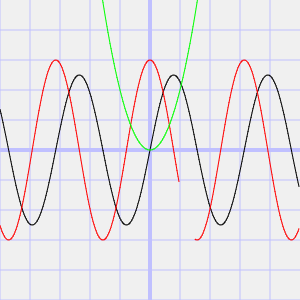
To render the graphs within their appropriate places I acquire a reference to the parent element in which the graph will be contained and I pass that to the makeGraph() function. Here I render the SIN function, the COSINE function (with no values returned from 2.0 to 3.0), and a x-squared

var randomPlotsArea = document.getElementById('randomPlots');				
var options = new graphOptions();
var g = makeGraph(randomPlotsArea, options);
g.plot([
	function(x){return 5*Math.sin(x);},
	(x)=>{
			if(Math.floor(x)!=2)
				return 6 * Math.cos(x);
			return null;
		},
	(x)=>{return x * x; }
	]);

Here is the result. The range for which no value is returned is apparent from the area in which the red line on the graph is not rendered.


Where to From Here?

Awesome! The code works! But now what?  Well, nothing for now. This was something I wrote with temporary intentions and to keep myself from being bored. That’s not to say that I’m giving up on developing a graphing library. Once back home I checked online to see what types of other graphing libraries are available. There’s a number of them, each having their own strengths. I have a direction in which I’d like to take this that is different from the others that are out there. I may revisit this, but only after a lot more thought of what I want to do, how I want this to work,  and how the variations on graphs can be specified.