Hashing String Data in JavaScript, C#, C++, and SQL Server

I’m working with some data that needs to be hashed in both C# and JavaScript. Usually converting an algorithm across languages is pretty trivial. But in JavaScript the regular numeric type is a double-precision 64-bit number. While this sounds sufficiently large, when used as an integer this only provides 53-bits of precision. As you might imagine, using a 53-bit numeric type on one system and 64-bit on another would result in differences in outcome. This would make hased data between these two functions incompatible with each other. To avoid these potential problems, I needed to use a different type. I used BIGINT.

A potential issue with BIGINT is that it can accommodate extremely large values. This isn’t usually a problem, but I need to have identical behaviour for the hash function to have identical results across the languages. Fixing this is simple though. I only need to perform the bitwise AND operation to truncate any bits in the BIGINT beyond position 64. The hast function I’m using was originally found on StackOverflow. This might not be the final Hash function that I use, but for now it works.

A key thing to note in the JavaScript implementation is the n suffix on the numbers. This ensures that they are all using the BIGINT type. Also take note of the bitwise operation with the number 0xFFFFFFFFn. This ensures that the number is truncated and acting like a 64-bit integer.

// 
function hashString(s) { 
    const A =  54059n ;
    const B = 76963n ;
    const C = 86969n;
    const FIRSTH = 37n;
   var h = FIRSTH;
   for ( var i=0;i<s.length;++i) {
        var c = BigInt(s.charCodeAt(i));
        h = ((h * A) ^ (((c) *B))) & 0xFFFFFFFFFFFFFFFFn;
   }
   return h; 
}

The C++ implementation (used for the Arduino ) follows. Using native types in C there’s nothing special that needs to be done.

#define A 54059   /* a prime */
#define B 76963   /* another prime */
#define C 86969   /* yet another prime */
#define FIRSTH 37 /* also prime */
unsigned long hash_str(String s) {
  unsigned long h = FIRSTH;
  for (auto i = 0; i < s.length(); ++i) {
    h = ((h * A) ^ (s[i] * B)) & 0xFFFFFFFFFFFFFFFF;
    //s++;
  }
  return h;  
}

The difference between the C# and C++ versions o the code are only notational. They both handle 64-bit integers just fine with no special tricks needed.

ulong hashString(String s) { 
    const ulong A =  54059ul ;
    const ulong B = 76963ul ;
    const ulong C = 86969ul;
    const ulong FIRSTH = 37ul;
   var h = FIRSTH;
   var stringBytes = Encoding.ASCII.GetBytes(s);
   for ( var i=0;i<stringBytes.Length;++i) {
        var c = stringBytes[i];
        h = ((h * A) ^ (((c) *B))) & 0xFFFFFFFFFFFFFFFFul;
   }
   return h; 
}

The differences for Kotlin are also notational, but significantly different from the C# and C++ in how the bitwise operators are expressed.

    fun hashString(s:String): ULong {
        val A:ULong =  54059u ;
        val B:ULong = 76963u ;
        val C:ULong = 86969u;
        val FIRSTH:ULong = 37u;
        var h = FIRSTH;
        var stringBytes = s.toByteArray()
        for ( i in 0..stringBytes.size-1) {
            var c = stringBytes[i].toULong();
            h = ((h * A) xor (((c) * B))) and 0xFFFFFFFFFFFFFFFFu;
        }
        return h;
    }

After having written this post, I was working in SQL Server. I was going to save some of this hashed data within SQL Server and decided to try with implementing a hash function there. Everything started out the same, but I ran into a notable problem. I encountered arithmetic overflow issues with declaring the mask 0xFFFFFFFFFFFFFFFF. This mask isn’t strictly necessary, but I’ve placed it there should I happen to use one of these implementations to hash to a smaller data type. I was using the BIGINT data type. But that data type only provides 63-bits of precision, not 64. Knowing that now I could just use a smaller mask to have a hash function that works identically across environments. If you’d like to try it out, the SQL Server implementation follows here.

CREATE FUNCTION HashString
(
	@SourceString as VARCHAR(15)
)
RETURNS BIGINT
AS
BEGIN
    DECLARE @A BIGINT =  54059
    DECLARE @B BIGINT = 76963
    DECLARE @C BIGINT = 86969
    DECLARE @FIRSTH BIGINT = 37
	DECLARE @StrLEn BIGINT = LEN(@SourceString)	
	DECLARE @Index BIGINT = 1
	DECLARE @MASK BIGINT = 0xFFFFFFFFFFFF
	DECLARE @Letter CHAR
	DECLARE @LetterCode BIGINT
	DECLARE @H BIGINT = @FIRSTH
	WHILE @Index <= @StrLEn	
	BEGIN
		SET @Letter = SUBSTRING(@SourceString, @Index, 1)
		SET @LetterCode = UNICODE(@Letter)
		SET @H = ((@H * @A) ^ (@LetterCode * @B)) & @MASK
		SET @Index = @Index + 1		
	END	
	return  @H;
END
GO

Mastodon: @j2inet@masto.ai
Instagram: @j2inet
Facebook: @j2inet
YouTube: @j2inet
Telegram: j2inet
Twitter: @j2inet

Posts may contain products with affiliate links. When you make purchases using these links, we receive a small commission at no extra cost to you. Thank you for your support.

Gaming Through Netflix

When I tell someone that I’m about to play a game on Netflix, the response is the same.

“A game on Netflix, what are you talking about?”

I guess this isn’t well know, but Netflix publishes and licenses video games. most of these have been casual games though. My attention was caught by a recent game made available through Netflix that was an action game. “Teenage Mutant Ninja Turtles: Shredder’s Revenge” was recently made available on a range of systems. The look to the game reminds me of some previous TMNT games that I enjoyed, and I wanted to get this one. I never got around to making a purchase because I found the game on Netflix. Great! But how exactly does someone play a game on Netflix? How does someone play **this** game, which allows up to 4 people to play at once! Let’s find out.

Netflix releases games as mobile games. If you have an iOS or Android device, then you have what it takes to play the games. You can usually find the games by searching for “Netflix” in either of the app stores. But I find it easier to open the mobile app and scroll down vertically until you find a section listing the games. Selecting one of the games shows more information on it and presents a button to open the store for installing it. On Android, if the game is already installed, this will but a button to open and play the game instead.

Of course, the games can be played right away without any accessories. I personally hate playing arcade or action games on phone with on screen controls. Thankfully, one is not limited to that as the only form of control. The game supports game controllers, and you may be able to play on a larger external display (such as a TV) if using additional accessories.

Controllers

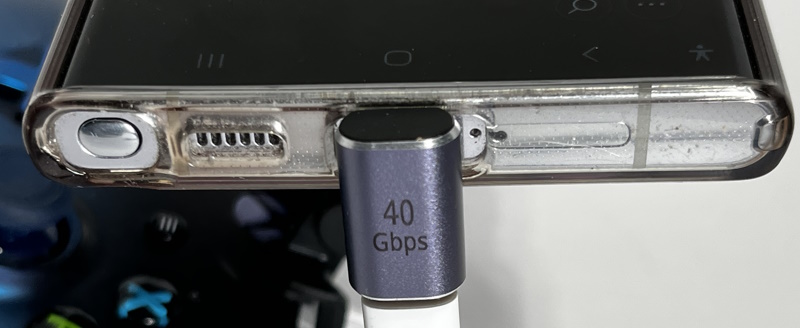
Both iOS and Android support game controllers. On iOS, you only need to pair the controller with the phone using the Bluetooth settings. On Android, you can either pair through the Bluetooth settings or you can connect it to the phone with a USB cable. I preferred this method so that I did not have to unpair the controller with the other device with which I use it. Recent Xbox controllers use USB-C as their connector. If you have an older controller, it uses USB-micro. You’ll need a USB-C to USB-micro cable. I preferred to use the shortest cable possible. I also use a USB-C right angle adapter to keep the cable a little neater.

External Display

You can play the games on an external display too. Well, maybe. It depends on your phone. Many Samsung devices will work with generic USB-C to HDMI adapters. If you have some other Android device, it may or may not support USB-C. Some iOS devices will work with HDMI adapters too. You just need to have an appropriate device to match either your Lightning port or USB-C port (I used this Lightning to HDMI adapter). Using an external display tends to drain the battery faster. It’s a good idea to use an adapter that also allows charging. With some of my Samsung devices I have found this can be tricky. The Samsung devices use USB-PD (Power Delivery). The device request some amount of power from the power supply. It the phone detects a different in the amount requested and the amount received, the phone will alert the user that there is potentially moisture on the USB-C port. Instead of using a PD power supply I had better results using a “dumb” power supply when pairing with the display adapter or using an HDMI adapter labeled as working with Samsung DEX. The video adapter that I preferred to use for Android was sold under the description of a USB-C Thunderbolt 3 Docking Station. My phone and tablet do not support Thunderbolt, but this doesn’t matter, the docking station works fine.

Multi-Player

I had hoped that I could connect multiple controllers to my Android device to play with multiple people. Sadly, this isn’t the case. The multiplayer works over the Internet with each person having a device. When you are starting the game, the character select screen also has a button to “Party Up” with two modes of “partying.” One can either create a private party or a public party. For the private party, a 6 character text string displays on the screen. Others that you want to join the party need to enter this code. If you select a public party then you can join up with others that wish to play online. For either option, you can either create a party, or you can join one.

Transferring Progress Between Devices

As you might expect, with Netflix games your progress is saved with your profile. If you go to a different device but use the same profile your progress shows up there. There’s nothing that you need to do. This is automatic.

Will It Replace my Game Streaming Service?

No. In its current form, Netflix Games are not going to replace Xbox or Luna streaming. But they don’t try to fill that space. Many of the games in their library are more casual game. At the time that I’m writing this, there are a total of about 50 games in the Netflix gaming library. While they wouldn’t be competing those larger game streaming service, the games do have their own charm to them. There are probably about 5 games that have support for controllers, including TMNT, Spiritfarer, and Stranger Things 3. Right now their games lean more casual (which to me makes sense, since that may be of broader interest). I do think that it is a space to watch as Netflix continues to find ways to grow.


Posts may contain products with affiliate links. When you make purchases using these links, we receive a small commission at no extra cost to you. Thank you for your support.

Mastodon: @j2inet@masto.ai
Instagram: @j2inet
Facebook: @j2inet
YouTube: @j2inet
Telegram: j2inet
Twitter: @j2inet