I was working with hardware that was sequential in coming off a production line. Looking at the hardwares’ serial number, I realized the numbers were mostly sequential, with the exception of the suffix on the serial number. I realized that I was looking at numbers suffixed with a checksum. I tried out a few checksum algorithms to figure out which one fit. This was only being done from curiosity.
One algorithm of special interest was Luhn’s algorithm. This is the algorithm that is used with IMEI, credit card numbers, and Canadian social security numbers. It’s a useful public domain algorithm. I’ve collected a few implementations of it here.
C++
bool pasesLuhnCheck(const string& cardNo)
{
    int nDigits = cardNo.length();

    int nSum = 0, isSecond = false;
    for (int i = nDigits - 1; i >= 0; i--) {

        int d = cardNo[i] - '0';

        if (isSecond == true)
            d = d * 2;

        // We add two digits to handle
        // cases that make two digits after
        // doubling
        nSum += d / 10;
        nSum += d % 10;

        isSecond = !isSecond;
    }
    return (nSum % 10 == 0);
}
C#
    public static bool CheckLuhnParity(string digits)
    {
        bool isValid = false;

        if (!string.IsNullOrEmpty(digits))
        {
            long sum = 0;
            int parity = digits.Length % 2;
            for (int i = 0; i < digits.Length; i++)
            {
                int digit = digits[^(i + 1)] - '0';
                sum += (i % 2 == parity) ? Luhn(digit) : digit;
            }
            isValid = (sum % 10) == 0;
        }
        return isValid;
    }
Kotlin
fun IsValidLuhnString(entry:String): Boolean {
    var sum = 0
    var isSecond = false
    for( i in entry.length-1..0) {
        val multiplier = if(isSecond) { 2} else {1}
        val digit = entry[i].digitToInt() * multiplier
        sum += digit / 10;
        sum += digit % 10
        isSecond = !isSecond
    }
    return (sum % 10) == 0
}
You can find a JavaScript/HTML implementation of it at https://j2inet.github.io/apps/luhns. Though this example doesn’t engage in any network communication, while I encourage you to try it out, please don’t use your bank card. Better yet, if you want to examine the code locally, there is also a download link on that page that contains all of the source code.
Posts may contain products with affiliate links. When you make purchases using these links, we receive a small commission at no extra cost to you. Thank you for your support.
Microsoft has made the MS DOS source code available on GitHub. At the time of this writing, the 1.25, 2.0, and 4.0 versions are available. For those that ever ran it, browsing through it shows some interesting attributes. 85% of the source code is x86 assembler and 13.1% is in C. Typically, programs on MS DOS ran in the same memory space (no surprise, since these versions of MS DOS did not support multi-tasking). In modern development the mechanism that a program used for calling an operating system is abstracted away. With a lot of this source code being written in x86 assembler, the communication between a user program and operating system functions is laid bare. Communication and function calls often occurred through dedicated processor interrupts. Though modern processors still use interrupts (especially for hardware events) much of our communication with modern operating systems don’t have to rely on these. Chances are that you don’t have the equipment to write the compiled images to a disk (do you even have a floppy disk?). But I think it is worth looking through if you ever ran it at any point in your life.
Posts may contain products with affiliate links. When you make purchases using these links, we receive a small commission at no extra cost to you. Thank you for your support.
If you try to invoke the Microsoft Storage Emulator (azurite.exe) and you see the following error, the solution is simple.
C:\Program Files\Microsoft Visual Studio\2022\Community\Common7\IDE\Extensions\Microsoft\Azure Storage Emulator>azurite.exe
Azurite Blob service is starting at http://127.0.0.1:10000
Exit due to unhandled error: Error: EPERM: operation not permitted, open 'C:\Program Files\Microsoft Visual Studio\2022\Community\Common7\IDE\Extensions\Microsoft\Azure Storage Emulator\__azurite_db_blob__.json~'
The solution is simple. You will likely see this error if your current directory is the same as the directory where the EXE is store. You don’t want to run the program that way. It will result in the program attempting to place its temporary files in that folder. The better way is to ensure that the program’s folder is included in your path variable so that you can invoke it from any folder. The full path to the folder will depend on your edition of Visual Studio. I’m using the Community version. If you are running the Professional version, then replace the folder name “Community” with “Professional” below.
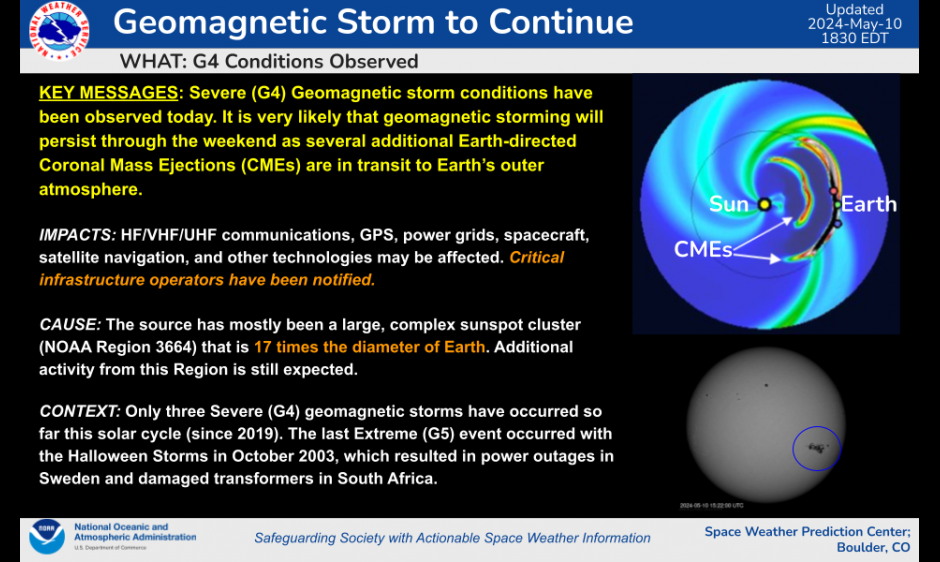
Right now the earth is being hit with a geomagnetic storm from the sun. The technical explanation of what this means, though interesting, will for now take back-seat an opportunity that is coming as a consequence. You might be able to see the Northern Lights as far south as Alabama this weekend!
The solar flares responsible for this opportunity occurred on Wednesday. At least 5 of the solar flares are though to be directed towards earth, according to NOAA. If you are out late this weekend, look north. Even if you can’t see anything with the naked eye, if you have clear weather, try taking a long exposure photo. You might be able to photograph an aurora!
Posts may contain products with affiliate links. When you make purchases using these links, we receive a small commission at no extra cost to you. Thank you for your support.
UPDATE: The launch is now delayed until 17 May to give time to replace O2 pressure regulation valve.
Boing is going to make a second attempt to launch its Starliner manned spacecraft. The first attempt was scrubbed because of a stuck valve. The next attempt is scheduled for Thursday 8 May at about 10:11 PM. Emphasis on “Attempt” because there is no guarantee that it will happen. The craft is capable of holding up to 7 people. But for this test flight there will only be three people. Barry Willmore, 61, is a NASA astronaut and former U.S. Navy Captain that will be in command. Sunita Williams, 58, is a former Navy server member, will be piloting. The flight plan for the Starliner includes a stay at the International Space Station for a week before returning the astronauts. If this launches, this will be Boeing’s first manned space flight.
This won’t be the first flight of the spacecraft itself. It first launched in 2019, but failed to rendezvous with the Space Station because of a software error. It was successful in a launch in May 2022. Though after that flight Boeing decided to change the type of tape used on the electrical cables to a material that was more fire resistant since then.
Someone had an NFC card for which I needed the data. There are a couple of ways I could have gotten it from him. One way was to ask him to install an app and scan the card. From the app, he could export the data and send it to me. I don’t generally like to ask people to install apps though. The other option was to make a web page and have him use the web page to scan the card. Key factors here is that he was using a Samsung Android phone and he uses Chrome as his primary driver. Chrome on Android has NFC support.
I needed to make the page in a hurry. It’s a single file web page. You can find it at this URL: https://j2inet.github.io/nfcreader/. You can view the source code completely through this link. If you are viewing this article from your computer and want to run the code on your phone, here’s a QR Code to that same URL.
The Interface
The interface is just a bit of HTML decorated with CSS attributes. We don’t need to explore the CSS to understand the interface. There are a couple of buttons for enabling and disabling a scanner, and a checkbox that, when checked, will cause the NFC card’s serial number to also be displayed.
At the time of this writing, NFC support is still considered experimental. mozilla.org reports support for Chrome 89, Opera 63, Samsung Internet 15.0, and WebView 89. I only tested this in Samsung Internet, Samsung Internet Beta, and Chrome. I only experienced this working in Chrome. Tho check whether your browser supports this API, see if the window object defines NDEFReader. If it does not, then the device doesn’t support reading NFC. Note that it is possible for a browser to have software support for NFC while the device has no available NFC hardware. That’s not something that you can test for.
if (! ('NDEFReader' in window))  {
   //This device doesn't have NFC capabilities.
   document.getElementById('scanButton').disabled = true;
   document.getElementById('stopScanButton').disabled = true;
   document.getElementById('lastError').innerText = "Sorry, this app only works on devices capable of reading NFC"
}
Before attempting to read the from the NFC card, you’ll need to create an object and set some handlers. You’ll need to create a new NDEFReader object. No parameters are required for its constructor. On the newly created object, add handlers for onreading and onreadingerror.
We will talk about the body of the onreading method shortly.
Initiating the Scan
You can initiate a scan just by calling the scan() method on the NDEFReader object with no parameters. I don’t suggest that though. You will probably want to pass an abort object to the method. This gives you a method to deactivate the scanner at will. For this purpose, I’ve created an AbortController instance.
ar abortController = new AbortController();
The scan method returns a promise. We can use this to know if something went wrong or if the application decided to terminate the scanning. The object returned in this promose is defined by us. On the object I return I may have an isError and reasonText object.
The onreading handler is given an event object. That object has a few elements of concern to us. One is serialNumber, which is a string that contains the serial number for that specific NFC card. The other element is message, which contains a NDEFMessage object. That’s where we will find most of the data! The NDEFMessage object has a field called records; that is a list of the NDEF records written to the card. You may typically encounter NFC cards that only have one message on it, but it can have multiple messages. If you iterate through this object on a non-empty list, you will find one or more NDEFRecordobjects. These are the fields from the record that I find to be the most important.
Field
Explination
recordType
The type of record. It could be the strings "empty", "text", "url", "smart-poster", "absolute-url", "mine", or "unknown". It could also be a custom domain name and custom type separated with a colon(:).
mediaType
Returns the mime type of the record.
data
Returns the raw byte data of the record’s payload.
encoding
The encoding used for a text payload. This could be null.
Iterating and Displaying the Records
For displaying the records, I build a few HTML objects and populate their innerText with the values. I optionally include the serial number to the card. I’m only displaying the record type and the text data. For the card that I needed someone to scan, I knew that this would be sufficient for my purposes. I displayed both the text representation of the data and the raw bytes themselves. Displaying the raw bytes was just a matter of converting the byte values to numeric strings. The browser provides a TextDecoder object for this purpose.
utf8decoder = new TextDecoder('utf8');
...
dataTextElement.innerText = utf8decoder.decode(record.data.buffer);
Here is the complete text for what happens when the card is detected.
reader.onreading = (e) => {
    var rootResultElement = document.getElementById("scanResult");
    rootResultElement.innerText = "";

    var showSerialNumberChecked = document.getElementById('showSerialNumber').checked;
    if(showSerialNumberChecked) {
        var serialNumberElement = document.createElement('div');
        serialNumberElement.class = 'serialNumber';
        serialNumberElement.innerText = e.serialNumber;
        rootResultElement.appendChild(serialNumberElement)                    ;
    }

    for(var i=0;i<e.message.records.length;++i)
    {
        var record = e.message.records[i];
        var envelopeElement = document.createElement('div')
        envelopeElement.className = 'ndfmessage';

        var typeText = document.createElement('div');
        typeText.className = 'recordType'
        typeText.innerText = record.recordType;

        var dataElement = document.createElement('div');
        dataElement.className = 'ndefdata'
        dataElement.innerText = bufferToString(record.data.buffer);
        var dataTextElement = document.createElement('div');
        dataTextElement.innerText = utf8decoder.decode(record.data.buffer);
        envelopeElement.appendChild(typeText);
        envelopeElement.appendChild(dataElement);
        envelopeElement.appendChild(dataTextElement);
        rootResultElement.appendChild(envelopeElement);
    }
}
Posts may contain products with affiliate links. When you make purchases using these links, we receive a small commission at no extra cost to you. Thank you for your support.





 j2i.net