Exhausting the Computer’s Hot Air from my Home

The concept of transporting the heat produced by an appliance to the outdoors isn’t by any means new. Whether it is the hot air rising out of an oven or the exhaust from the dryer, it’s a concept implemented for generations. Less common in the home environment, however, is the heat from a computer. There are probably people mining cryptocurrency that have already tackled this problem. Though I’m not mining, I found myself faced with it when rendering video or playing a graphically intensive video game. I recently decided to do something about it. On the days I am working from home, it could sometimes become uncomfortably hot in my office though it is cool in the rest of the house. I thought it would be unreasonable to further cool the house just to make it more comfortable in one room; that feels like a waste of energy. Instead, I decided to evacuate the hot air from the computer before it spills out into the room.

I feel like there should be a ready-made solution available somewhere. But my searches turned up next to nothing. I did find an ant-miner adapter made for connecting a 4-inch hose to the antminer. This is a must have for what I’m doing! Four inches is the same diameter as the exhaust hoses used on many residential dryer. The computer in question is near a window. I started off looking for the adapters that are used for portable air conditions. These are usually made to better blend-in with the windows. I wasn’t able to find any that would work for my purposes. I did however find an adapter that was made for venting the air from a drive-through a window. This was perfect! It also used the same 4 inch fitting that the antminer adapter uses. The last major piece I needed was something to help move the air along the hose.

The exhaust fan on a computer is usually blowing air out into an open room. When that same airflow is directed through the dryer hose there may be some back-pressure to overcome. To compensate for this, was I initially was going to for an additional computer fan on the ant-miner adapter. When I tested this out with the 12-volt fan, the air flow was weak. I even tried slightly over-volting the fan to 14 volts to little effect. This was going to be inadequate. I was going to need a stronger solution. With a little more searching I discovered that I could also get 4-inch inline duct fans. This was perfect! There are a variety of duct fans available. For myself, I got a single speed fan. Other options to consider are do you want an inline fan to have a power switch on it, do you want it to be adjustable speed, and what flow rate you want it to have. The flow rate, usually expressed in Cubic Feet per Minute, tells what volume of air it can move over a minute. The higher this number, the more air it moves.

The window adapter with the vent in place.

Before installing anything I fit the pieces together and turned it on. It was working great! when I turned it on I could see the shutters on the exhaust vent open a little. The fan, though audible, didn’t sound much different from the quiet sound of air flowing from an AC unit. For the installation, I had to remove the screen from my Window. The screen was designed to be easily removed and restored.

The exhast vent on the computer with magnets placed around it.

I wanted to be able to quickly attach and disconnect the exhaust vent to my computer. I’ve placed four magnets around the area of the back of the computer that the hot air comes from. I also placed four screws on the antminer adapter. When I line up the adapter with the magnets, it stays in place. There is also weather stripping material that came with the window adapter that I’ve placed on the edges of the ant miner adapter so that it better captures the hot air.

Adapter and hose magnetically atached to the computer.

Drawbacks

Aesthetically, though the adapter was designed to better blend in with the window, it doesn’t completely blend in. Having to remove the screen from my window makes it visually different from my other windows. That’s a drawback. The exhaust duct is warm to the touch. This is expected, since there is warm air flowing through it. But this also means that some of the thermal energy is leaking through it into the room. An insulated duct could prevent this. Not that the current state is awful. Keep in mind previously 100% of the thermal energy was being dumped into the room before. As you might imagine, the window fitting does not block the transfer ot noise to/from the room as well as the double paned glass. If I were in a noisy environment, this could be problematic. I’d like a way to exchange the hot air with the outside without actually pushing air out the window. I’m sure the negative pressure that this solution puts on the room results outside air beign pulled into other areas of the house. An idea solution would perform the heat exchange with the outside without pushing out the air. That would be an air-condition.

Items Purchased or Suggested

Below you will find affiliate links to items that I used or that I would recomend that someone else consider if they decide to implement a similar solution for themselves.


Posts may contain products with affiliate links. When you make purchases using these links, we receive a small commission at no extra cost to you. Thank you for your support.

Mastodon: @j2inet@masto.ai
Instagram: @j2inet
Facebook: @j2inet
YouTube: @j2inet
Telegram: j2inet
Twitter: @j2inet

Luhn’s Algorithm, The Checksum used on Credit Cards

I was working with hardware that was sequential in coming off a production line. Looking at the hardwares’ serial number, I realized the numbers were mostly sequential, with the exception of the suffix on the serial number. I realized that I was looking at numbers suffixed with a checksum. I tried out a few checksum algorithms to figure out which one fit. This was only being done from curiosity.

One algorithm of special interest was Luhn’s algorithm. This is the algorithm that is used with IMEI, credit card numbers, and Canadian social security numbers. It’s a useful public domain algorithm. I’ve collected a few implementations of it here.

C++

bool pasesLuhnCheck(const string& cardNo)
{
    int nDigits = cardNo.length();
 
    int nSum = 0, isSecond = false;
    for (int i = nDigits - 1; i >= 0; i--) {
 
        int d = cardNo[i] - '0';
 
        if (isSecond == true)
            d = d * 2;
 
        // We add two digits to handle
        // cases that make two digits after
        // doubling
        nSum += d / 10;
        nSum += d % 10;
 
        isSecond = !isSecond;
    }
    return (nSum % 10 == 0);
}

C#

    public static bool CheckLuhnParity(string digits)
    {
        bool isValid = false;

        if (!string.IsNullOrEmpty(digits))
        {
            long sum = 0;
            int parity = digits.Length % 2;
            for (int i = 0; i < digits.Length; i++)
            {
                int digit = digits[^(i + 1)] - '0';
                sum += (i % 2 == parity) ? Luhn(digit) : digit;
            }
            isValid = (sum % 10) == 0;
        }
        return isValid;
    }

Kotlin

fun IsValidLuhnString(entry:String): Boolean {
    var sum = 0
    var isSecond = false
    for( i in entry.length-1..0) {
        val multiplier = if(isSecond) { 2} else {1}
        val digit = entry[i].digitToInt() * multiplier
        sum += digit / 10;
        sum += digit % 10
        isSecond = !isSecond
    }
    return (sum % 10) == 0
}

JavaScript

const luhnCheck =( num, radix) => {
    if(radix == null) { 
        radix = 10
    }
    const arr = `${num}`
      .split('')
      .reverse()
      .map(x => Number.parseInt(x, radix));
    const lastDigit = arr.shift();
    let sum = arr.reduce(
      (acc, val, i) =>
        i % 2 !== 0 ? acc + val : acc + ((val *= 2) > 9 ? val - 9 : val),
      0
    );
    sum += lastDigit;
    return sum % 10 === 0;
  };

You can find a JavaScript/HTML implementation of it at https://j2inet.github.io/apps/luhns. Though this example doesn’t engage in any network communication, while I encourage you to try it out, please don’t use your bank card. Better yet, if you want to examine the code locally, there is also a download link on that page that contains all of the source code.


Posts may contain products with affiliate links. When you make purchases using these links, we receive a small commission at no extra cost to you. Thank you for your support.

Mastodon: @j2inet@masto.ai
Instagram: @j2inet
Facebook: @j2inet
YouTube: @j2inet
Telegram: j2inet
Twitter: @j2inet

MS DOS Source Code on Git Hub

Microsoft has made the MS DOS source code available on GitHub. At the time of this writing, the 1.25, 2.0, and 4.0 versions are available. For those that ever ran it, browsing through it shows some interesting attributes. 85% of the source code is x86 assembler and 13.1% is in C. Typically, programs on MS DOS ran in the same memory space (no surprise, since these versions of MS DOS did not support multi-tasking). In modern development the mechanism that a program used for calling an operating system is abstracted away. With a lot of this source code being written in x86 assembler, the communication between a user program and operating system functions is laid bare. Communication and function calls often occurred through dedicated processor interrupts. Though modern processors still use interrupts (especially for hardware events) much of our communication with modern operating systems don’t have to rely on these. Chances are that you don’t have the equipment to write the compiled images to a disk (do you even have a floppy disk?). But I think it is worth looking through if you ever ran it at any point in your life.


Posts may contain products with affiliate links. When you make purchases using these links, we receive a small commission at no extra cost to you. Thank you for your support.

Mastodon: @j2inet@masto.ai
Instagram: @j2inet
Facebook: @j2inet
YouTube: @j2inet
Telegram: j2inet
Twitter: @j2inet

Resolving Azurite Error “EPERM operation not permitted”

If you try to invoke the Microsoft Storage Emulator (azurite.exe) and you see the following error, the solution is simple.

C:\Program Files\Microsoft Visual Studio\2022\Community\Common7\IDE\Extensions\Microsoft\Azure Storage Emulator>azurite.exe
Azurite Blob service is starting at http://127.0.0.1:10000
Exit due to unhandled error: Error: EPERM: operation not permitted, open 'C:\Program Files\Microsoft Visual Studio\2022\Community\Common7\IDE\Extensions\Microsoft\Azure Storage Emulator\__azurite_db_blob__.json~'

The solution is simple. You will likely see this error if your current directory is the same as the directory where the EXE is store. You don’t want to run the program that way. It will result in the program attempting to place its temporary files in that folder. The better way is to ensure that the program’s folder is included in your path variable so that you can invoke it from any folder. The full path to the folder will depend on your edition of Visual Studio. I’m using the Community version. If you are running the Professional version, then replace the folder name “Community” with “Professional” below.

C:\Program Files\Microsoft Visual Studio\2022\Community\Common7\IDE\Extensions\Microsoft\Azure Storage Emulator

With it added to your path, the storage emulator will only try to create files in what your current directory is.


It’s Geomagnetic Storming in the Northern Hemisphere!

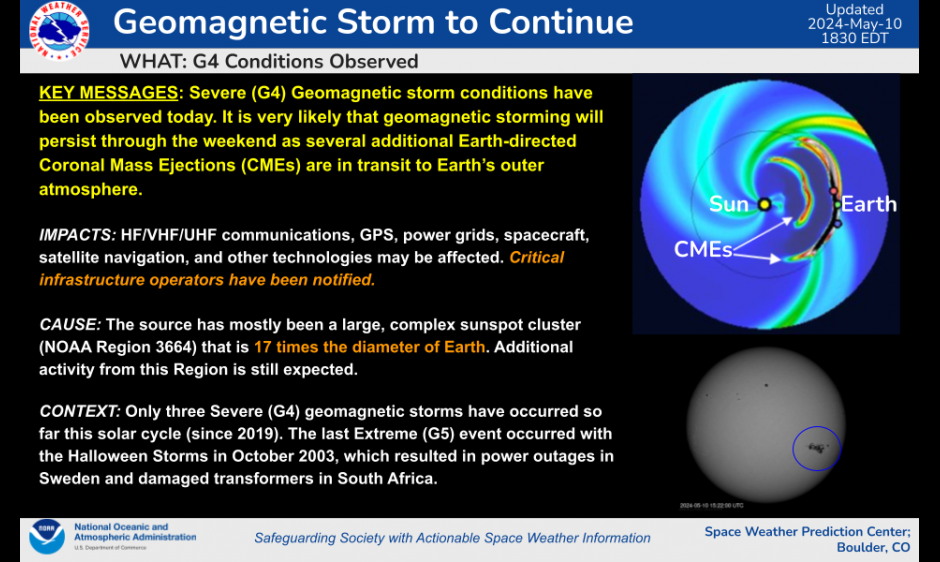
Right now the earth is being hit with a geomagnetic storm from the sun. The technical explanation of what this means, though interesting, will for now take back-seat an opportunity that is coming as a consequence. You might be able to see the Northern Lights as far south as Alabama this weekend!

The solar flares responsible for this opportunity occurred on Wednesday. At least 5 of the solar flares are though to be directed towards earth, according to NOAA. If you are out late this weekend, look north. Even if you can’t see anything with the naked eye, if you have clear weather, try taking a long exposure photo. You might be able to photograph an aurora!


Posts may contain products with affiliate links. When you make purchases using these links, we receive a small commission at no extra cost to you. Thank you for your support.

Mastodon: @j2inet@masto.ai
Instagram: @j2inet
Facebook: @j2inet
YouTube: @j2inet
Telegram: j2inet
Twitter: @j2inet

Starliner Launch Attempt Scheduled for 17 May 2024

UPDATE: The launch is now delayed until 17 May to give time to replace O2 pressure regulation valve.

Boing is going to make a second attempt to launch its Starliner manned spacecraft. The first attempt was scrubbed because of a stuck valve. The next attempt is scheduled for Thursday 8 May at about 10:11 PM. Emphasis on “Attempt” because there is no guarantee that it will happen. The craft is capable of holding up to 7 people. But for this test flight there will only be three people. Barry Willmore, 61, is a NASA astronaut and former U.S. Navy Captain that will be in command. Sunita Williams, 58, is a former Navy server member, will be piloting. The flight plan for the Starliner includes a stay at the International Space Station for a week before returning the astronauts. If this launches, this will be Boeing’s first manned space flight.

This won’t be the first flight of the spacecraft itself. It first launched in 2019, but failed to rendezvous with the Space Station because of a software error. It was successful in a launch in May 2022. Though after that flight Boeing decided to change the type of tape used on the electrical cables to a material that was more fire resistant since then.

Reading NFC Cards from HTML

Someone had an NFC card for which I needed the data. There are a couple of ways I could have gotten it from him. One way was to ask him to install an app and scan the card. From the app, he could export the data and send it to me. I don’t generally like to ask people to install apps though. The other option was to make a web page and have him use the web page to scan the card. Key factors here is that he was using a Samsung Android phone and he uses Chrome as his primary driver. Chrome on Android has NFC support.

I needed to make the page in a hurry. It’s a single file web page. You can find it at this URL: https://j2inet.github.io/nfcreader/. You can view the source code completely through this link. If you are viewing this article from your computer and want to run the code on your phone, here’s a QR Code to that same URL.

The Interface

The interface is just a bit of HTML decorated with CSS attributes. We don’t need to explore the CSS to understand the interface. There are a couple of buttons for enabling and disabling a scanner, and a checkbox that, when checked, will cause the NFC card’s serial number to also be displayed.

 <div>
       <button id="scanButton" onclick="scanTag()">Scan for Tags</button>
</div>

<div>
    <button id="stopScanButton" onclick="abortScan()" disabled>Abort Scan</button>
</div>

<div style="position:relative;">
    <input type="checkbox" id="showSerialNumber" /> <label for="showSerialNumber">Show Serial Number</label>
</div>        

<div id="scanResult"></div>

<div id="lastError"></div>

How does it work?

At the time of this writing, NFC support is still considered experimental. mozilla.org reports support for Chrome 89, Opera 63, Samsung Internet 15.0, and WebView 89. I only tested this in Samsung Internet, Samsung Internet Beta, and Chrome. I only experienced this working in Chrome. Tho check whether your browser supports this API, see if the window object defines NDEFReader. If it does not, then the device doesn’t support reading NFC. Note that it is possible for a browser to have software support for NFC while the device has no available NFC hardware. That’s not something that you can test for.

if (! ('NDEFReader' in window))  {
   //This device doesn't have NFC capabilities.
   document.getElementById('scanButton').disabled = true;                
   document.getElementById('stopScanButton').disabled = true;
   document.getElementById('lastError').innerText = "Sorry, this app only works on devices capable of reading NFC"
}

Preparing to Read NFC

Before attempting to read the from the NFC card, you’ll need to create an object and set some handlers. You’ll need to create a new NDEFReader object. No parameters are required for its constructor. On the newly created object, add handlers for onreading and onreadingerror.

reader = new NDEFReader();

reader.onreadingerror = (e) => {
     var lastError = document.getElementById('lastError');
     lastError.innerText = e.toString();
}

reader.onreading = (e) => {
   ...
}

We will talk about the body of the onreading method shortly.

Initiating the Scan

You can initiate a scan just by calling the scan() method on the NDEFReader object with no parameters. I don’t suggest that though. You will probably want to pass an abort object to the method. This gives you a method to deactivate the scanner at will. For this purpose, I’ve created an AbortController instance.

ar abortController = new AbortController();

The scan method returns a promise. We can use this to know if something went wrong or if the application decided to terminate the scanning. The object returned in this promose is defined by us. On the object I return I may have an isError and reasonText object.

function scanTag() {
    reader.scan({signal: abortController.signal})
    .then(()=>{})
    .catch((e)=>{
        if(!e) {
             return;
        }
        if(e.isError) {
            console.error(e);
        } else {
            if(e.reasonText) {
            console.info(e.reasonText);
          }
        }
    })
    document.getElementById('scanButton').disabled = true;
    document.getElementById('stopScanButton').disabled = false;
 }

The onreading handler is given an event object. That object has a few elements of concern to us. One is serialNumber, which is a string that contains the serial number for that specific NFC card. The other element is message, which contains a NDEFMessage object. That’s where we will find most of the data! The NDEFMessage object has a field called records; that is a list of the NDEF records written to the card. You may typically encounter NFC cards that only have one message on it, but it can have multiple messages. If you iterate through this object on a non-empty list, you will find one or more NDEFRecord objects. These are the fields from the record that I find to be the most important.

FieldExplination
recordTypeThe type of record. It could be the strings "empty", "text", "url", "smart-poster", "absolute-url", "mine", or "unknown". It could also be a custom domain name and custom type separated with a colon(:).
mediaTypeReturns the mime type of the record.
dataReturns the raw byte data of the record’s payload.
encodingThe encoding used for a text payload. This could be null.

Iterating and Displaying the Records

For displaying the records, I build a few HTML objects and populate their innerText with the values. I optionally include the serial number to the card. I’m only displaying the record type and the text data. For the card that I needed someone to scan, I knew that this would be sufficient for my purposes. I displayed both the text representation of the data and the raw bytes themselves. Displaying the raw bytes was just a matter of converting the byte values to numeric strings. The browser provides a TextDecoder object for this purpose.

utf8decoder = new TextDecoder('utf8');
...
dataTextElement.innerText = utf8decoder.decode(record.data.buffer);

Here is the complete text for what happens when the card is detected.

reader.onreading = (e) => {
    var rootResultElement = document.getElementById("scanResult");                
    rootResultElement.innerText = "";

    var showSerialNumberChecked = document.getElementById('showSerialNumber').checked;
    if(showSerialNumberChecked) {
        var serialNumberElement = document.createElement('div');
        serialNumberElement.class = 'serialNumber';
        serialNumberElement.innerText = e.serialNumber;
        rootResultElement.appendChild(serialNumberElement)                    ;
    }

    for(var i=0;i<e.message.records.length;++i)
    {
        var record = e.message.records[i];
        var envelopeElement = document.createElement('div')
        envelopeElement.className = 'ndfmessage';
                    
        var typeText = document.createElement('div');
        typeText.className = 'recordType'                    
        typeText.innerText = record.recordType;

        var dataElement = document.createElement('div');
        dataElement.className = 'ndefdata'
        dataElement.innerText = bufferToString(record.data.buffer);
        var dataTextElement = document.createElement('div');
        dataTextElement.innerText = utf8decoder.decode(record.data.buffer);
        envelopeElement.appendChild(typeText);
        envelopeElement.appendChild(dataElement);
        envelopeElement.appendChild(dataTextElement);
        rootResultElement.appendChild(envelopeElement);
    }
}

Posts may contain products with affiliate links. When you make purchases using these links, we receive a small commission at no extra cost to you. Thank you for your support.

Mastodon: @j2inet@masto.ai
Instagram: @j2inet
Facebook: @j2inet
YouTube: @j2inet
Telegram: j2inet
Twitter: @j2inet

Enrolling a Device in Samsung Knox Through the Browser

I’ve been exploring Samsung Knox. For enrollment on my test devices, I had initiated a hard reset of the phone and used the secret gesture to get the device in enrollment mode (draw a plus on the initial welcoming screen). While reading through Knox documentation, I encountered a support document with a URL I had not seen before. https://me.samsungknox.com.

As it turns out, by going to this site you can enroll a device without performing a hard reset. This initiates Bluetooth Enrollment. You do need to have a device sitting by with Knox Deploy installed to push the profile to the device.


Posts may contain products with affiliate links. When you make purchases using these links, we receive a small commission at no extra cost to you. Thank you for your support.

Mastodon: @j2inet@masto.ai
Instagram: @j2inet
Facebook: @j2inet
YouTube: @j2inet
Telegram: j2inet
Twitter: @j2inet

ๆ—ฅๆœฌ่ชžใฎC++ (Japanese Language C++)

I came across something that I thought was cool, though not something I would ever use. It was a set of C++ defines for Japanese language coders that let’s them write in C++ using Japanese words in the place of various C++ control statements and key words. The repository for this project can be found at https://gist.github.com/HerringtonDarkholme/2dbb2a1ec748a786f54908320447b3dd. Here are a few lines from the code.

#define  ใ‚จใ‚นใƒ†ใ‚ฃใƒผใƒ‡ใ‚ฃใƒผ std
#define ใ‚ขใ‚คใ‚ชใƒผใ‚นใƒˆใƒชใƒผใƒ  <iostream>
#define  ใƒฆใƒผใ‚ธใƒณใ‚ฐ using
#define ใ‚คใƒ• if
#define ใ‚คใƒณใ‚ฏใƒซใƒผใƒ‰ #include
#define ใ‚คใƒณใƒˆ int

You can probably guess what is going on here, but I will explain. The Japanese characters here are Katakana. They are commonly used to phonetically spelling out words from other languages. The very first define here is kind of clumsy. It spells out how we would say std. As in ess-tee-dee. The rest of the defines spell out the English pronunciations of the words. I found out about this by way of the following tweet, which showed some C++ written using a substantial amount of Japanese.

While it looks cool, I have a preference of minimizing my use of defines in my C++ code. But I’m also not a native ๆ—ฅๆœฌ่ชž speaker. I imagine this provides some advantages for someone that is.


Posts may contain products with affiliate links. When you make purchases using these links, we receive a small commission at no extra cost to you. Thank you for your support.

Mastodon:ย @j2inet@masto.ai
Instagram:ย @j2inet
Facebook:ย @j2inet
YouTube:ย @j2inet
Telegram:ย j2inet
Twitter:ย @j2inet

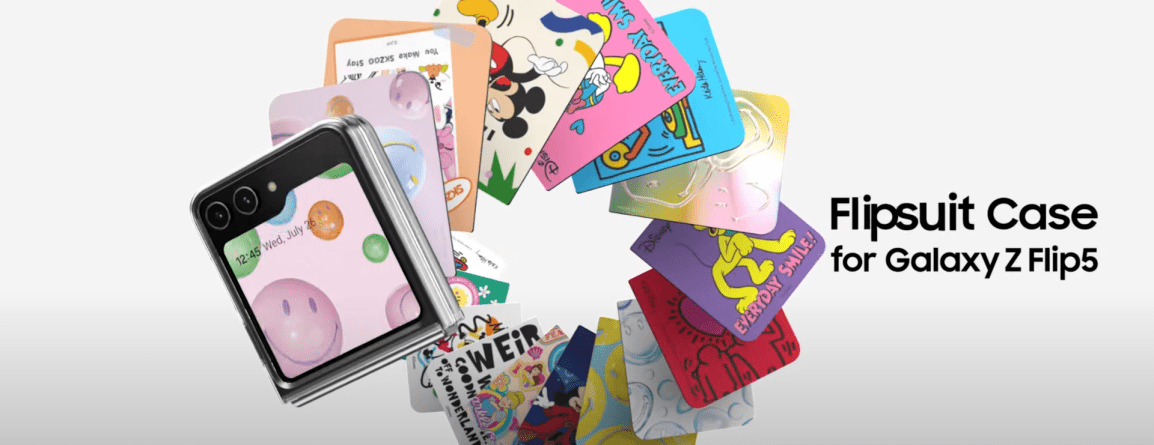
How Do the Samsung FlipSuit Cards Work?

I’ve been looking at the Samsung FlipSuit cards lately. For the uninitiated, these are cards that one slips into a case that cause the phone to also change the content of its inner and outer screens to match the theme on the card. You can find these for the Galaxy Flip 4/5, and more recently the Galaxy S24. A question I’ve seen asked in reading about these is “How do they work” and “Can I make my own.” While I don’t have sufficient technical data needed to enable you to go off and make your own, I do have some knowledge of how these work. These are not the first iteration of such a system. The earliest form of those date back to 2018.

Galaxy Friends: An Ancestor of FlipSuit

At the Samsung Developer’s Conference from 2018, one of the technologies and solutions on display was Samsung Theme Studio. With Theme Studio, a creative could package changes to the UI to give the phone an entirely new look and feel. These themes are packaged in an APK (like other Android applications) and available for download in the Samsung App Store. This tool is relevant to another offering released that same year.

At the same conference, Samsung showcased the Galaxy Friends Accessory program. Under this program, someone could make an NFC enabled and associate that case with a Theme and other content. The theme would automatically be applied just by putting the case on a phone. In addition to the theme, content and applications could be associated with the case. Someone could get exclusive access to content (that could be changed as frequently as once a day) through having this case. It’s not hard to draw a line between this and the Galaxy FlipSuit cards.

Where can you find the Galaxy Friends program now? I don’t think that you can. The email address associated with it no longer exists. Outside of a few forum posts, there is no mention of it on Samsung’s site at all. The strongest remaining items of evidence that it existed are in the forms of a couple of Amazon listings for Galaxy Friends cases for the Note 10 (Ironman Case, Spiderman Case). Reviews for it make mention of the NFC Chip and the theme that gets applied to the phone.

Does that mean Galaxy Friends is dead and gone? Well, no. Searching for that name yields few results, but searching for the functionality is a different matter.

Knox Configure

Over the years, Samsung has moved its products and services related to device management, configuration, and security under the Knox branding. While you can find some mention of Knox across a broad range of products (don’t be surprised if you find a Wi-Fi enabled clothing washer with Knox) we are most interested in the services on mobile devices. I’ve found that some are confused on what Knox is because of the broad list of products on which it can be found. The specific Knox service in which we have interest is Knox Configure.

Knox Configure provides functionality for enrolling and configuring a device even before it has been removed from its box. A device’s unique ID could be added to someone’s Samsung Knox account (usually through a Samsung reseller). A device could also be enrolled during setup, or enrolled by an accessory. For accessory enrolment, the accessory could be an NFC device, a cover, or a USB device. You might think that NFC devices and covers are identical, but more on that in a moment.

Once enrolled, a device will apply a profile. The profile could contain a variety of settings and applications to be applied to the device. There are two profile attributes of special interest here, the theme and the accessory ID. The theme, according to Samsung’s documentation, would be created by Theme Studio. There’s a bit of a break-down in process and/or documentation here. While Knox Configure points to the Theme Studio page, telling a developer they should get access to it, Theme Studio access is restricted. Years ago, anyone could get access to it. Present day, someone wishing to have access can apply during windows that open every other year (the next window is said to be in 2025). I get the impression that the Knox Configure group in Samsung and the Theme Studio groups are not completely in sync with each other. For those reading this with the hopes of making your own themes, here if your first obstacle.

The accessory ID attributes are meant to be written to the USB, NFC, or cover device. According to Samsung’s current documentation, this is something that should be done by a Samsung Accessory Partner.

These profiles are housed on Samsung’s servers and associated with a licenses that the person making the profile hat to purchase. That these profiles are tied to callbacks to a Samsung services implies that one wouldn’t be able to arbitrarily make their own card without Samsung’s involvement.

There may be other services that Samsung has for distribution of content based on an NFC cards of which I don’t know. Note that Knox is just one of them.

NFC Device Enrollment

How does the NFC device invoke enrollment? One of the messages encoded on an NFC card will be a URL. This URL starts with smdm://accessory (Samsung Mobile Device Management?). This URL will have additionally parameters attached to it. But this URI prefix is important. There is a package that is registered to handle URLs that start with this prefixed. The common name for the package is “Knox Enrollment.” The package identifier is com.sec.enterprise.knox.cloudmdm.smdms. I’ve found that if I use this URL without specifying any parameters that this process will crash and I see output on logcat. I’ve been able to figure out some of the other parameter names, but I have no idea what their potential values would be. Here are some of the other potential parameters passed.

  • countryiso_code
  • deviceProductType
  • email
  • mdm_token
  • program
  • seg_url
  • service_type
  • update_url
  • mdm_token

I speculate that if any information is to be found on potential values for these, that the information will be found in the Knox SDK Documentation. These values get passed to the Knox Enrollment service through this service. Once the device is enrolled, the associated configuration items are applied, including and themes or applications associated with the profile. However, I don’t think that information on all of the values will be found through documentation that is generally avaialble. Samsung explicitly states in one of their documents that only accessory manufacturers can inject the IDs into the accessories.

Image from Samsung documentation stating that only manufacturers can inject identifiers into accessories.

Examining a FlipSuit Card

Though I’ve seen the FlipSuit cards described as NFC cards, I’m not entirely convince of this. When I hold one of these cards to an NFC reading device I get nothing. It is possible that it uses some features of NFC unfamiliar to me. I don’t have either a Flip 5 or Galaxy S24 (the most recent phone that I have my hands on is an S23). Earlier, I mentioned that Knox Config has NFC and covers listed as separate device types. I think this is why, there is something different in the communication from an NFC card and the Flip cards. I held a FlipSuit card to the back of a Galaxy Flip 5 while an NFC examination application was running. I got no info.

What Happens when a Knox Configure License Expires

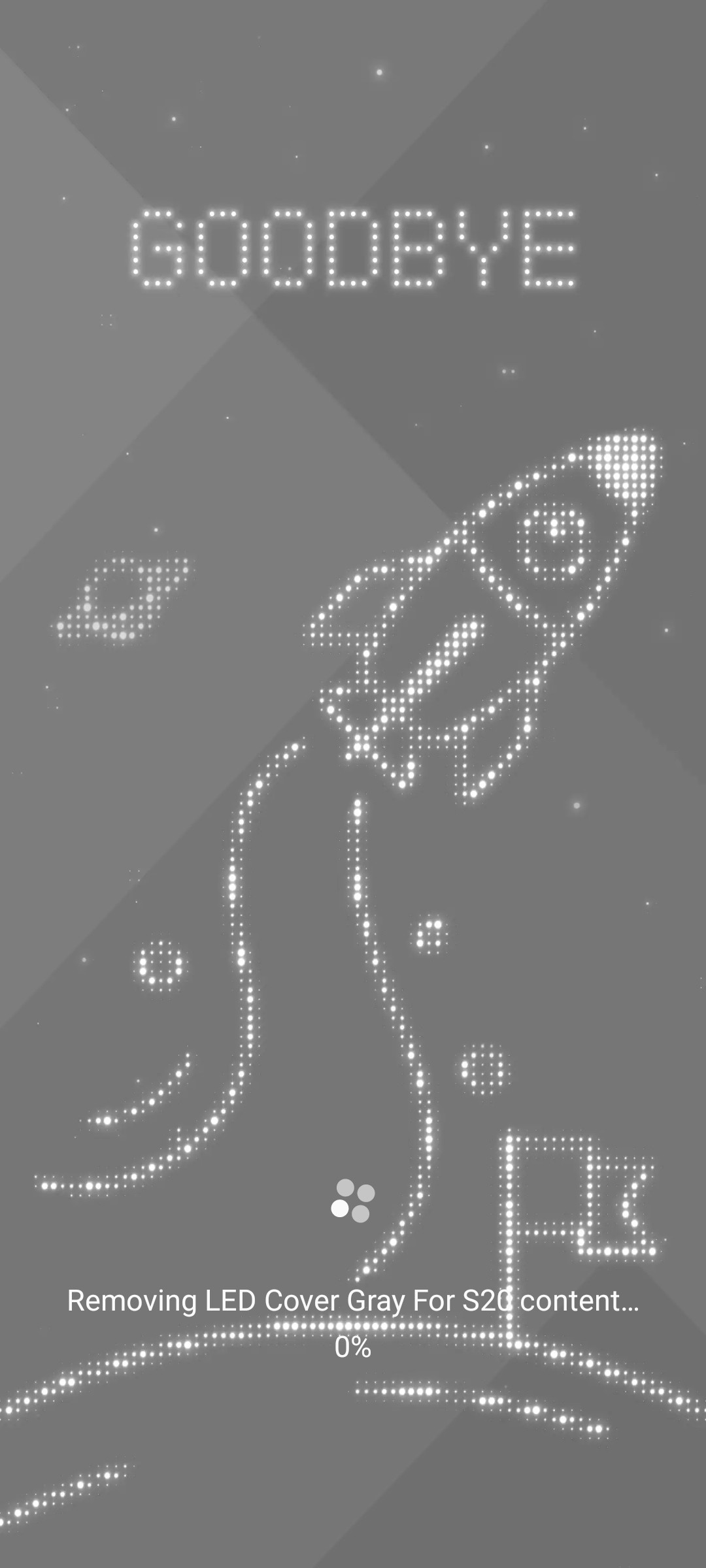
Knox Configure and cases with themes have been around long enough such that we know what happens when a theme expires. Consider the Galaxy S20 and it’s LED case. The LED case had a theme that was associated with it. That theme expired on or around January 1, 2023. Some users in a reddit thread discussed their experience.Of note, before the theme reached it’s expiration date, there was a notification for it. Note that this notification refers to “Samsung Galaxy Friends.” It’s not clear to me if the theme was expiring because the Galaxy Friends program was being sunset or because the license associated with the theme was at the end of it’s life.

Screen with notification about expiring theme.

When the date was reached, the theme automatically uninstalled.

Notification of Theme Uninstalling.

The Pathway To Making Theme Cards

I’ve mentioned obstacles and information and obstacles. If you still wanted to go through with making a theme card, what would you do? You need to get access to Theme Studio. While the next window for applying for Theme Studio isn’t until 2025, this might not be as much as a problem as some might initially think. Between now and when the window opens, you can start practing designing your themes and get a portfolio put together for the application process. After you have access to Theme Studio and are able to publish themes, you might want to become familiar with Knox Configure. You can get a 90-day subscription to Knox Configure at no cost. You won’t need to get a deep understanding of it though. For making the cards themselves though, you will need to go through a Samsung Accessory Partner. There’s no way around that of which I know, since the information I have on how data is written to the card is incomplete.

Though not in furtherance of making Theme Cards, in one of my next posts, I will be exploring a simple Knox Configuration scenario to customize a Samsung device. I’ll also be posting the code that I used for examining NFC cards. The code was written completely in HTML and JavaScript.

Additional Information


Posts may contain products with affiliate links. When you make purchases using these links, we receive a small commission at no extra cost to you. Thank you for your support.

Mastodon: @j2inet@masto.ai
Instagram: @j2inet
Facebook: @j2inet
YouTube: @j2inet
Telegram: j2inet
Twitter: @j2inet

NASA Receives Orders to Develop a Lunar Time Zone

The Whitehouse has sent NASA orders to develop a lunar time zone. At first glance, some might think that this is silly. There are no people on the moon, why is a time zone needed? While it is easy to coordinate time on earth, coordinating time between the earth and moon is a bit different because of the effects of gravity/mass on the passage of time. The moon has less mass than the earth, resulting in time passing at a different rate. The difference in the rate of the passage of time is tiny, but can be significant when working with high-precision clocks. A clock on the moon and earth would drift apart by about 58 microseconds per day.

NASA was asked to come up with the system for Lunar Coordinated Time by the end of 2026. The efforts will include contributions of international bodies and the 36 nations that are part of the Artemis Accords. This will add to the systems of time used in astronomy such as a solar day, mean solar day, sidereal day, and the 11 time zones on Mars.


Posts may contain products with affiliate links. When you make purchases using these links, we receive a small commission at no extra cost to you. Thank you for your support.

Mastodon:ย @j2inet@masto.ai
Instagram:ย @j2inet
Facebook:ย @j2inet
YouTube:ย @j2inet
Telegram:ย j2inet
Twitter:ย @j2inet

Eclipse 8 April 2024

If you are in the United States or Mexico, come Tuesday 8 April you might be able to view a total solar eclipse. Even if you are not in the path of totality, you might have an opportunity to view a partial eclipse. If you are interested in viewing, the key pieces of information you need are when it will be, where it can be viewed, and what you need for viewing. It isn’t too late just yet to get viewing equipment (if you are interested in any). But if something shows a delivery date of Monday, consider it something that will likely not arrive in time.

When and Where

The time at which you can see the eclipse will vary by location and timezone. NASA has in which you can enter a zip code and get the information for your location. Even if you are not in the path of totality, you might be able to see a partial eclipse.

LocationPartial BeginsTotality BeginsMaximumTotality EndsPartial Ends
Dallas, Texas12:23 CDT13:40 CDT13:42 CDT13:44 CDT15:02 CDT
Idabel, Oklahoma12:28 CDT13:45 CDT13:47 CDT13:49 CDT15:06 CDT
Little Rock, Arkansas12:33 CDR13:51 CDT13:52 CDT13:454 CDT15:11 CDT
Poplar Bluff, Missouri12:39 CDT13:56 CDT13:56 CDT14:00 CDT15:15 CDT
Paducah, Kentucky12:42 CDT13:59 CDT14:01 CDT14:02 CDT15:18 CDT
Carbondale, Illinois12:42 CDT14:00 CDT14:01 CDT14:03 CDT15:18 CDT
Evansville, Indiana12:45 CDT14:02 CDT14:04 CDT14:05 CDT15:20 CDT
Clevland, Ohio13:50 EDT15:13 EDT15:15 EDT15:17 CDT16:29 EDT
Erie, Pennsylvania2:02 EDT15:16 EDT15:18 EDT15:20 EDT16:30 EDT
Buffalo, New York14:04 EDT15:18 EDT15:20 EDT15:22 EDT16:32 EDT
Burlington, Vermont14:14 EDT15:26 EDT15:27 EDT15:29 EDT16:37 EDT
Lancaster, New Hampshire14:16 EDT15:27 EDT15:29 EDT15:20 EDT16:28 EDT
Caribou, Main13:22 EDT15:32 EDT15:33 EDT13:34 EDT16:40 EDT

What do you need for viewing?

There are a lot of options for equipment. The simplest option would be a pinhold projector or some variation of it. To make one of these, you only need a stiff piece of material, such as cardboard, and a white sheet of paper. Drill a hold in the center of the cardboard. If you aim the hold for the cardboard at the sun and place the paper behind it with a decent gap between them, you’ll see a circle of light on the carboard. That’s a projection of the sun. As the eclipse progresses, it will be more apparent that this is an image of the sun as you see the sape of the moon encroching on the projection. This solution isn’t much different from the earliers cameras (Camera Obscura), which were made by cutting off all light sources in a room except for one edge with a hole or lens. The image of what is going on outside the room is projected on the wall opposite to the hole.

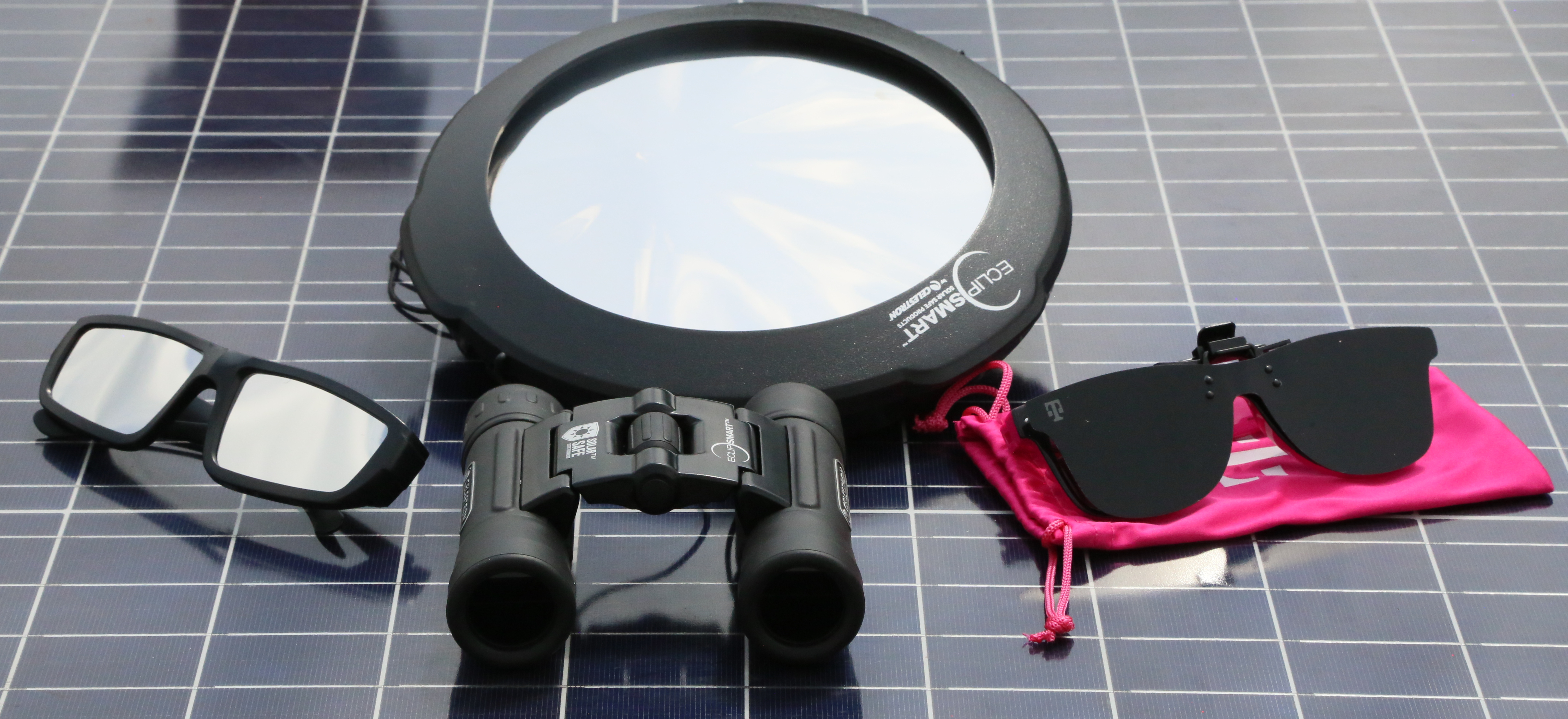
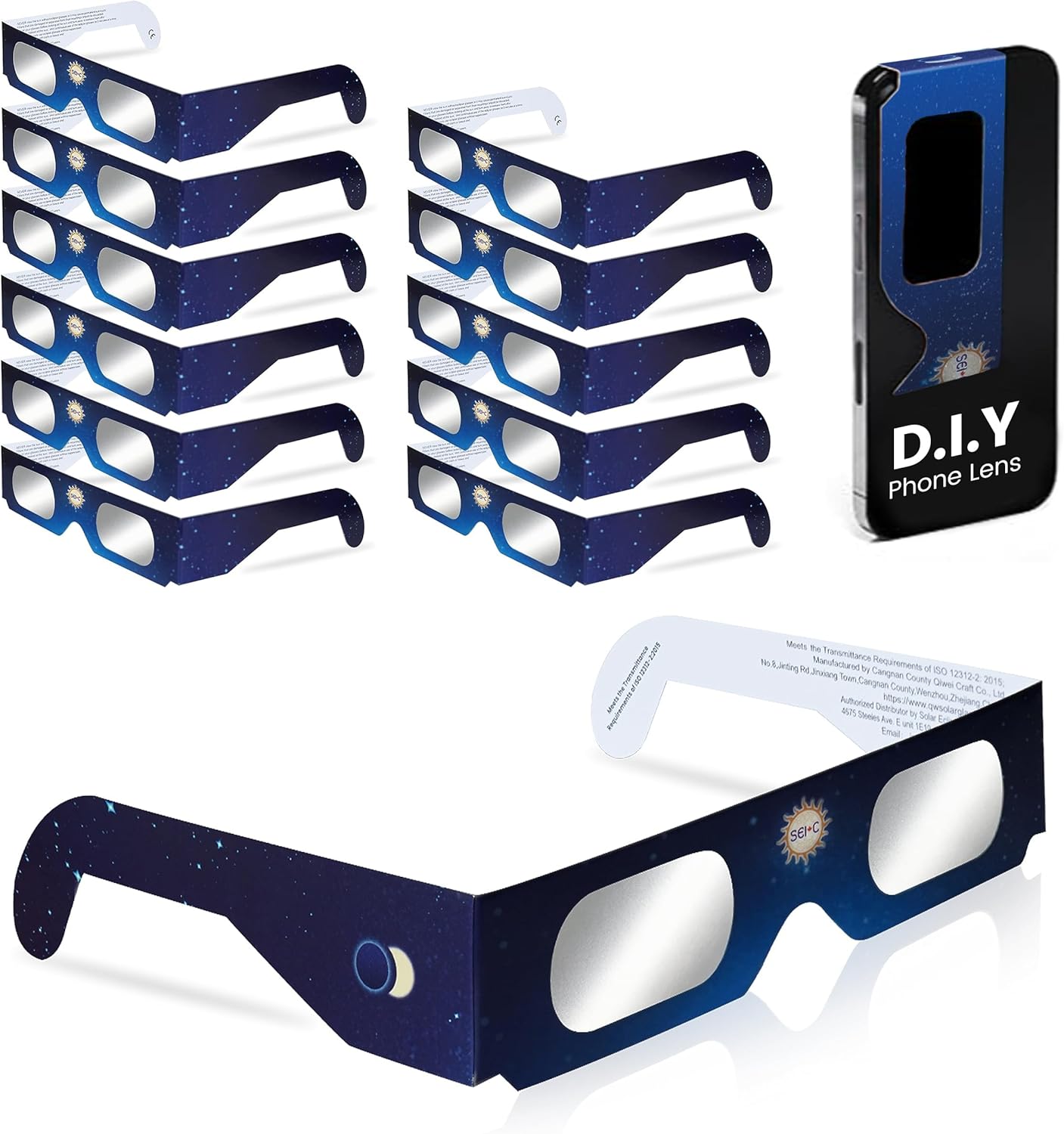
The next step up for viewing would be to have solar viewing glasses. These are usually have cardboard frames with a thin plastic where lenses would go. Though either absorption or reflection, these glasses prevent an overwhelming majority of the light from reaching your eyes so that you can safely view the image. They are as cheap as 0.80 USD for disposable units and as much as 7 USD for some of the studier ones. If you are a T-Mobile subscriber, you might have grabed some solar glasses for T-Mobile Tuesday for free.

If you plan to use your smartphone to take pictures, you might run into a challenge if you try to put the glasses in front of your phone. Even if you zoom for your phone’s camera to use a specific lens, some phones will still switch lenses based on changes in lighting conditions. It may be easier to get a silter specificly made for the phone.

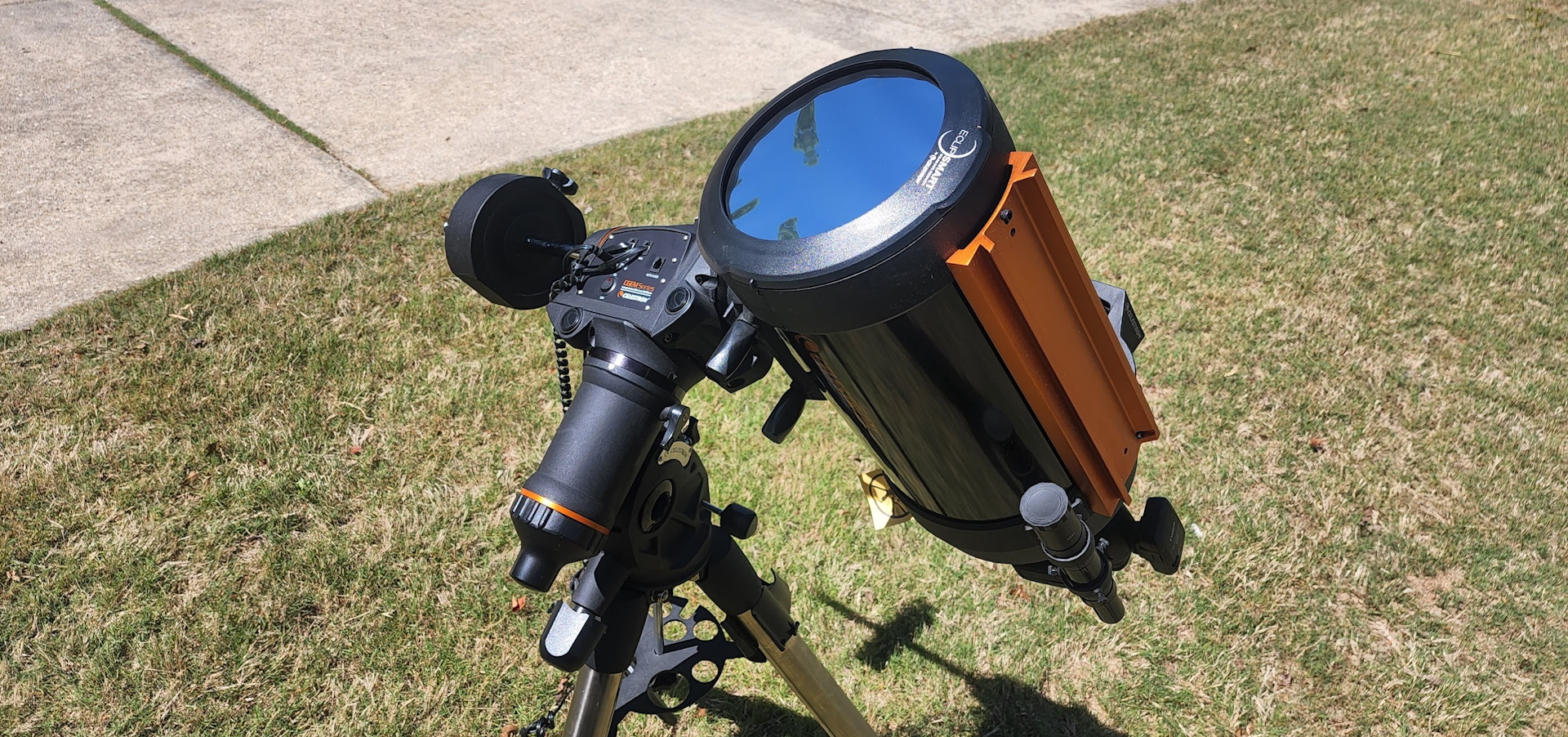
Beyond glasses, there are magnifying devices or viewing the eclipse. The least expensive of these would be eclipse binoculars. These darkened binoculars give you a much more dramativ perspective of the show. On the higher end of this, there are telescopes that have been fitted with solar filters (similar to the glasses). This would be an option to considere only if you already have a telescope. Keep in mind that if you are using a regular telescope, do not use a viewfinder to aim the scope. That would be a great way to cause eye damage. Instead, keep the caps on the viewfnder so that it is blocked and put a sheet of paper behind the viewfinder. When it is aimed properly, the sioulette of the viewfinder will be a perfect circle.

Finishing Preperations

Check your local weather before monday. If you know the weather might not be good, you may be less disapointed if and when it doesn’t allow viewing. If you have the option, make it a work from home day. Remember to block your calendar around the time of the eclipses maximum. If you plan on viewing away from home, load your glasses into your car so that they are not forgotten. If you plan to order viewing equipment, make sure you have it in hand by Sunday!


Posts may contain products with affiliate links. When you make purchases using these links, we receive a small commission at no extra cost to you. Thank you for your support.

Mastodon:ย @j2inet@masto.ai
Instagram:ย @j2inet
Facebook:ย @j2inet
YouTube:ย @j2inet
Telegram:ย j2inet
Twitter:ย @j2inet

SVBONY SV510 Solar Eclipse Telescope

Disabling Driver Data Collection (GM Vehicles)

Some recent news articles have made more people aware of data collection for GM vehicles that could, for some, raise insurance rate. The OnStar Safe Driver program collects information about driver habits, such as maximum speeds, instances of hard breaking, hard acceleration, and seatbelt use. This information is collected by GM and available to at least two known data brokers (Lexis Nexis, Verisk) and can end up working it’s way to one’s Insurance company, affecting rates. Two instances of people unhappy with this service include a person in Florida suing both Cadillac and Lexis Nexis after his insurance rates increased and a Chevy Bolt driver whose insurance rates went up.

Did GM Automatically Opt Me Into This Program?

The OnStar Smart Driver Q&A says the following.

Do you auto enroll customers in OnStar Smart Drive?

No, we do not auto enroll customers into OnStar Smart Driver. All customers must opt-in to be enrolled.

https://www.onstar.com/support/faq/smart-driver

How Do I Opt-Out through the App

Depending on your driving style, this could be something that works to your advantage. But in either case, it is good to know how to opt out of it. Many of the GM vehicles have brand-specific variations of an application. For my vehicle, the application is myChevrolet (Android, iOS). Other variants include myGMC (Android, iOS), myBuick (Android, iOS), and myCadillac(Android, iOS).

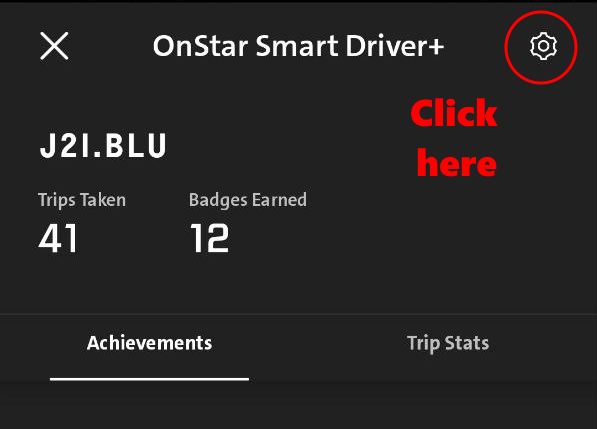
To turn the feature off, open your GM app and go to the section titled “Trip Overviews and Insights.” (You’ll see “OnStar Smart Driver” listed there). Select it.

One the next screen, click on the geat icon in the upper-right corner to open the settings for this feature.

From there, you’ll sww a switch for turning the feature off. Use this switch to opt out of the program.

What if I don’t have the App Installed?

If you don’t have the application installed but know your GM login, you can unenroll through the website.

From the OnStar SmartDriver Q&A, the steps to perform are as follows.

To unenroll via the vehicle brand website, sign into your account. Click on โ€œAccount,โ€ scroll down the page and click on โ€œData & Privacy.โ€ Scroll down to โ€œOnStar Smart Driverโ€ and select โ€œManage Settings.โ€ From there, switch off the โ€œOnStar Smart Driverโ€ toggle.

Of you want to know more about the OnStar Driver Safety Program you can read about it here. Though I thought the website was a bit light on information.

I want my collected data removed. What do I do?

You will need to contact Lexis Nexis or Verisk for more information on removal of your data. You can contact them for more information about having your data removed or seeing what data they have on you.


Posts may contain products with affiliate links. When you make purchases using these links, we receive a small commission at no extra cost to you. Thank you for your support.

Mastodon:ย @j2inet@masto.ai
Instagram:ย @j2inet
Facebook:ย @j2inet
YouTube:ย @j2inet
Telegram:ย j2inet
Twitter:ย @j2inet

My First Infrared Photograph ๐Ÿ“ท

I have a DSLR that has been modified for Infrared Photography. Digital cameras usually have filters that will block out light that is outside of the visible spectrum. Without these filters, though we cant see this light, the camera’s sensor will still respond to it. If you have an IR remote you can test this out yourself by viewing the emitter end through the camera on your phone and holding down a button on the remote.

The world looks different when you biew the IR or UV light reactions with objects. There are elements of an object that may be invisible until you view them in another spectrum, and elements that might disappear all together. I wanted to explore this more, which is why I have this modified camera. There are a few things that I’ve learned along the way. Once a camera is modified for IR shooting, it’s not very good to use for regular photography. You won’t want to take family photos or vacation pictures with such a modified camera. The viewfinder on the DSLR also becomes useless for some shooting situations; since our eyes cannot see IR light, when some filters are applied to the camera, the view through the viewfinder looks black. Instead, we must enable a live view on the camera’s display to preview the image.

The IR blocking filter being removed from the camera isn’t the only adjustment that needs to be done. Better results come from also adding a filter to the lens that blocks some of the visible colors of light. Post-processing of the photo will be necessary.

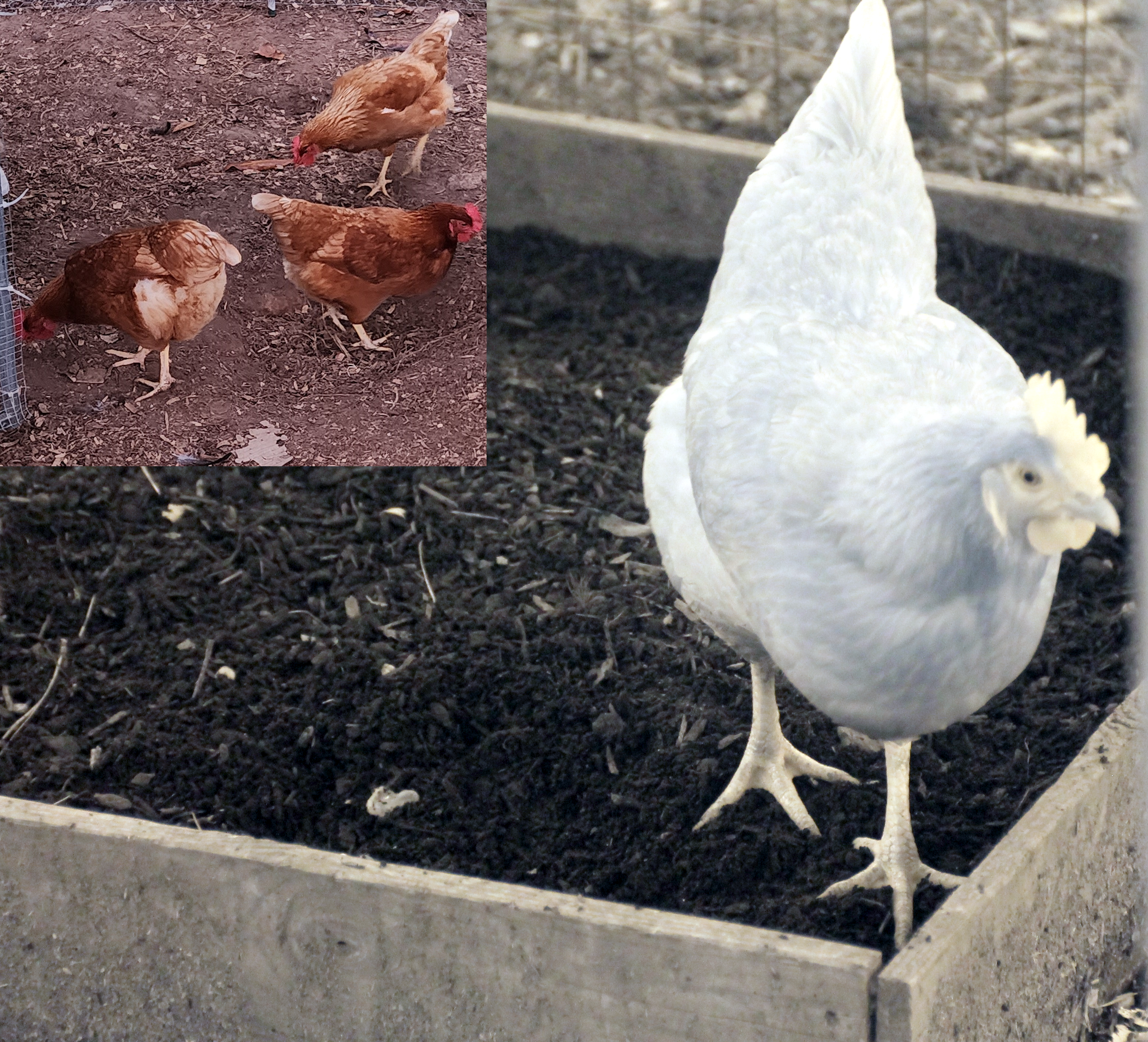
I’ve been wanting to take a photograph with the camera for the last week. But obligations to others and my work schedule preventing me from being available for some of the prime hours of the day where the sun would be where I would like for it to be. Today, between meetings, I had a chance to run outside, snap a couple of photographs of a flower, and run back inside. The image that shows at the top of this post is one of the results. That image was taken with a filter on the lens that only lets IR light pass. If I remove the filter, I end up with a picture like the following. Removing the filter and allowing visible light to come through, I get a photo that looks partially desaturated.Though color is present, the influence of the IR on the photo is discernable.

While out at “the farm” I took some pictures of some chickens. As appears to be the case with many things that are red, in infrared they appear closer to white. The chicken’s comb’s look especially white.

I’ll be taking more occasional photographs using this camera. When I do, you’ll generally be able to find them on my Instagram page.

This a lot more for me to learn. I hope to have some interesting shows to post.


Posts may contain products with affiliate links. When you make purchases using these links, we receive a small commission at no extra cost to you. Thank you for your support.

Mastodon:ย @j2inet@masto.ai
Instagram:ย @j2inet
Facebook:ย @j2inet
YouTube:ย @j2inet
Telegram:ย j2inet
Twitter:ย @j2inet

Rechargeable USB-C Batteries

Over the past year, I’ve transitioned some of my devices from conventional to rechargeable batteries. I’ve used rechargeable batteries before and had generally been disappointed with them. The need for a separate charger for each battery type sometimes meant extra hardware to keep up with.

With these batteries, one of the main advantages is that they charge over a USB-C cable. Though they came with USB-A to USB-C cables for charging, I generally use the cables that and power supplies that I already have for my phones.

These don’t last as long as a conventional battery, but I’m okay with that since the charging experience is no-fuss. I often forget to turn off my voice recorder and run through batteries in it quickly. With these, it is less of a concern.

Presently, I’m using AA, AAA, and 9-Volt batteries. You can find all of these on Amazon among other places. The affiliate links for the ones that I purchased are below.


Posts may contain products with affiliate links. When you make purchases using these links, we receive a small commission at no extra cost to you. Thank you for your support.

Mastodon: @j2inet@masto.ai
Instagram: @j2inet
Facebook: @j2inet
YouTube: @j2inet
Telegram: j2inet
Twitter: @j2inet