Recompiling the V8 JavaScript Engine on Windows

Note Added 2025 March 10 – These instructions no longer work. Google has dropped support for using MSVC. It is still possible to build on Windows using Clang. But this presents new challenges, such as linking CLang binaries to MSVC binaries. More information on this change can be found in a Google Group discussion here.

Note Added 2024 September 3 – I tried to follow my own instructions on a whim today and found that some parts of the instructions don’t work. I made my way through them with adjustments to get to success.

I decided to compile the Google V8 JavaScript engine. Why? So that I could include it in another program. Google doesn’t distribute the binaries for V8, but they do make the source code available. Compiling it is, in my opinion, a bit complex. This isn’t a criticism. There are a lot of options for how V8 can be built. Rather than making available the permutations of these options for each version of V8, one could just set options themselves and build it for their platform of interest.

But Isn’t There Already Documentation on How to Do This?

There does exists documentation from Google on compiling Chrome. But there are variations from those instructions and what must actually be done. I found myself searching the Internet for a number of other issues that I encountered and made notes on what I had to do to get around compilation problems. The documentation comes close to what’s needed, but isn’t without error and deviation.

Setting Up Your Environment

Before touching the v8 source code, ensure that you have installed Microsoft Visual Studio. I am using Microsoft Visual Studio 2022 Community Edition. There are some additional components that must be installed. In an attempt to make this setup process as scriptable as possible, I’ve have a batch file that will have the Visual Studio Installer add the necessary components. If a component is already installed, no action is taken. Though the Google V8 instructions also offer a command to type to accomplish the same thing, this is where I encountered my first variation from their instructions. Their instructions assume that the name of the Visual Studio Installer command to be setup.exe (it probably was on a previous version of Visual Studio) where my installer is named vs_installer.exe. There were also additional parameters that I had to pass, possibly because I have more than one version of Visual Studio installed (Community Edition 2022, Preview Community Edition 2022, and a 2019 version).

pushd C:\Program Files (x86)\Microsoft Visual Studio\Installer\

vs_installer.exe install --productid Microsoft.VisualStudio.Product.Community --ChannelId VisualStudio.17.Release --add Microsoft.VisualStudio.Workload.NativeDesktop  --add Microsoft.VisualStudio.Component.VC.ATLMFC  --add Microsoft.VisualStudio.Component.VC.Tools.ARM64 --add Microsoft.VisualStudio.Component.VC.MFC.ARM64 --add Microsoft.VisualStudio.Component.Windows10SDK.20348 --includeRecommended

popd

You may need to make adjustments if your installer is located in a different path.

While those components are installing, let’s get the code downloaded and put int place. I did the download and unpacking from powershell. All of the commands that follow were stored in a power shell script. Scripting the process makes it more repeatable and is easier to document (since the scripts are also a record of what was done). You do not have to use the same file paths that I do. But if you change them, you will need to make adjustments to the instructions when one of these paths is used.

I generally avoid placing folders directly in the root. The one exception to that being a folder I make called c:\shares. There’s a structure that I conform to when placing this folder on Windows machines. For this structure, Google’s code will be placed in subdirectories of c:\shares\projects\google. In the following script you’ll see that path used.

$depot_tools_source = "https://storage.googleapis.com/chrome-infra/depot_tools.zip"
$depot_tools_download_folder= "C:\shares\projects\google\temp\"
$depot_tools_download_path = $depot_tools_download_folder + "depot_tools.zip"
$depot_tools_path = "c:\shares\projects\google\depot_tools\"
$chromium_checkout_path = "c:\shares\projects\google\chromium"
$v8_checkout_path = "c:\shares\projects\google\"

mkdir $depot_tools_download_folder
mkdir $depot_tools_path
mkdir $chromium_checkout_path
mkdir $v8_checkout_path

pushd "C:\Program Files (x86)\Microsoft Visual Studio\Installer\"
.\vs_installer.exe install --productID Microsoft.VisualStudio.Product.Community --ChannelId VisualStudio.17.Release --add Microsoft.VisualStudio.Workload.NativeDesktop  --add Microsoft.VisualStudio.Component.VC.ATLMFC  --add Microsoft.VisualStudio.Component.VC.Tools.ARM64 --add Microsoft.VisualStudio.Component.VC.MFC.ARM64 --add Microsoft.VisualStudio.Component.Windows10SDK.20348 --includeRecommended
popd

Invoke-WebRequest -Uri $depot_tools_source -OutFile $depot_tools_download_path
Expand-Archive -LiteralPath $depot_tools_download_path -DestinationPath $depot_tools_path

After this script completes running, Visual Studio should have the necessary components and the V8/Chrome development tools are downloaded and in place.

There are some environment variables on which the build process is dependent. These variables could be set within batch files, could be set to be part of the environment for an instance of the command terminal, or set at the system level. I chose to set them at the system level. This was not my first approach. I set them at more local levels initially. But several times when I needed to open a new command terminal, I forgot to apply them, and just found it easier to set them globally.

ENVIRONMENT VARIABLEVALUE
DEPOT_TOOLS_WIN_TOOLCHAIN0
vs2022_installC:\Program Files\Microsoft Visual Studio\2022\Community
PATHc:\shares\projects\google\depot_tools\;%PATH%
Environment Variables that must be set

From here on, we will be using the command prompt, and not PowerShell. This is because some of the commands that are part of Google’s tools are batch files that only run properly in the command prompt.

From the command terminal, run the command gclient. This will initialize the Google Tools. Next, navigate to the folder in which you want the v8 code to download. For me, this will be c:\shares\projects\google. The download process will automatically make a subfolder named v8. Run the following command.

fetch --nohistory v8

This command can take a while to complete. After it completes you will have a new directory named v8 that contains the source code. Navigate to that directory.

cd v8

The online documentation that I see from Google for v8 is for version 9. I wanted to compiled version 12.0.174.

git checkout 12.0.174

Update 2025 March 7

Reviewing the instructions now, I find that the above command fails. It may be necessary to fetch the labels for the versions with the following commands to get version 13.6.9.

git fetch --tags
git checkout 13.6.9

Today I am trying to only rebuild v8 for Windows. Eventually I’ll rebuild it for ARM64 also. Run the following commands. It will make the build directories and configurations for different targets.

python3 .\tools\dev\v8gen.py x64.release
python3 .\tools\dev\v8gen.py x64.debug
python3 .\tools\dev\v8gen.py arm64.release
python3 .\tools\dev\v8gen.py arm64.debug

The build arguments for each environment are in a file named args.gn. Let’s update the configuration for the x64 debug build. To open the build configuration, type the following.

notepad out.gn\x64.debug\args.gn

This will open the configuration in notepad. Replace the contents with the following.

is_debug = true
target_cpu = "x64"
v8_enable_backtrace = true
v8_enable_slow_dchecks = true
v8_optimized_debug = false
v8_monolithic = true
v8_use_external_startup_data = false
is_component_build = false
is_clang = false

Chances are the only difference between the above and the initial version of the file are from the line v8_monolithic onwards. Save the file. You are ready to start your build. To kick off the build, use the following command.

ninja -C out.gn\x64.debug v8_monolith

Update 2024 September 3 – Compiling this now, I’m encountering a different error. It appears the compilier I’m using takes issues with some of the nested #if directives in the source code. There was in in src/execution/frames.h around line 1274 that was problematic. It involved a line concerning enabling V8 Drumbrake. Nope, I don’t know what that is. This was for a call to DCHECK, which is not used in production builds. I just removed it. I encountered similar errors in src/diagnostics/objects-debug.cc, src\wasm\wasm-objects.cc,

This will also take a while to run, but this will fail. There is a third party component that will fail concerning a line in a file named fmtable.cpp. You’ll have to alter a function to fix the problem. Open the file in the path .\v8\third_party\icu\source\i18n\fmtable.cpp. Around line 59, you will find the following code.

static inline UBool objectEquals(const UObject* a, const UObject* b) {
     // LATER: return *a == *b
     return *((const Measure*)a) == ((const Measure*)b);
}

You’ll need to change it so that it contains the following.

static inline UBool objectEquals(const UObject* a, const UObject* b) {
     // LATER: return *a == *b
     return *((const Measure*)a) == *b;
}

Save the file, and run the build command again. While that’s running, go find something else to do. Have a meal, fly a kite, read a book. You’ve got time. When you return, the build should have been successful.

Hello World

Now, let’s make a hellow world program. Google already has a v8 hellow would example that we can use to see that our build was successful. We will use it for now, as I’ve not discussed anything about the v8 object library yet. Open Microsoft Visual Studio and create a new C++ Console application. Replace te code in the cpp file that it provides with Google’s code.

// Copyright 2015 the V8 project authors. All rights reserved.
// Use of this source code is governed by a BSD-style license that can be
// found in the LICENSE file.

#include <stdio.h>
#include <stdlib.h>
#include <string.h>

#include "libplatform/libplatform.h"
#include "v8-context.h"
#include "v8-initialization.h"
#include "v8-isolate.h"
#include "v8-local-handle.h"
#include "v8-primitive.h"
#include "v8-script.h"

int main(int argc, char* argv[]) {
    // Initialize V8.
    v8::V8::InitializeICUDefaultLocation(argv[0]);
    v8::V8::InitializeExternalStartupData(argv[0]);
    std::unique_ptr<v8::Platform> platform = v8::platform::NewDefaultPlatform();
    v8::V8::InitializePlatform(platform.get());
    v8::V8::Initialize();

    // Create a new Isolate and make it the current one.
    v8::Isolate::CreateParams create_params;
    create_params.array_buffer_allocator =
        v8::ArrayBuffer::Allocator::NewDefaultAllocator();
    v8::Isolate* isolate = v8::Isolate::New(create_params);
    {
        v8::Isolate::Scope isolate_scope(isolate);

        // Create a stack-allocated handle scope.
        v8::HandleScope handle_scope(isolate);

        // Create a new context.
        v8::Local<v8::Context> context = v8::Context::New(isolate);

        // Enter the context for compiling and running the hello world script.
        v8::Context::Scope context_scope(context);

        {
            // Create a string containing the JavaScript source code.
            v8::Local<v8::String> source =
                v8::String::NewFromUtf8Literal(isolate, "'Hello' + ', World!'");

            // Compile the source code.
            v8::Local<v8::Script> script =
                v8::Script::Compile(context, source).ToLocalChecked();

            // Run the script to get the result.
            v8::Local<v8::Value> result = script->Run(context).ToLocalChecked();

            // Convert the result to an UTF8 string and print it.
            v8::String::Utf8Value utf8(isolate, result);
            printf("%s\n", *utf8);
        }

        {
            // Use the JavaScript API to generate a WebAssembly module.
            //
            // |bytes| contains the binary format for the following module:
            //
            //     (func (export "add") (param i32 i32) (result i32)
            //       get_local 0
            //       get_local 1
            //       i32.add)
            //
            const char csource[] = R"(
        let bytes = new Uint8Array([
          0x00, 0x61, 0x73, 0x6d, 0x01, 0x00, 0x00, 0x00, 0x01, 0x07, 0x01,
          0x60, 0x02, 0x7f, 0x7f, 0x01, 0x7f, 0x03, 0x02, 0x01, 0x00, 0x07,
          0x07, 0x01, 0x03, 0x61, 0x64, 0x64, 0x00, 0x00, 0x0a, 0x09, 0x01,
          0x07, 0x00, 0x20, 0x00, 0x20, 0x01, 0x6a, 0x0b
        ]);
        let module = new WebAssembly.Module(bytes);
        let instance = new WebAssembly.Instance(module);
        instance.exports.add(3, 4);
      )";

            // Create a string containing the JavaScript source code.
            v8::Local<v8::String> source =
                v8::String::NewFromUtf8Literal(isolate, csource);

            // Compile the source code.
            v8::Local<v8::Script> script =
                v8::Script::Compile(context, source).ToLocalChecked();

            // Run the script to get the result.
            v8::Local<v8::Value> result = script->Run(context).ToLocalChecked();

            // Convert the result to a uint32 and print it.
            uint32_t number = result->Uint32Value(context).ToChecked();
            printf("3 + 4 = %u\n", number);
        }
    }

    // Dispose the isolate and tear down V8.
    isolate->Dispose();
    v8::V8::Dispose();
    v8::V8::DisposePlatform();
    delete create_params.array_buffer_allocator;
    return 0;
}

If you try to build this now, it will fail. You need to do some configuration. Here is a quick list of the configuration changes. If you don’t understand what to do with these, that’s find. I’ll will walk you through applying them.

VC++ Directories : 
	Include : v8\include
	Library Directories<Debug>: v8\out.gn\x64.debug\obj
	Library Directories<Release>: v8\out.gn\x64.release\obj

C/C++
	Code Generation
		Runtime Library <Debug>: /MTd
		Runtime Library <Release> /Mt
	Preprocessors
		V8_ENABLE_SANDBOX;V8_COMPRESS_POINTERS;_ITERATOR_DEBUG_LEVEL=0;
		
Linker
	Input
		Additional Dependencies: v8_monolith.lib;dbghelp.lib;Winmm.lib;

Right-click on the project file and select “Properties.” From the pane on the left, select VC++ Directories. In the drop-down on the top, select All Configurations. On the right there is a field named Include. Select it, and add the full path to your v8\include directory. For me, this will be c:\shares\projects\google\v8\include. If you build in a different path, it will be different for you. After adding the value, select Apply. You will generally want to press Apply after each field that you’ve changed.

Change the Configuration drop-down at the top to Debug. In the Library Directories entry, add the full path to your v8\out.gn\x64.debug\obj folder and click Apple. Change the Configuration dropdown to Release and in Library Directories add the full path to your v8\out\gn\x64.release\obj folder.

From the pane on the left, expand C/C++ and select Code Generation. On the right, set the Debug value for Runtime Library to /MTd and set the Release value for the field to /Mt.

Change the Configurations option to All and set add the following values to Preprocessors

V8_ENABLE_SANDBOX;V8_COMPRESS_POINTERS;_ITERATOR_DEBUG_LEVEL=0;

Keep the Configurations option on ALL. Expand Linker and select Input. For Additional Dependencies enter v8_monolith.lib;dbghelp.lib;Winmm.lib;

With that entered, press Okay. You should now be able to run the program. It will pass some values to the JavaScript engine to execute and print out the values.

What’s Next

My next set of objectives is to demonstrate how to project a C++ object into JavaScript. I also want to start thinning out the size of these files. On a machine that is using the v8 binaries, the entire build tools are not needed. At the end of the above process the b8 folder has 12 gigs of files. If you copy out only the build files and headers needed for other projects, the file size is reduced to 3 gigs. Further reductions could occur through changing some of the compilation options.


Mastodon: @j2inet@masto.ai
Instagram: @j2inet
Facebook: @j2inet
YouTube: @j2inet
Telegram: j2inet
Twitter: @j2inet

Making a Web Crawler using the Android Web Client

Source Code

Like many others my coworkers and I have been called back to work in the office for part of the week. Returning to the office hasn’t been without its challenges, especially since the environment has substantially changed. At the end of one week I was asked to collect some information on ads served to the browser in certain countries. To gather this information, I used a VPN to browse from a different country and I created a web-crawler using JavaScript and Node. It created a browser instance, followed links starting from a specific set of pages, and kept track of resources that the pages loaded, and download content that was accessed from certain domains. The app worked fine and it collected the information that I needed. On Monday, when I was in the office, I was asked to produce a similar dataset as seen from a different country. I started my software to do this tasks only to find that the network now actively blocks VPN connections.

I thought about driving back home to complete the task, but decided to just make a new web crawler to run from my Android tablet. That’s what I did. I made an app with a WebView and had it to load each one of ty starting pages. For each page that loaded, there were two sets of data that I needed to capture; the resources that the page requested, and the links that were in the page. To retrieve this information, I would need a WebViewClient for the WebView. The WebViewClient is an object with a number of methods that get called that let one intercept or get notifications of what the WebView is doing. I was only concerned with a few methods on this object.

  • onPageFinished – Fires once a page has finished loading
  • onLoadResource – Fires when a page is requesting a resource, such as an image

When a page finishes loading, I grab the links. There is not API specifically for querying the page’s DOM. There is, however, a method on the WebView to execute JavaScript and return the results as a string object. I inject a small function into the page that grabs the links and extract them from the JSON array of strings that comes back. This is the JavaScript.

function extractLinks(){
     var list = Array.from(document.getElementsByTagName('a')); 
     for(var i=0;i<list.length;++i) { 
           list[i] = list[i].href;
     }
     return list;
})()

To execute the JavaScript in the webview, I use the WebView’s evaluateJavascript() method. The method accepts a ValueCallback object. The value is a string of the JSON encoding of the information. I convert that to a String array and save the links. The two references to the dataHandler object are from a class that I defined. The two methods of interest here are LinksExtracted(String[]) and PageLoadComplete(). The LinksExtracted method receives all of the URLs of the links in the page. The dataHandler is responsible for saving those. PageLoadComplete is used to create demarcaction in the data between the pages. Note that this method of capturing links isn’t perfect; it is possible that after a page loads, the page could dynamically adjust the HTML to remove some links and add others. For my application, the result of this apparent oversight is fine.

    override fun onPageFinished(view: WebView?, url: String?) {
        super.onPageFinished(view, url)

        view!!.evaluateJavascript("(function extractLinks(){var list = Array.from(document.getElementsByTagName('a')); for(var i=0;i<list.length;++i) { list[i] = list[i].href};; return list;})()",
            object:ValueCallback<String> {
                override fun onReceiveValue(value: String) {
                    if(value != null && value != "null")
                    {
                        val gson = GsonBuilder().create()
                        val theList = gson.fromJson<ArrayList<String>>(value, object :
                            TypeToken<ArrayList<String>>(){}.type)
                        if(theList != null) {
                            dataHandler.LinksExtracted(theList.toTypedArray());
                        }
                    }
                    dataHandler.PageLoadComplete()
                }
            }
            )
    }

The links are persisted to an SqLite database. To do this, I’ve defined a data class for holding a row of data.

package net.j2i.webcrawler.data
import kotlinx.serialization.Serializable

@Serializable
data class UrlReading(val sessionID:Long=0L, val pageRequestID:Long = 0L, val url:String = "", val timestamp:Long = -1L) {
}

The sessionID will be the same for all values captured during the same run of the program. pageRequestID increments every time a new page loads. urlString contains the information of interest, the URL. And timestamp contains the time at which the URL was captured.

Creation of the database and insertion of data into it fairly plain-vanilla code. I won’t post the code here, but if you would like to see it, it’s on GitHub and can be found through this link: https://github.com/j2inet/sample-webcrawler/blob/main/app/src/main/java/net/j2i/webcrawler/data/UrlReadingDataHelper.kt

When the data is to be extracted, the program will write it to a CSV file with headers. To minimize the memory demand for this, I have a method on the data helper that will write the data as a cursor is reading it.

    fun writeAllRecords(os:OutputStreamWriter):List<UrlReading>  {

        os.write("SessionID, PageRequestID, Timestamp, URL\r\n")

        val readings = mutableListOf<UrlReading>()
        val db = writableDatabase
        val projection = arrayOf(
            BaseColumns._ID,
            UrlReadingsContract.COLUMN_NAME_SESSION_ID,
            UrlReadingsContract.COLUMN_NAME_PAGE_REQUEST_ID,
            UrlReadingsContract.COLUMN_NAME_URL,
            UrlReadingsContract.COLUMN_NAME_TIMESTAMP
        )
        val sortOrder = "${UrlReadingsContract.COLUMN_NAME_TIMESTAMP} ASC"
        val cursor = db.query(
            UrlReadingsContract.TABLE_NAME,
            projection,
            null,
            null,
            null,
            null,
            sortOrder
        )
                    with(cursor) {
            while (moveToNext()) {
                val reading = UrlReading(
                    //source = getString(getColumnIndexOrThrow(BaseColumns._ID)),
                    sessionID = getLong(getColumnIndexOrThrow(UrlReadingsContract.COLUMN_NAME_SESSION_ID)),
                    pageRequestID = getLong(getColumnIndexOrThrow(UrlReadingsContract.COLUMN_NAME_PAGE_REQUEST_ID)),
                    url = getString(getColumnIndexOrThrow(UrlReadingsContract.COLUMN_NAME_URL)),
                    timestamp = getLong(getColumnIndexOrThrow(UrlReadingsContract.COLUMN_NAME_URL)),
                );

                val line = "${reading.sessionID}; ${reading.pageRequestID}; ${reading.timestamp}, ${reading.url}\r\n";
                os.write(line);
                readings.add(reading)
            }
        }
        return readings
    }

The program keeps track of the URLs that it has found links for and ads them to a list. When going to the next page, it randomly selects from this list (and removes the item selected). However, the program will first visit all of the initial set of URLs that it was given before randomly selecting. If I don’t do this, then the links found on the first page loaded might result in the other initial set of pages not being visited or not having a chance of having as much of an impact in the pages visited. Those initial URLs are added to the list and a count of the URLs is saved.

        UrlList.add("https://msn.com")
        UrlList.add("https://yahoo.com");
        linearLoadCount = UrlList.count()

The method for loading random URLs initially dequeues URLs from the beginning of the list. After all of the intial URLs have been read, random reads occur.

    fun openRandomSite() {
        var index = 0;
        if(linearLoadCount>0) {
            --linearLoadCount
            var index = random.nextInt(UrlList.count())
        }
        val nextUrl = UrlList[index];
        UrlList.removeAt(index);
        mainWebView!!.loadUrl(nextUrl)
    }

To keep the pages cycling, in the PageLoadComplete()handler the next call to load a random page is queue (with a delay).

            override fun PageLoadComplete() {
                ++pageSessionID;
                mainHandler.postDelayed(object:Runnable {
                    override fun run() {
                        openRandomSite()
                    }
                },NAVIGATE_DELAY)
            }

It took less time to write this than it would have to drive home. The initial set of URLs in the code are in the source code. This was written to only be used once, so I skipped practices that would have made the program of more general utility. Nevertheless, I think it might be useful to someone. You can find the complete source code on GitHub.

https://github.com/j2inet/sample-webcrawler


Mastodon:ย @j2inet@masto.ai
Instagram:ย @j2inet
Facebook:ย @j2inet
YouTube:ย @j2inet
Telegram:ย j2inet
Twitter:ย @j2inet

USA Testing Emergency Alert System on 4 October 2023 around 2:20 pm

On 3 October 2023 around 2:20PM, the USA is testing its emergency alert system. The test will be broadcast over radio (including TV) and mobile phone. Expect phones to be blaring around you around this time. Don’t worry, this is only a test.

If you are likely to be in a situation where you cannot afford or tolerate your phone going off, then you might want to keep your phone powered off around this time. Some environments, such as courthouses, have rules on phones being in silent mode or turned off (I believe a phone going off in court in Atlanta can get someone in trouble for contempt of court). Even if you’ve muted all your settings on your phone, this alert might not respect those settings. While some phones expose settings to silence other alerts, the national alert system’s setting has been unalterable on the phones that I’ve examined over the years.

When the test goes off, don’t be alarmed. If you have one of those emergency tests radios, it might be a good opportunity to see how well it works.

Updating your Profiles in Cisco VPN Connect (MacOS)

Some years ago I worked with a client and had to install Cisco VPN Connect on my Mac. After the work was done, I uninstalled the client. Recently, I found myself needing the VPN with a different client. On reinstalling the software, all of the old settings from the previous client were still there and the VPN software refused to save the new connection URL. To get the client to work the way I needed, I had to update the profile manually.

One of the places where the Cisco Anytime Connect software saves information is /opt/cisco/anyconnect/profile. Navigating to that path in Terminal you will find a couple of files. The one of interest is Anyconnect-SAML.xml. This is an XML file that contains the connection settings. In addition to this file the software also remembers the last connection that it attempted to connect to. I don’t know where that information is stored, but that information won’t be needed for this change. The simplest way to address the connection problem is to rename this file. I say “rename” and not “delete” so that the information is available should you need it. Renaming has the same effect as deleting, but allows you to rollback. I changed the file to a name that had .backup on the end.

With the file effectively deleted, if you restart the Cisco Anytime VPN software, it will still show the last server that you connected to. Enter your new VPN URL and connect. After successfully connecting, the software will remember this URL and make it available the next time that you need to connect.

Setting a DLL Path at Runtime for P/Invoke

.Net applications can call functions from static DLLs using the [DllImport] attribute. This attribute has as its argument the name of the DLL in which the target is store. But what does one do if the location of the DLL is not in the paths that the system will search? First, let’s consider where the system looks for DLLs in the order that it searches for them.

  1. The Application Directory
  2. The System Directory
  3. The Windows Directory
  4. Current Directory
  5. Directorys in the PATH environment variable

If the target DLL isn’t in one of those folders, it won’t be found. There is a Win32 function that let’s an application set an additional folder in which the system will look for resolving a DLL location at runtime. The function has the signature HRESULT SetDllDirectory(LPWSTR pathname). When this method is called with a valid path the new search path is as follows.

  1. The Application Directory
  2. The Directory passed in SetDllDirectory()
  3. The System Directory
  4. The Windows Directory
  5. The Current Directory
  6. Directories in the PATH environment variable

The statement for adding a declaration for SetDllDirectory follows.

[DllImport("kernel32.dll", SetLastError = true)]
static extern bool SetDllDirectory(string lpPathName);

Mastodon:ย @j2inet@masto.ai
Instagram:ย @j2inet
Facebook:ย @j2inet
YouTube:ย @j2inet
Telegram:ย j2inet
Twitter:ย @j2inet

Customizing the Logitech/Saitek Flight Instrument Panel

Saitek (which was later acquired my Logitech) created flight instrument hardware that is primarily associated with Microsoft Flight Simulator. While there are various device types that they make, the one in which I had the most interest is the “Flight Instrument Panel.” It is a small LCD display that connects to the computer via a USB connector. It doesn’t appear that Logitech has made any changes to the hardware since it’s release; the device still uses a mini-USB connector.

I have some purposes for it beyond using it for Microsoft Flight Simulator. I wanted to perform some customization on the pane. After going through the setup, the panel begin to display information. By default it displays promotional information for other hardware until an application tells it to display something else. I’m not fond of advertisements on my idle devices and wanted to change these first. Thankfully this can be done without any programming. The default displays images are from jpg files that can be found in the file system after the device is setup. Navigate to C:\Program Files\Logitech\DirectOutput to see the files. Replace any one of them to alter what the screen displays.

Before purchasing a panel I searched for an SDK for it. I didn’t find an SDK, but I found that plenty of other people had software projects for it and figured I would be able to make it work. Only after getting the device setup did I find that the SDK was closer than I realized. Documentation for controlling the panel installs along side the panel. The group of APIs in the SDK are referred to as DirectOutput. No, that’s not one of Microsoft’s DirectX APIs (Like Direct3D, DirectInput, so on). That’s just the name Saitek selected for their SDK.

  1. The Application Directory
  2. The System Directory
  3. The Windows Directory
  4. Current Directory
  5. Directorys in the PATH environment variable

If the target DLL isn’t in one of those folders, it won’t be found. There is a Win32 function that let’s an application set an additional folder in which the system will look for resolving a DLL location at runtime. The function has the signature HRESULT SetDllDirectory(LPWSTR pathname). When this method is called with a valid path the new search path is as follows.

  1. The Application Directory
  2. The Directory passed in SetDllDirectory()
  3. The System Directory
  4. The Windows Directory
  5. The Current Directory
  6. Directories in the PATH environment variable

The statement for adding a declaration for SetDllDirectory follows.

[DllImport("kernel32.dll", SetLastError = true)]
static extern bool SetDllDirectory(string lpPathName);

Mastodon:ย @j2inet@masto.ai
Instagram:ย @j2inet
Facebook:ย @j2inet
YouTube:ย @j2inet
Telegram:ย j2inet
Twitter:ย @j2inet

Erasing an EPROM with Alternative Devices

I’ve come into possession of an EPROM and got a programmer for it. Writing data to it was easy. Erasing data is another matter. Note that I said EPROM and not EEPROM. What’s the difference? An The first E in EEPROM means “Electrically.” And Electrically Erasable Read Only Memory can be cleared by using some electric circuit. The EPROM I have must be erased through UV light. There is a window on the ceramic package that exposes the silicon underneath. With enough UV light through this window, this chip should be erased.

There are devices sold to specifically erase such memory. I’m not using those. Instead, I have a number of other UV sources to test with. These are

  • The Sun
  • A portable UV phone Cleaner
  • A Clamshell UV Phone Cleaner
  • A Tube Blacklight

I’m using a M27C256 32k EPROM. To know whether my attempt at erasing worked or not I needed to first put something on it. I filled the memory with binary digits counting from 0 to 255, repeating the sequence when I reached the end. The entire 32K was filled with this pattern. To produce a file with the pattern I wrote a few lines of code.

// See https://aka.ms/new-console-template for more information
byte[] buffer = new byte[0x7FFF];
for(int i = 0;i <buffer.Length;i++)
{
    buffer[i] = (byte)i;
}
using (FileStream fs = new FileStream("content.bin", FileMode.Create, FileAccess.Write))
{
    fs.Write(buffer, 0, buffer. Length);
}

Now to get the resultant file copied to the EPROM. The easiest way to do that is with a dedicated EPROM programmer. They are relatively cheap, easy to find, and versatile. I found one on Amazon that worked well for me. Using it was only a matter of selecting what type of EPROM I was using, selecting a file containing the content to be written, and selectin the program button.

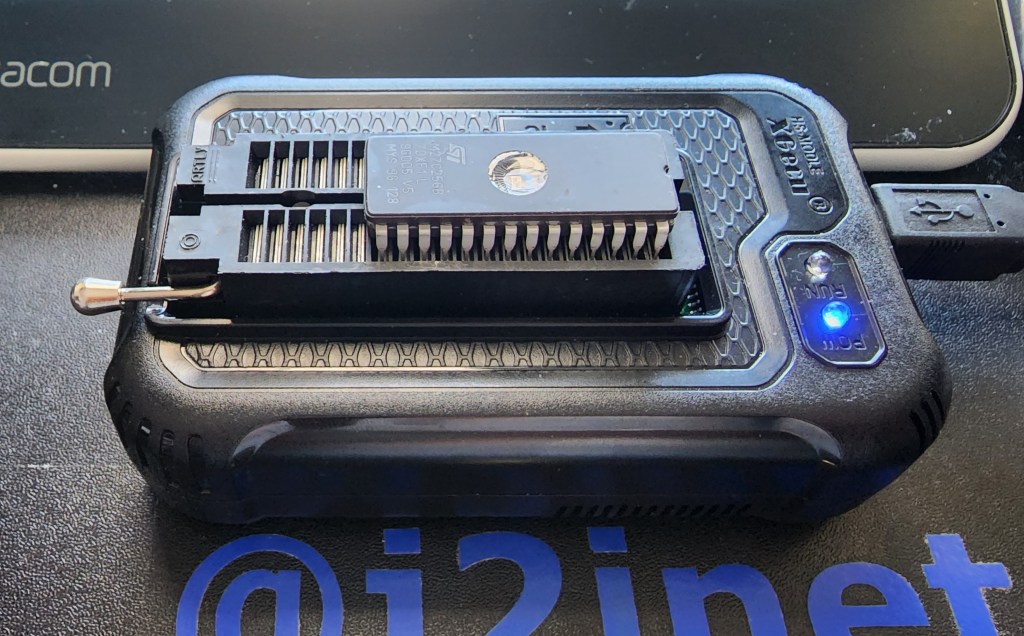
The software for writing information to the EPROMs

Reading from the EPROM is just as simple. After the EPROM is connected to the programmer and the EPROM model is selected in the software, it provides a READ button that copies all the bytes from the memory device and displays them in the hex editor. To determine whether the EPROM had been erased I will use this functionality. Now that I have a way to read and write from the EPROM, let’s test the different means of erasure.

Using the Sun

These results were the most disappointing. After having an EPROM out for most of the day, the ROM was not erased. Speaking to someone else, I was told that it would take several days of exposure to erase the EPROM. I chose not to leave the EPROM out for this long, as I’d risk forgetting it was out there when the weather becomes more wet.

Using a Portable UV Sanitizer

The portable UV Sanitizer that I tried was received as a Christmas gift at the end of 2022. Such devices are widely available now in the wake of COVID. This unit charges with a USB cable and runs off of a battery. When turned on, it stays on until it is either turned off, the battery goes dead, or someone turns it over. This unit will only emit light when the light is facing downward. I speculate this is a safety feature; you won’t want to look directly into the EV light.

My first attempts to erase one of the EPROMs with this sanitizer were not successful. After several sessions, the EPROMs still had their data on them. While I wouldn’t look directly into the UV light I could point my camera at it safely. The picture was informative. The light had a brighter level on the end that was closer to the power source, and was very dim at the end. Before, I was only ensuring the window of the EPROM were under some portion of the lighting tube. Now, I knew to ensure it was close to the brighter end of the UV emitter. Using the new placement, I was able to erase an EPROM in about 60 minutes.

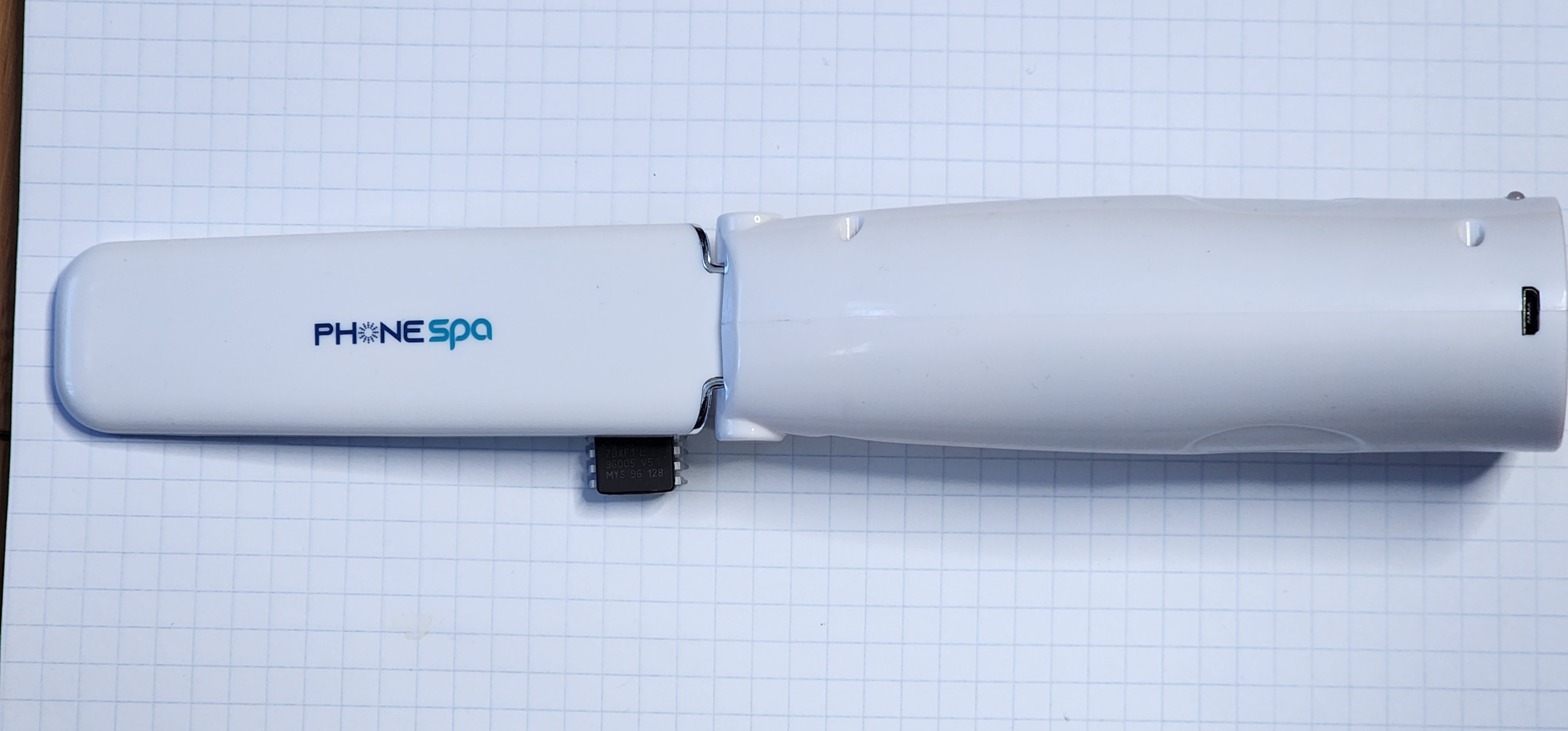
UV Sanitizer with the EPROM at the brighter end.

Provided that someone is only erasing a single EPROM and isn’t in a hurry, I think that this could make for an adequate solution for erasing an EPROM. If there’s more than one though his might not work as well, especially when one considers the time needed to recharge the battery after it has been diminished by an erasing session.

Clamshell UV Phone Cleaner

I received this clamshell UV phone cleaner as a gift nearly a decade ago. This specific model isn’t sold any more, but newer variations are available under the description PhoneSoap. These have a few advantages over the portable UV sanitizer. It runs from a 12 volt power source. There’s no waiting for it to recharge before you can use it. It also appears to be a lot brighter. The UV emitter automatically deactivates when the case is being opened, but there is a brief moment where the case is just being opened but the light hasn’t turned off yet in which some of the light spills out of the unit. It is either a lot brighter, or it has more light in the visible spectrum. The unit I use has emitters on both the hinged and the lower area of the case. EPROMs placed in it could be oriented face-up or face-down and still be erased. When this case is closed, the emitter turns on for 300 seconds and then turns off. I’d like for it to be longer for my purposes, but 300 seconds isn’t bad. After I let an EPROM sit for one 5-minute session in the sanitizer, it still has data on it. But after a second 5-minute session it showed as erased. I think this unit is worthy of consideration.

Tube UV Light

I have an old UV tube light that I purchased in my teens. I dug it up and found a power supply for it. The light still works, but after leaving an EPROM in direct contact with it for well over 24 hours I found no change. I speculated that this would be the outcome for a few reasons. Among which is that UV lights of this type are commonly where people can see them. The cleaning UV lights have warnings to keep them away from skin and eyes. From the glimpse that I got of them through the phone’s camera, it looks that they are working in a different wavelength. Not that this is a true measure of the true bandwidth. But there’s not much to be said about the tube light.

The Winner

The clear winner here is the clamshell UV light. It was easy to use and was able to erase the EPROM in ten minutes. The portable UV cleaner comes in second. The other sources didn’t cross the finish line given a generous amount of time to do so. It might be possible to eventually erase an EPROM with them, but I don’t think it is worth the time.

Now that I have a reliable way to erase these EPROMs, I can use these in the MC6800 Computer that I was working on.


Mastodon: @j2inet@masto.ai
Instagram: @j2inet
Facebook: @j2inet
YouTube: @j2inet
Telegram: j2inet
Twitter: @j2inet

Posts may contain products with affiliate links. When you make purchases using these links, we receive a small commission at no extra cost to you. Thank you for your support.

Jameco Valuepro BB-4T7D 3220-Point Solderless Breadboard

The File System Watcher::Reloading Content Automatically

I was performing enhancements on a video player that read its content at startup, and then would serve from that content on demand. The content, though loaded from the file system, was being put in place by another process. Since the primary application only scanned for content at startup, it would not detect the new content until after the scheduled daily reboot.

The application needed a different behaviour. It needed to detect when content was updated and rescan content accordingly. There are several ways that this could be done, with the application occasionally scanning its content being among the most obvious solutions. There are better solutions. The one I am sharing here is the File System Watcher. I’ll be looking at using the implementations for NodeJS and .NET.

The File System Watchers keeps track of files in specific paths and notifies an application when a change of interest occurs. Once could watch an entire folder or watch only specific files. If any files change, the application receives a notification.

Let’s consider how this feature is used in NodeJS first. You’ll need to import the file system object. The file system object has a function named watch that accepts a file path. The object that is returned is used to received notifications when an item within that path is created or updated.

const fs = require('fs')
const readline = require('readline');
const path = require('path');

var watcher;
let watchPath = path.join(__dirname, 'config');
console.log(`Watch path: ${watchPath}`);
watcher = fs.watch(watchPath)
watcher.on('change', (event, filename)=> {
	console.log(event);
	console.log(filename);
});

console.log('asset watcher activated');

When a configuration file is change, how that is handled depends on the logic of how your application works.

In the .Net environment there’s a class named FileSystemWatcher that accepts a directory name and a file filter. The file filter is the pattern for the file names that you won’t considered. Use *.* to monitor for any file. You can also filter for notifications of the file attributes changing. Instances of FileSystemWatcher exposes several events for different types of file system events.

  • Renamed
  • Deleted
  • Changed
  • Created

When an event occurs, the application receives a FileSystemEventArgs object. It provides three properties about the change that has occurred.

  • ChangeType – Type of event that occurred
  • FullPath – The full path to the file system object affected
  • Name – the name of the file system object affected

These should tell you most of the information that you need to know the nature of the change.

Whether in NodeJS or .Net, using the file system watcher provides a simple and efficient method for detecting when vital files have been updated. If you decide to add features to your application to ensure it is responsive to changes in files, you’ll want to use it in your solutions.

Find the source code for sample apps here

https://github.com/j2inet/FileSystemWatcherDemo

.Net Sample App

The .Net Sample App monitors the executable directory for the files content.txt and title.txt. The application has a title area and a content area. If the contents of the files are changed, the application UI updates accordingly. I made this a WPF app because the binding features makes it especially easy to present the value of a variable with minimal custom code. I did make use of some custom base classes to keep the app-specific code simple.

using System;
using System.Collections.Generic;
using System.DirectoryServices;
using System.IO;
using System.Linq;
using System.Security.Policy;
using System.Text;
using System.Threading.Tasks;

namespace FileSystemWatcherSample.ViewModels
{
    public  class MainViewModel: ViewModelBase
    {
        public MainViewModel() {
            var assemblyFile = new FileInfo(this.GetType().Assembly.Modules.FirstOrDefault().FullyQualifiedName);
            var parentDirectory = assemblyFile.Directory;
            Directory.SetCurrentDirectory(parentDirectory.FullName);

            FileSystemWatcher fsw = new FileSystemWatcher(parentDirectory.FullName);
            fsw.Filter = "*.txt";
            fsw.Created += FswCreatedOrChanged;
            fsw.Changed += FswCreatedOrChanged;
            fsw.NotifyFilter = NotifyFilters.CreationTime | NotifyFilters.LastWrite | NotifyFilters.FileName;
            fsw.EnableRaisingEvents = true;
        }


        void FswCreatedOrChanged(object sender, FileSystemEventArgs e)
        {
            var name = e.Name.ToLower();
            switch (name)
            {
                case "contents.txt":
                    try
                    {
                        Content = File.ReadAllText(e.FullPath);
                    }catch(IOException exc)
                    {
                        Content = "<unreadable>";
                    }
                    break;
                case "title.txt":
                    try
                    {
                        Title = File.ReadAllText(e.FullPath);
                    } catch(IOException exc)
                    {
                        Title = "<unreadable>";
                    }
                    break;
                default:
                    break;
            }
        }

        private string _title = "<<empty>>";
        public string Title
        {
            get => _title;
            set => SetValueIfChanged(() => Title, () => _title, value);
        }

        string _content = "<<empty>>";
        public string Content
        {
            get => _content;
            set => SetValueIfChanged(()=>Content, ()=>_content, value);
        }
    }
}

Node Sample App

The Node Sample App runs from the console. In operation, it is much more simple than the .Net application. When a file is updated it prints a notification to the screen.

const fs = require('fs')
const readline = require('readline');
const path = require('path');


function promptUser(query) {
    const rl = readline.createInterface({
        input: process.stdin,
        output: process.stdout,
    });

    return new Promise(resolve => rl.question(query, ans => {
        rl.close();
        resolve(ans);
    }))
}


var watcher;
let watchPath = path.join(__dirname, 'config');
console.log(watchPath);
watcher = fs.watch(watchPath)
watcher.on('change', (event, fileName)=> {
    console.log(event);
    console.log(fileName);
    if(fileName == 'asset-config.js') {
      targetWindow.webContents.send('ASSET_UPDATE', fileName);
    }
  })
  console.log('asset watcher activated');


var result = promptUser("press [Enter] to terminate program.")

Retro: Building a Motorola 6800 Computer Part 1

I was cleaning out a room and I came across a box of digital components. Among these components were a few ICs for microcontrollers and microprocessors. Seeing these caused me to revisit interest that I had in computer hardware during a time prior to me deciding on the path of a Software Engineer. I decided to make a simple, yet functional computer with one of the processors. I selected the Motorola 6808 from what was available. There was a more capable Motorola 68K among the ICs, but I decided on the 6808 since it would require less external components and would be a great starting point for building something. It could make for a great teaching aid for understanding some computer fundamentals.

MC6800 Series Hello World on YouTube

Hello World

The first thing I want to do with it is simple. I just want to get the processor in a state where it can run without halting. This will be my Hello World program equivalent. Often times with Hello World programs, the goal is simply to produce something that compiles runs without failing, and performs some observable action. Hello World programs validate that one’s build system is properly configured to begin producing something. The program itself is trivial.

About the 6800

This processor family is from before my time, initially made in 1974. The MC6800 series of processors comes in a few variants. They differ on their amount of internal ram, stand-by capabilities, and clock speed. These are small variations. I’m using the MC6808, but will refer to it as a 6800 since most of what I write here is applicable to all of these processors. This 8-bit processor has only a few registers to track, a 16-bit address line, and a few control lines. List any processor, it has a program counter and stack pointer. It also has an index register, and a couple of 8-bit accumulators. The Index, stack, and program counters are all 16-bit while the two accumulators are 8-bit.

The processor only natively performs integer math operations. But there is a library for floating point operations. In times past it had been distributed as an 8K ROM. But the source code for this library is readily available and could be place on someone’s own ROM. You can find the source code on GitHub.

MC6800 Block Diagram Image Credit: Wikipedia.org

Instruction Set

This processor has an instruction set of only 72 instructions. The instructions + operands range with a usual size of between 1 to 3 bytes. At this size and simplicity, even putting together a simple program without an assembler could be done. Many instructions are variations on the same high-level operation with a different addressing mode. For my task goal, I don’t need to get deep into understanding of the instruction. I just needed to know what is a 1 byte operation that I could do without any additional hardware or memory needed. Many processors support an instruction often called nop, standing for “No Operation.” This instruction, as its name suggest, does nothing beyond take up space. My plan was to hard-wire this instruction into the system. This would let it run without any RAM and without causing any faults or halting conditions.

For this processor, the numerical value for the nop instruction is 0x01. This is an easy encoding to remember. To wire this instruction in the circuit, I only need to connect the least significant bit of the processor’s data line to a high signal and tie the other ones to a low signal.

Detecting Activity

It is easy to think of a processor that is only executing nop instructions as doing nothing at all. This isn’t the case though. The processor is still incrementing its program bus. As it does, it is asserting the new address over the processor’s address lines to specify the next instruction that it is trying to fetch. Some output status lines will also indicate activity. The R/!W line will indicate read operations, the BA (Bus Address) line will be high when ever the processor isn’t halted, ant the VMA line will be high when the processor is trying to asset an address on the address bus. The processor also responds to some input lines. There are three input lines that have an effect on the processor when they are in the low state. RESET, HALT, and IRQ all effect execution. I’ll need to ensure those are tied low. Most important of all, the processor needs to receive a clock signal within an acceptable range. The clock signal is necessary for the processor to coordinate it’s actions . If the clock signal is too high or too low, then the process might not function correctly. That said, I’m going to intentionally try to run the processor at a rate that is lower than what is on the spec sheet for reasons to be discussed.

As the processor is running, I should be able to monitor what’s going on by monitoring a few lines, especially on the address line. If I connect light emitting diodes (LEDs) to the address lines then I should observe whether each connection is in a high or low state by seeing which LEDs are on or off. But with the processor running at a clock speed of 1MHz – 2MHz, the processor could go through its entire address space at a rate faster than I can perceive. If I run the clock at a reduced speed, then I might make the processor progress slow enough so that I can watch the address lines increment. To achieve this, I’m going to make a clock circuit and put the output through a counter IC. If you are familiar with digital counting circuits, you know that each binary digit will be changing at half the speed of the digit before it. I can use the output of the circuit to get the clock running at 1/2, 1/4, 1/8,…,1/256. I can get the clock into the kilohertz range, which would be slow enough to see the address lines increment.

The Circuit

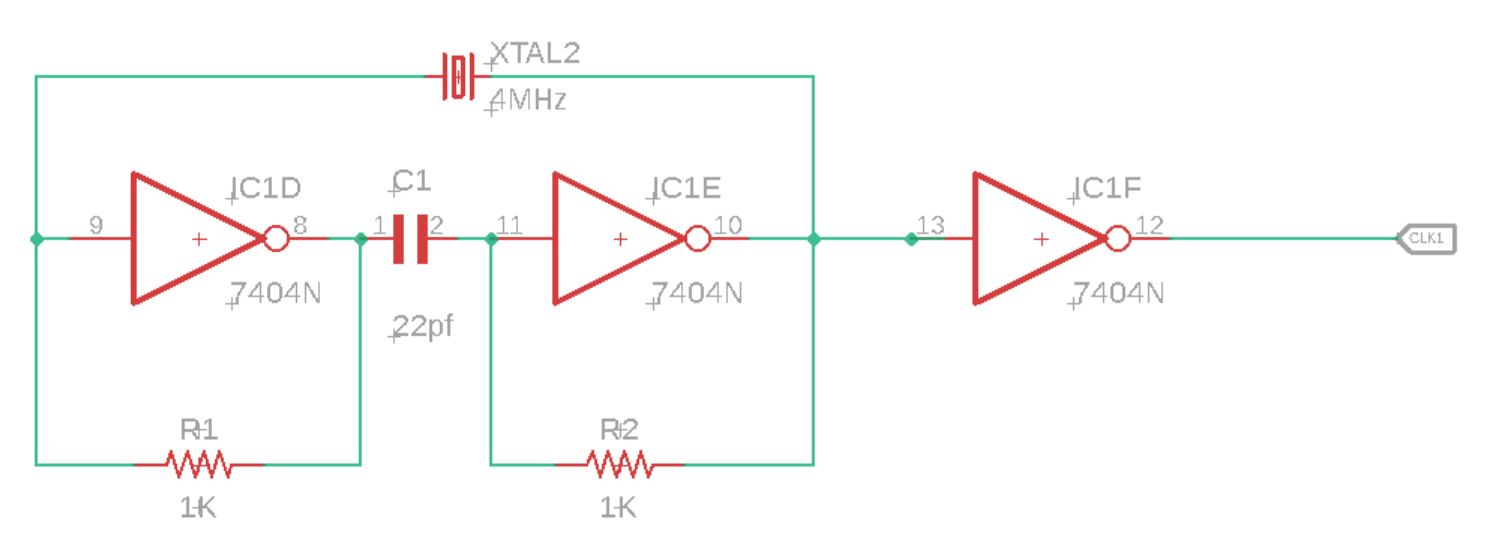
For the clock circuit, I have a 4MHz crystal wired into a circuit with some inverters, resisters, and capacitors. I take the output of that and pass it through another inverter before passing it on to the processor (or the counter between the processor and clock).

For the processor, most of the work is connecting LEDs with resistors to limit the current. Additionally I’ve for the instruction 1 wired to the data bus. With this wired, the only thing the system needs is power.

The Outcome

I’m happy to say that this worked. The processor started running and I can see the address bus values increasing through the LEDs on the most significant bits.

Next Steps

Now that I have the processor in a working state, I want to replace the hard-wired instruction with an EPROM and add RAM. Once I’m confident that all is well with the EPROM and RAM then I’ll add some interfaces for the outside world. While the parts that I think that I’ll need are generally out of production (though there are some derivative processors still available new) used versions are available for only a few dollars. Overall though this is a temporary diversion. Once it is developed to a certain point, it will be shelved, but that’s not the end of my hardware exploration. There are some things I’d like to do with some ARMs processors (likely an STMF32 arm processor). Many of the ARMs processors I’ve looked at are fairly complete system-on-a-chip components and don’t require a lot of hardware to get them to their minimal working state beyond a clean power supply.

Resources

One of the nice things about dabbling in Retro Computing is that there are plenty of sources available for the hardware. If you find this interesting and want to try some things out yourself, here are some resources that may be helpful.


Mastodon: @j2inet@masto.ai
Instagram: @j2inet
Facebook: @j2inet
YouTube: @j2inet
Telegram: j2inet
Twitter: @j2inet

Posts may contain products with affiliate links. When you make purchases using these links, we receive a small commission at no extra cost to you. Thank you for your support.

7 Auto Makers Jointly Work to Expand EV Charging

BMW Group, GM, Honda, Hyundai, Kia, Mercedes-Benz, and Stellantis, are planning to engage in a joint venture to add EV chargers across the USA and Canada. This joint venture is dependent on regulatory approval and closing conditions. Their plan calls for more at least 30,000 chargers starting next year. The new chargers will support both CCS1 and NACS plugs (which, in North America translates into supporting Non-Tesla and Tesla vehicles). The new stations are to support the Plug-and-Charge protocol; this means that the charger and vehicle will communicate with each other to automatically charge the drive with the driver not having to do any more than connect the charger to their car.

Starting in 2024 the group says it plans to deploy chargers along major highway and metropolitan areas first. They plan to make use of National Eletric Vehicle Infrastructure (NEVI) funding being administered by the states to improve charging across major travel corridors. “the stations will be in convenient locations offering canopies where ever possible and amenities such as restrooms, food services, and retail operations either nearby or within the same complex.” This sounds a bit like they’ve re-invented the modern gas station, but with chargers instead of gas pumps. But this sounds like a significant improvement compared to some charging experiences, where the chargers may be in an isolated area of a parking lot with no rain cover and no buildings or restrooms nearby.

Some Auto Manufacturers Moving to Tesla Chargers

This announcement comes at the heels of several automakers announcing that they plan to transition from CCS1 chargers to support Tesla’s NACS. This includes Mercedes, Nissan, Rivian, Polestar, and Volvo. Though they made their announcements halfway through 2023, vehicles implementing the chargers are not expected until 2024 and 2025.

While I look forward to the expansion of EV charging availability, at the moment this announcement is aspirational. But it’s a space I plan to keep an eye on as I’m personally interested in seeing EV charging capabilities expand.

Statements from the Joint Venture Members

BMW Group CEO Oliver Zipse: โ€œNorth America is one of the worldโ€™s most important car markets โ€“ with the potential to be a leader in electromobility. Accessibility to high-speed charging is one of the key enablers to accelerate this transition. Therefore, seven automakers are forming this joint venture with the goal of creating a positive charging experience for EV consumers. The BMW Group is proud to be among the founders.โ€

GM CEO Mary Barra: โ€œGMโ€™s commitment to an all-electric future is focused not only on delivering EVs our customers love, but investing in charging and working across the industry to make it more accessible. The better experience people have, the faster EV adoption will grow.โ€

Honda CEO Toshihiro Mibe: โ€œThe creation of EV charging services is an opportunity for automakers to produce excellent user experiences by providing complete, convenient and sustainable solutions for our customers. Toward that objective, this joint venture will be a critical step in accelerating EV adoption across the U.S. and Canada and supporting our efforts to achieve carbon neutrality.โ€

Hyundai CEO Jaehoon Chang: โ€œHyundaiโ€™s investment in this project aligns with our โ€˜Progress for Humanityโ€™ vision in making sustainable transportation more accessible. Hyundaiโ€™s expertise in electrification will help redefine the charging landscape and we look forward to working with our other shareholders as we create this expansive high-powered charging network.โ€

Kia CEO Ho Sung Song: โ€œKia’s engagement and investment in this high-powered charging joint venture is set to increase charging access and convenience to current and future drivers and therefore accelerate the transition to EVs across North America. Kia is proud to be an important part of this joint venture with other reputable automakers as we embark on a journey towards seamless charging experiences for our customers and further strengthening Kiaโ€™s brand identity in the EV market.โ€

Mercedes-Benz Group CEO Ola Kรคllenius: โ€œThe fight against climate change is the greatest challenge of our time. What we need now is speed โ€“ across political, social and corporate boundaries. To accelerate the shift to electric vehicles, weโ€™re in favor of anything that makes life easier for our customers. Charging is an inseparable part of the EV-experience, and this network will be another step to make it as convenient as possible.โ€

Stellantis CEO Carlos Tavares: โ€œWe intend to exceed customer expectations by creating more opportunities for a seamless charging experience given the significant growth expected in the market. We believe that a charging network at scale is vital to protecting freedom of mobility for all, especially as we work to achieve our ambitious carbon neutrality plan. A strong charging network should be available for all – under the same conditions – and be built together with a win-win spirit. I want to thank each colleague involved, as it is a milestone example of our collective intelligence to listen and serve our customers.โ€


Mastodon: @j2inet@masto.ai
Instagram: @j2inet
Facebook: @j2inet
YouTube: @j2inet
Telegram: j2inet
Twitter: @j2inet

Posts may contain products with affiliate links. When you make purchases using these links, we receive a small commission at no extra cost to you. Thank you for your support.

Xamarin: “The Application cannot be launched because it is not installed”

Working on a Xamarin project for iOS from a Windows PC I ran into a situation where I could no longer debug the application. There had been no changes in source code from when I could debug to when I could not. A search for the error took me to other places where the problem had been discussed but not resolved. While I’ve been able to resolve the problem for myself, the other discussions were closed and I couldn’t place a resolution there. In the absence of another place to put this solution, I’m hosting it myself.

The more complete text of the error is as follows.

The application 'MyApplication' cannot be launched or debugged because it's not installed The app has been terminated.

Ofcourse, MyApplication would have the name of your application if you encounter this. While I don’t know what causes it, resolve it is a simple matter of erasing files. For my Xamrin project I’m using Visual Studio Community 2022 on a Windows Machine and communicating with an M1 Mac for compilation. On the M1, I had to navigate to the path $HOME/Library/Caches/Xamarin/mtbs/builds/ and erase the files and folders there. Returning to my solution on Windows, I got some other error about files not being found that was resolved by manually selecting dependency projects and recompiling those. After that, I was about to compile and debug the project like I could before.

I’m not sure what causes this error. I would have liked to have looked into it further. But delivery deadlines do not allow further examination. That said, there have been a few other low-frequency errors that I’ve encountered that are resolved by simply clearing this folder.

I hope that this solution is helpful to someone.


Mastodon: @j2inet@masto.ai
Instagram: @j2inet
Facebook: @j2inet
YouTube: @j2inet
Telegram: j2inet
Twitter: @j2inet

Posts may contain products with affiliate links. When you make purchases using these links, we receive a small commission at no extra cost to you. Thank you for your support.

Enterprise Apple Certificates and Expiration

I recently explained the expiration behaviour of Apple Distribution certificates to someone, and thought it was worth sharing.

I often work on iOS applications signed with an Enterprise certificate. Applications signed with these certificates can be distributed directly to the device, such as through a Mobile Device Manager or through the browser. They cannot be distributed through the app store. These applications are signed with a distribution certificate. The Distribution Certificate can last up to one year, but may expire sooner. The distribution certificate will not last beyond the expiration of the account. If a app were signed by an account that has 7 months until renewal is needed, then the distribution certificate will also expire in 7 months.

Usually, this hasn’t been a problem for me. Many of the applications that I work on are either to be used for a predefined time period, such as for a holiday event, and then get shelved. Or they are applications that are receiving updates, in which case they will occasionally get new distribution certificates. I had a client that requested an iOS application be signed such that it would not expire. Someone in the development department for the client had resigned the application and redeployed it when it reached its first expiration period. But he wanted to be independent of their development department all together.

Unfortunately, this is not an option for iOS apps. The only way to have a version of the application that is immune to expiration would be to run it on an operating environment that doesn’t demand apps be signed with certificates that expire in a year or less. That is an option with Windows and Android, but not with iOS. For the best situation with iOS one needs an Mobile Device Manager (MDM). With an MDM, there is the option of making an updated distribution profile and pushing that out to the devices. Without the MDM then rebuild-and-redeploy is the only option.

This may be something that you’d like to consider when choosing hardware for a solution within an organization. iOS hardware is consistent in its form, performance, so on. While Android offers more openness, the variances in hardware is both an advantage and a disadvantage. I appreciate the ability to be able to make an app and install it to an Android device very quickly. OfCourse, the ability to do this easily also comes with the potential of bad actors doing the same. The barrier to getting malicious code on an iOS device is a bit higher.


Posts may contain products with affiliate links. When you make purchases using these links, we receive a small commission at no extra cost to you. Thank you for your support.

Mastodon: @j2inet@masto.ai
Instagram: @j2inet
Facebook: @j2inet
YouTube: @j2inet
Telegram: j2inet
Twitter: @j2inet

Restoring Life to a Game Gear

Recently, the Game Gear of a friend ceased to function. As is the case with many old electronics, I suspected that the capacitors in the unit had gone bad. Electrolyte capacitors contain a fluid and given enough time, that fluid can evaporate. Between the chemistry of soldered in batteries reaching the end of their lives and capacitors drying out, some electronics are doomed to start from the beginning. Thankfully these components are not necessarily hard to replace. Before having taken possession of the Game Gear, I suspected it was the capacitors and got information on the values. I have a box of capacitors in the house already.

When I received the unit and tried turning it on, the unit has no response at all. This configuration had a bolted on batter pack that used a couple of 18650 batteries. The battery pack was dead, and refused to charge. Fixing this is pretty easy with the right tools. In addition to a couple of 18650 batteries had had a couple of metalic strips to connect them along with insulating shrink wrap to prevent the batteries from being electrically exposed.

The Game Gear itself had lots of potential points of failure. There are a lot of capacitors distributed throughout the unit. The device has three circuit boards. One circuit-board has the power components on it, another has the audio circuitry, and then there is the main board. All of these boards have capacitors on them. But I thought most likely the ones on the power circuit board were my culprits. Rather than testing them, I replaced all three. My repair actions stopped there because the unit was restored to full functionality once those were placed.

Having opened the Game Gear though I found that its construction is fairly straight forward. I decided to start looking at some other old video game systems that I have within the house. When I had some of these as a child, how ever they worked was magical to me! Looking at them now, I see them as something that I can understand and manipulate or modify. That lead to a quick examination of the circuit schematics and the DRM that each one of these units used. Of all of the units I considered, the original Game Box and some of it’s derivatives (GameBoy Color, GameBoy Pocket) appears to be one of the easiest devices to target. I’m thinking of setting up a development environment for one, writing a “hello world” program, writing it to a cartridge, and seeing it run. I’ll be writing more about that here.


Posts may contain products with affiliate links. When you make purchases using these links, we receive a small commission at no extra cost to you. Thank you for your support.

Mastodon: @j2inet@masto.ai
Instagram: @j2inet
Facebook: @j2inet
YouTube: @j2inet
Telegram: j2inet
Twitter: @j2inet
In-App Static Web Server with HttpListener in .Net

I was working on a Xamrin iOS application (using .Net) and one of the requirements was for the application to support a web view for presenting another form. The form would need to be served from within the application. There are lots of ways that one could accomplish this. For the requirements this only needed to be a static web server. The contents would be delivered via a zip file. Creating a static web server is pretty easy. I’ve created one before. Making this one would be easier.

What made this one so easy is that .Net provides the HttpListener class, which handles most of the socket/network related things for us. It will also parse out information from the incoming request and we can use it to generate a well formatted supply. It contains no logic for what replies should be sent for what circumstances, or for retrieving files from the file system, so on. That’s the part I had to build.

I was given an initial suggestion of getting the Zip file, using the .Net classes to decompress it and write it to the iPad’s file system, and retrieve the files from there. I started with that direction, but ended up with a different solution. Since the amount of data in the static website would be small, I thought it would be fine to leave it in the compressed archive. But if I changed my mind on this I wanted to be able to make adjustments with minimal effort.

Receiving Connections

To receive connections, the TcpListener class needs to know the prefix strings for requests. This prefix will usually contain http://localhost with a port number, such as http://localhost:8081/. It must end with the slash. Multiple prefixes can be specified. If you want the server to listen on all adapters for a specific port localhost could be replaced with * here. After creating a HttpListener these prefixes must be added to the listener’s Prefix collection.

String[] PrefixList
{
    get
    {
        return new string[] { "http://localhost:8081/",  "http://127.0.0.1:8081/", "http://192.168.1.242:8081/" };
    }
}

void ListenRoutine()
{
    _keepListening = true;
    listener = new HttpListener();
            
    foreach (var prefix in PrefixList)
    {
        listener.Prefixes.Add(prefix);
    }
            
    listener. Start();
    //...more code follows
}

The listener is ready to start listening for requests now. A call to TcpListener::GetContext() will block until a request comes in. Since it blocks, everything that I’m doing with the listener is on a secondary thread. I use the listener in a loop to keep replying to requests. The HttpListenerContext object contains an object representing the request (HttpListenerRequest) and the response (HttpListenerResponse). From the request, I am interested in the AbsolutePath of the request. This is the request URL Path with any query parameters removed. I’m also interested in the verb that was used on the request. For the server that I made I’m only handling GET requests.

while (_keepListening)
{
    //This call blocks until a request comes in
    HttpListenerContext context = listener.GetContext();
    HttpListenerRequest request = context.Request;
    HttpListenerResponse response = context. Response;


    ///Handle the request here

}
listener. Stop();

Let’s say that I wanted my server to return a hard coded response. I would need to know the size of that response in bytes. There is an OutputStream on the HttpListenerResponse object that I will write the entirety of my response to. Before I do, I set the ContentLength64 member of the HttpListenerResponse object.

async void HandleResponse(HttpListenerRequest request, HttpListenerResponse response)
{
    String responseString = "<html><body>Hello World</body></html>";
    byte[] responseBytes = System.Text.Encoding.UTF8.GetBytes(responseString);
    response.ContentLength64 = responseBytes.Length;
    var output = response.OutputStream;
    await output.WriteAsync(responseBytes, 0, responseBytes.Length);
    await output.FlushAsync();
    output. Close();
}

When I run the code now and navigate to the URL, I’ll see the text “Hello World” in the browser. But I want to be able to send more than just a hardcoded response. To make the server more useful it needs to send the property Mime Type header for certain content. I need to be able to easily change the content that it servers. To satisfy this goal I’ve externalized the data from the program and I’ve defined an interface to aid in adding new ways for the server to respond to the request. I’ll also want to be able to define other classes with different behaviours for requests. For those classes I’ve made the interface IRequestHandler. It defines two methods and two properties that the handlers must implement.

  • Prefix – this is a path prefix for the handler. It will only be considered as a class that can handle a response if the request’s absolute path starts with this prefix. If this field is an empty string then it can be considered for any request.
  • DefaultDocument – if no file name is specified in the path, then this is the document name that will be used.
  • CanHandleRequest(string method, string path) – This gives the class basic information on the request. If the class can handle the request it should return true from this method. If it returns false, it will no be given the request to process.
  • HandleRequest(HttpListenerRequest, HttpListenerResponse) – processes the actual request.

A list of these handlers will be made and added to a list. Each handler is considered for be given the request to handle one at a time until one is found that is appropriate for the request. When one is, it processes the request and no further handlers are considered. One of the handlers that I defined is the FileNotFoundHandler. It is the simplest of the request handlers. It can handle anything. Later, I’ll set this up as the last handler to be considered. If nothing else handles a request, thisn my FileNotFoundHandler will run.

public class FileNotFoundHandler : IRequestHandler
{
    public string Prefix => "/";

    public string DefaultDocument => "";

    public bool CanHandleRequest(string method, string path)
    {
        return true;
    }

    public async void HandleRequest(HttpListenerRequest request, HttpListenerResponse response)
    {
        String responseString = $"<html><body>Cannot find the file at the location [{request.Url.ToString()}]</body></html>";
        byte[] responseBytes = System.Text.Encoding.UTF8.GetBytes(responseString);
        response.StatusCode = 404;
        response.ContentLength64 = responseBytes.Length;
        var output = response.OutputStream;
        await output.WriteAsync(responseBytes, 0, responseBytes.Length);
        await output.FlushAsync();
        output. Close();
    }
}

Going back to the local server, I’m adding a list of IRequestHandler objects. The list will start with only the FileNotFoundHandler in it. Any other handlers added will be added at the front of the list, pushing everything back by one position. The last item added to the list will receive the highest priority.

List<IRequestHandler> _handlers = new List<IRequestHandler>();

public LocalServer(bool autoStart = false) {
    var fnf = new FileNotFoundHandler();
    AddHandler(fnf);
    if(autoStart)
    {
        Start();
    }
}

public void AddHandler(IRequestHandler handler)
{
    _handlers. Insert(0, handler);
}

void ListenRoutine()
{
    _keepListening = true;
    listener = new HttpListener();
            
    foreach (var prefix in PrefixList)
    {
        listener.Prefixes.Add(prefix);
    }
            
    listener. Start();
    while (_keepListening)
    {
        //This call blocks until a request comes in
        HttpListenerContext context = listener.GetContext();
        HttpListenerRequest request = context. Request;
        HttpListenerResponse response = context. Response;
        bool handled = false;
        foreach(var handler in _handlers)
        {
            if(handler.CanHandleRequest(request.HttpMethod, request.Url.AbsolutePath))
            {
                handler.HandleRequest(request, response);
                handled = true;
                break;
            }
        }
        if (!handled)
        {
            HandleResponse(request, response);
        }
    }
    listener. Stop();

}

This completes the functionality of the server itself, but I still need a handler. I mentioned earlier I wanted to serve content from a zip file. To do this I made a new handler named ZipRequestHandler. Some of the functionality that it will need will likely be part of almost any handler. I’ll put that functionality in a base class named RequestHandlerBase. This base class will define a DefaultDocument of index.html. It is also able to provide mime types based on a file extension. To retrieve mime types I have a string dictionary that maps an extension to a mimetype. Within the code I define some basic mime types. I don’t want all the mimetypes to be defined in source code. I have a JSON file that has a total of about 75 mime types in it. If that file were omitted for some reason the server would still have the foundational mime types provided here.

static StringDictionary ExtensionToMimeType = new StringDictionary();

static RequestHandlerBase()
{

            
    ExtensionToMimeType.Clear();
    ExtensionToMimeType.Add("js", "application/javascript");
    ExtensionToMimeType.Add("html", "text/html");
    ExtensionToMimeType.Add("htm", "text/html");
    ExtensionToMimeType.Add("png", "image/png");
    ExtensionToMimeType.Add("svg", "image/svg+xml");
    LoadMimeTypes();
}

        static void LoadMimeTypes()
        {
            try
            {
                var resourceStreamNameList = typeof(RequestHandlerBase).Assembly.GetManifestResourceNames();
                var nameList = new List<String>(resourceStreamNameList);
                var targetResource = nameList.Find(x => x.EndsWith(".mimetypes.json"));
                if (targetResource != null)
                {
                    DataContractJsonSerializer dcs = new DataContractJsonSerializer(typeof(LocalContentHttpServer.Handler.Data.MimeTypeInfo[]));
                    using (var resourceStream = typeof(RequestHandlerBase).Assembly.GetManifestResourceStream(targetResource))
                    {
                        var mtList = dcs.ReadObject(resourceStream) as MimeTypeInfo[];
                        foreach (var m in mtList)
                        {
                            ExtensionToMimeType[m.Extension.ToLower()] = m.MimeTypeString.ToLower();
                        }
                    }

                }
            } catch
            {

            }
        }

Getting a mime type is a simple dictionary entry lookup. We will see this used in the child class ZipRequestHandler.

public static string GetMimeTypeForExtension(string extension)
{
    extension= extension.ToLower();
    if(extension.Contains("."))
    {
        extension = extension.Substring( extension.LastIndexOf("."));
    }
    if(extension.StartsWith('.'))
        extension = extension.Substring(1);
    if(ExtensionToMimeType.ContainsKey(extension))
    {
        return ExtensionToMimeType[extension];
    }
    return null;
}

The ZipRequestHandler accepts either a path to an archive or a ZipArchive object along with a prefix for the requests. Optionally someone can set the caseSensitive parameter to disable the ZipRequestHandler‘s default behaviour of making request case sensitive. I’ve defined a decompress parameter too, but haven’t implemented it. When I do, this parameter will be used to decide if the ZipRequestHandler will completely decompress an archive before using it or keep the data compressed in the zip file. The two constructors are not substantially different. Let’s look at the one that accepts a string for the path to the zip file.

ZipArchive _zipArchive;
readonly bool _decompress ;
readonly bool _caseSensitive = true;
Dictionary<string, ZipArchiveEntry> _entryLookup = new Dictionary<string, ZipArchiveEntry>();

public ZipRequestHandler(String prefix, string pathToZipArchive, bool caseSensitive = true, bool decompress = false):base(prefix)
{
    FileStream fs = new FileStream(pathToZipArchive, FileMode.Open, FileAccess.Read);
    _zipArchive = new ZipArchive(fs);            
    this._decompress = decompress;
    this._caseSensitive = caseSensitive;
    foreach (var entry in _zipArchive.Entries)
    {
        var entryName = (_caseSensitive) ? entry.FullName : entry.FullName.ToLower();
        _entryLookup[entryName] = entry;
    }
}

public override bool CanHandleRequest(string method, string path)
{
    if (method != "GET") return false;
    return Contains(path);
}

Given the ZipArchive I collect the entries in the zip and their path. When request come in I’ll use this to jump straight to the relevant entry. The effect of the caseSensitive parameter can be seen here. If the class is intended to run case insensitive, then I convert file names to lower case. For later lookups, the search name specified will also be converted to lower case. Provided that a request is using the GET verb and requests a file that is contained within the archive this class will report that it can handle the request.

Ofcourse, the handling of the request is where the real work happens. A request may have query parameters appended to the end of it. We don’t want those for locating a file. Url.AbsolutePath will give the request path with the query parameters removed. If the URL path is for a folder, then we append the name of the default document to the path. we also remove any leading slashes so that the name matches the path within the ZipArchive. While I use TryGetValue on the dictionary to retrieve the ZipEntry, this should always succeed since there was an earlier check for the presence of the file through the CanHandleRequest call. We then get the mimeType for the file using the method RequestHandlerBase::GetMimeTypeForExtension. If a mimetype was found then the value for the header Content-Type is set.

The rest of the code looks similar to the code that was returning the hard coded responses. The ZipEntry abstracts away the details of getting a file out of a ZipArchive so nicely that it looks like reading from any other stream. The file is read and sent to the requester.

public override void HandleRequest(HttpListenerRequest request, HttpListenerResponse response)
{
    var path = request.Url.AbsolutePath;

    if (path.EndsWith("/"))
        path += DefaultDocument;
    if (path.StartsWith("/"))
        path = path.Substring(1);

    if (_entryLookup.TryGetValue(path, out var entry))
    {
        var mimeType = GetMimeTypeForExtension(path);
        if(mimeType != null)
        {
            response.AppendHeader("Content-Type", mimeType);
        }
        try
        {
            var size = entry.Length;
            byte[] buffer = new byte[size];
            var entryFile = entry.Open();
            entryFile.Read(buffer, 0, buffer.Length);

            var output = response.OutputStream;
            output.Write(buffer, 0, buffer.Length);
            output.Flush();
            output.Close();
        }catch(Exception exc)
        {

        }
    }
    else
    {
                
    }
}

The code in its present state meets most of the current needs. I won’t be sharing the final version of the code here. That will be in a private archive. But I can share a version that is functional. You can find the source code on GitHub at the following address.

https://github.com/j2inet/LocalStaticWeb.Net


Posts may contain products with affiliate links. When you make purchases using these links, we receive a small commission at no extra cost to you. Thank you for your support.

Mastodon: @j2inet@masto.ai
Instagram: @j2inet
Facebook: @j2inet
YouTube: @j2inet
Telegram: j2inet
Twitter: @j2inet

Hashing String Data in JavaScript, C#, C++, and SQL Server

I’m working with some data that needs to be hashed in both C# and JavaScript. Usually converting an algorithm across languages is pretty trivial. But in JavaScript the regular numeric type is a double-precision 64-bit number. While this sounds sufficiently large, when used as an integer this only provides 53-bits of precision. As you might imagine, using a 53-bit numeric type on one system and 64-bit on another would result in differences in outcome. This would make hased data between these two functions incompatible with each other. To avoid these potential problems, I needed to use a different type. I used BIGINT.

A potential issue with BIGINT is that it can accommodate extremely large values. This isn’t usually a problem, but I need to have identical behaviour for the hash function to have identical results across the languages. Fixing this is simple though. I only need to perform the bitwise AND operation to truncate any bits in the BIGINT beyond position 64. The hast function I’m using was originally found on StackOverflow. This might not be the final Hash function that I use, but for now it works.

A key thing to note in the JavaScript implementation is the n suffix on the numbers. This ensures that they are all using the BIGINT type. Also take note of the bitwise operation with the number 0xFFFFFFFFn. This ensures that the number is truncated and acting like a 64-bit integer.

// 
function hashString(s) { 
    const A =  54059n ;
    const B = 76963n ;
    const C = 86969n;
    const FIRSTH = 37n;
   var h = FIRSTH;
   for ( var i=0;i<s.length;++i) {
        var c = BigInt(s.charCodeAt(i));
        h = ((h * A) ^ (((c) *B))) & 0xFFFFFFFFFFFFFFFFn;
   }
   return h; 
}

The C++ implementation (used for the Arduino ) follows. Using native types in C there’s nothing special that needs to be done.

#define A 54059   /* a prime */
#define B 76963   /* another prime */
#define C 86969   /* yet another prime */
#define FIRSTH 37 /* also prime */
unsigned long hash_str(String s) {
  unsigned long h = FIRSTH;
  for (auto i = 0; i < s.length(); ++i) {
    h = ((h * A) ^ (s[i] * B)) & 0xFFFFFFFFFFFFFFFF;
    //s++;
  }
  return h;  
}

The difference between the C# and C++ versions o the code are only notational. They both handle 64-bit integers just fine with no special tricks needed.

ulong hashString(String s) { 
    const ulong A =  54059ul ;
    const ulong B = 76963ul ;
    const ulong C = 86969ul;
    const ulong FIRSTH = 37ul;
   var h = FIRSTH;
   var stringBytes = Encoding.ASCII.GetBytes(s);
   for ( var i=0;i<stringBytes.Length;++i) {
        var c = stringBytes[i];
        h = ((h * A) ^ (((c) *B))) & 0xFFFFFFFFFFFFFFFFul;
   }
   return h; 
}

The differences for Kotlin are also notational, but significantly different from the C# and C++ in how the bitwise operators are expressed.

    fun hashString(s:String): ULong {
        val A:ULong =  54059u ;
        val B:ULong = 76963u ;
        val C:ULong = 86969u;
        val FIRSTH:ULong = 37u;
        var h = FIRSTH;
        var stringBytes = s.toByteArray()
        for ( i in 0..stringBytes.size-1) {
            var c = stringBytes[i].toULong();
            h = ((h * A) xor (((c) * B))) and 0xFFFFFFFFFFFFFFFFu;
        }
        return h;
    }

After having written this post, I was working in SQL Server. I was going to save some of this hashed data within SQL Server and decided to try with implementing a hash function there. Everything started out the same, but I ran into a notable problem. I encountered arithmetic overflow issues with declaring the mask 0xFFFFFFFFFFFFFFFF. This mask isn’t strictly necessary, but I’ve placed it there should I happen to use one of these implementations to hash to a smaller data type. I was using the BIGINT data type. But that data type only provides 63-bits of precision, not 64. Knowing that now I could just use a smaller mask to have a hash function that works identically across environments. If you’d like to try it out, the SQL Server implementation follows here.

CREATE FUNCTION HashString
(
	@SourceString as VARCHAR(15)
)
RETURNS BIGINT
AS
BEGIN
    DECLARE @A BIGINT =  54059
    DECLARE @B BIGINT = 76963
    DECLARE @C BIGINT = 86969
    DECLARE @FIRSTH BIGINT = 37
	DECLARE @StrLEn BIGINT = LEN(@SourceString)	
	DECLARE @Index BIGINT = 1
	DECLARE @MASK BIGINT = 0xFFFFFFFFFFFF
	DECLARE @Letter CHAR
	DECLARE @LetterCode BIGINT
	DECLARE @H BIGINT = @FIRSTH
	WHILE @Index <= @StrLEn	
	BEGIN
		SET @Letter = SUBSTRING(@SourceString, @Index, 1)
		SET @LetterCode = UNICODE(@Letter)
		SET @H = ((@H * @A) ^ (@LetterCode * @B)) & @MASK
		SET @Index = @Index + 1		
	END	
	return  @H;
END
GO

Mastodon: @j2inet@masto.ai
Instagram: @j2inet
Facebook: @j2inet
YouTube: @j2inet
Telegram: j2inet
Twitter: @j2inet

Posts may contain products with affiliate links. When you make purchases using these links, we receive a small commission at no extra cost to you. Thank you for your support.