Google is making some changes to Android that make it more restrictive than I’ve previously thought of it. Age verification for apps is coming to Android, and side loading is being restricted to apps that have been “verified” by Google. This is something that is coming to conform to new laws. Apple is also making some changes to conform and published information about it earlier this year. I just received Android’s notification about the change. The full e-mail is appended to the end of this post.
App Verification for Sideloaded Apps
Sideloading is the practice of loading applications onto the device outside of an app store. For Android, this usually involves changing a setting on the phone to allow applications from unknown sources, copying a .apk file to the device, and opening it for the phone to install the app within the .apk. To make an app, someone could download Android Studio, write their code, package their app, and share it with their friends at no cost. Google says that a side-loaded application is 50 times more likely to contain malware. For a developer to distribute their app outside of the Play Store, the developer must register with Google. This is a change from being able to build an app and make the .apk available without interacting with Google. Users who do not load applications outside of the Play Store will not see a difference.
Age Verification
Age verification is attributed to several state laws. The most prominent one referenced is Texas’s Senate Bill 2420. This bill says it regulates the sale of applications to mobile devices. It creates an obligation for app stores to inquire and verify user ages and categorize users into one of a defined set of categories.
Age 13 or older but younger than 16
At least 16 but younger than 18
18 or older
For each application that a minor downloads, the download will require the consent of the parent. The developers are obligated to come up with age ratings for the applications based on the categories above. The developer must disclose information on the elements of the software that lead to a particular setting being selected. Safety-related features must be enabled in response to the younger age categories. The Texas bill also says that the parent of a minor can make civil damage claims against a developer or app store for failing to meet the requirements.
Expected Impacts
My expectation is that a typical end-user is not likely to notice any change from this bill. At most, there’s the possibility of apps from smaller independent developers that may disappear if it is not eventually updated to conform. From what I’ve seen of the children in my family, they are more inclined to install new apps, especially games. I expect parents to be bugged a lot more about giving permission to install apps. That said, it isn’t unusual for a child to have access to their parents’ phones and sometimes certain passwords. I can’t help but expect that some non-significant portion of children may just use their parents’ phones or passwords to approve themselves.
Different than 1996
These restrictions remind me of another set of restrictions from 29 years ago. In 1996, Congress passed a bipartisan bill, the Communications and Decency Act. A part of that bill required that any website that may have content that isn’t appropriate for children perform age verification and filtering. Most of this bill failed and was enjoined as unconstitutional. The bill’s requirement for age verification would burden lawfully speaking adults and non-commercial interactions. The only portion of that bill that survives as a law today is a law that many simply refer to as Section 230 (47 USC §230). §230 provides a civil defense from liability for what someone else posted to an interactive computer service. The implementation of the Texas bill and others differs from the 1996 Act in that it targets commercial entities (App stores).
The Email from Google
What’s happening
A few U.S. states, currently Texas, Utah, and Louisiana, have recently passed verification laws requiring app stores to verify users’ ages, obtain parental approval, and provide users’ age information to developers. These laws also create new obligations for developers who distribute their apps through app stores in these states.
Our plan to support you
While we have user privacy and trust concerns with these new verification laws, Google Play is designing APIs, systems, and tools to help you meet your obligations. The first verification law to take effect is Texas’s SB 2420 on January 1, 2026. Given short implementation timelines, we are sharing details about the Play Age Signals API (beta) and have made the API integration guide available to you.
What this means for you
These laws impose significant new requirements on many apps that may need to provide age appropriate experiences to users in these states. These requirements include ingesting users’ age ranges and parental approval status for significant changes from app stores and notifying app stores of significant changes. It is important that you review these laws and understand your obligations.
If you have any additional questions, please contact our support team.
Thank you,
Your Google Play team
Posts may contain products with affiliate links. When you make purchases using these links, we receive a small commission at no extra cost to you. Thank you for your support.
Note Added 2025 March 10 – These instructions no longer work. Google has dropped support for using MSVC. It is still possible to build on Windows using Clang. But this presents new challenges, such as linking CLang binaries to MSVC binaries. More information on this change can be found in a Google Group discussion here.
Note Added 2024 September 3 – I tried to follow my own instructions on a whim today and found that some parts of the instructions don’t work. I made my way through them with adjustments to get to success.
I decided to compile the Google V8 JavaScript engine. Why? So that I could include it in another program. Google doesn’t distribute the binaries for V8, but they do make the source code available. Compiling it is, in my opinion, a bit complex. This isn’t a criticism. There are a lot of options for how V8 can be built. Rather than making available the permutations of these options for each version of V8, one could just set options themselves and build it for their platform of interest.
But Isn’t There Already Documentation on How to Do This?
There does exists documentation from Google on compiling Chrome. But there are variations from those instructions and what must actually be done. I found myself searching the Internet for a number of other issues that I encountered and made notes on what I had to do to get around compilation problems. The documentation comes close to what’s needed, but isn’t without error and deviation.
Setting Up Your Environment
Before touching the v8 source code, ensure that you have installed Microsoft Visual Studio. I am using Microsoft Visual Studio 2022 Community Edition. There are some additional components that must be installed. In an attempt to make this setup process as scriptable as possible, I’ve have a batch file that will have the Visual Studio Installer add the necessary components. If a component is already installed, no action is taken. Though the Google V8 instructions also offer a command to type to accomplish the same thing, this is where I encountered my first variation from their instructions. Their instructions assume that the name of the Visual Studio Installer command to be setup.exe (it probably was on a previous version of Visual Studio) where my installer is named vs_installer.exe. There were also additional parameters that I had to pass, possibly because I have more than one version of Visual Studio installed (Community Edition 2022, Preview Community Edition 2022, and a 2019 version).
You may need to make adjustments if your installer is located in a different path.
While those components are installing, let’s get the code downloaded and put int place. I did the download and unpacking from powershell. All of the commands that follow were stored in a power shell script. Scripting the process makes it more repeatable and is easier to document (since the scripts are also a record of what was done). You do not have to use the same file paths that I do. But if you change them, you will need to make adjustments to the instructions when one of these paths is used.
I generally avoid placing folders directly in the root. The one exception to that being a folder I make called c:\shares. There’s a structure that I conform to when placing this folder on Windows machines. For this structure, Google’s code will be placed in subdirectories of c:\shares\projects\google. In the following script you’ll see that path used.
After this script completes running, Visual Studio should have the necessary components and the V8/Chrome development tools are downloaded and in place.
There are some environment variables on which the build process is dependent. These variables could be set within batch files, could be set to be part of the environment for an instance of the command terminal, or set at the system level. I chose to set them at the system level. This was not my first approach. I set them at more local levels initially. But several times when I needed to open a new command terminal, I forgot to apply them, and just found it easier to set them globally.
From here on, we will be using the command prompt, and not PowerShell. This is because some of the commands that are part of Google’s tools are batch files that only run properly in the command prompt.
From the command terminal, run the command gclient. This will initialize the Google Tools. Next, navigate to the folder in which you want the v8 code to download. For me, this will be c:\shares\projects\google. The download process will automatically make a subfolder named v8. Run the following command.
fetch --nohistory v8
This command can take a while to complete. After it completes you will have a new directory named v8 that contains the source code. Navigate to that directory.
cd v8
The online documentation that I see from Google for v8 is for version 9. I wanted to compiled version 12.0.174.
git checkout 12.0.174
Update 2025 March 7
Reviewing the instructions now, I find that the above command fails. It may be necessary to fetch the labels for the versions with the following commands to get version 13.6.9.
git fetch --tags
git checkout 13.6.9
Today I am trying to only rebuild v8 for Windows. Eventually I’ll rebuild it for ARM64 also. Run the following commands. It will make the build directories and configurations for different targets.
The build arguments for each environment are in a file named args.gn. Let’s update the configuration for the x64 debug build. To open the build configuration, type the following.
notepad out.gn\x64.debug\args.gn
This will open the configuration in notepad. Replace the contents with the following.
Chances are the only difference between the above and the initial version of the file are from the line v8_monolithic onwards. Save the file. You are ready to start your build. To kick off the build, use the following command.
ninja -C out.gn\x64.debug v8_monolith
Update 2024 September 3 – Compiling this now, I’m encountering a different error. It appears the compilier I’m using takes issues with some of the nested #if directives in the source code. There was in in src/execution/frames.h around line 1274 that was problematic. It involved a line concerning enabling V8 Drumbrake. Nope, I don’t know what that is. This was for a call to DCHECK, which is not used in production builds. I just removed it. I encountered similar errors in src/diagnostics/objects-debug.cc, src\wasm\wasm-objects.cc,
This will also take a while to run, but this will fail. There is a third party component that will fail concerning a line in a file named fmtable.cpp. You’ll have to alter a function to fix the problem. Open the file in the path .\v8\third_party\icu\source\i18n\fmtable.cpp. Around line 59, you will find the following code.
Save the file, and run the build command again. While that’s running, go find something else to do. Have a meal, fly a kite, read a book. You’ve got time. When you return, the build should have been successful.
Hello World
Now, let’s make a hellow world program. Google already has a v8 hellow would example that we can use to see that our build was successful. We will use it for now, as I’ve not discussed anything about the v8 object library yet. Open Microsoft Visual Studio and create a new C++ Console application. Replace te code in the cpp file that it provides with Google’s code.
// Copyright 2015 the V8 project authors. All rights reserved.
// Use of this source code is governed by a BSD-style license that can be
// found in the LICENSE file.

#include <stdio.h>
#include <stdlib.h>
#include <string.h>

#include "libplatform/libplatform.h"
#include "v8-context.h"
#include "v8-initialization.h"
#include "v8-isolate.h"
#include "v8-local-handle.h"
#include "v8-primitive.h"
#include "v8-script.h"

int main(int argc, char* argv[]) {
    // Initialize V8.
    v8::V8::InitializeICUDefaultLocation(argv[0]);
    v8::V8::InitializeExternalStartupData(argv[0]);
    std::unique_ptr<v8::Platform> platform = v8::platform::NewDefaultPlatform();
    v8::V8::InitializePlatform(platform.get());
    v8::V8::Initialize();

    // Create a new Isolate and make it the current one.
    v8::Isolate::CreateParams create_params;
    create_params.array_buffer_allocator =
        v8::ArrayBuffer::Allocator::NewDefaultAllocator();
    v8::Isolate* isolate = v8::Isolate::New(create_params);
    {
        v8::Isolate::Scope isolate_scope(isolate);

        // Create a stack-allocated handle scope.
        v8::HandleScope handle_scope(isolate);

        // Create a new context.
        v8::Local<v8::Context> context = v8::Context::New(isolate);

        // Enter the context for compiling and running the hello world script.
        v8::Context::Scope context_scope(context);

        {
            // Create a string containing the JavaScript source code.
            v8::Local<v8::String> source =
                v8::String::NewFromUtf8Literal(isolate, "'Hello' + ', World!'");

            // Compile the source code.
            v8::Local<v8::Script> script =
                v8::Script::Compile(context, source).ToLocalChecked();

            // Run the script to get the result.
            v8::Local<v8::Value> result = script->Run(context).ToLocalChecked();

            // Convert the result to an UTF8 string and print it.
            v8::String::Utf8Value utf8(isolate, result);
            printf("%s\n", *utf8);
        }

        {
            // Use the JavaScript API to generate a WebAssembly module.
            //
            // |bytes| contains the binary format for the following module:
            //
            //     (func (export "add") (param i32 i32) (result i32)
            //       get_local 0
            //       get_local 1
            //       i32.add)
            //
            const char csource[] = R"(
        let bytes = new Uint8Array([
          0x00, 0x61, 0x73, 0x6d, 0x01, 0x00, 0x00, 0x00, 0x01, 0x07, 0x01,
          0x60, 0x02, 0x7f, 0x7f, 0x01, 0x7f, 0x03, 0x02, 0x01, 0x00, 0x07,
          0x07, 0x01, 0x03, 0x61, 0x64, 0x64, 0x00, 0x00, 0x0a, 0x09, 0x01,
          0x07, 0x00, 0x20, 0x00, 0x20, 0x01, 0x6a, 0x0b
        ]);
        let module = new WebAssembly.Module(bytes);
        let instance = new WebAssembly.Instance(module);
        instance.exports.add(3, 4);
      )";

            // Create a string containing the JavaScript source code.
            v8::Local<v8::String> source =
                v8::String::NewFromUtf8Literal(isolate, csource);

            // Compile the source code.
            v8::Local<v8::Script> script =
                v8::Script::Compile(context, source).ToLocalChecked();

            // Run the script to get the result.
            v8::Local<v8::Value> result = script->Run(context).ToLocalChecked();

            // Convert the result to a uint32 and print it.
            uint32_t number = result->Uint32Value(context).ToChecked();
            printf("3 + 4 = %u\n", number);
        }
    }

    // Dispose the isolate and tear down V8.
    isolate->Dispose();
    v8::V8::Dispose();
    v8::V8::DisposePlatform();
    delete create_params.array_buffer_allocator;
    return 0;
}
If you try to build this now, it will fail. You need to do some configuration. Here is a quick list of the configuration changes. If you don’t understand what to do with these, that’s find. I’ll will walk you through applying them.
Right-click on the project file and select “Properties.” From the pane on the left, select VC++ Directories. In the drop-down on the top, select All Configurations. On the right there is a field named Include. Select it, and add the full path to your v8\include directory. For me, this will be c:\shares\projects\google\v8\include. If you build in a different path, it will be different for you. After adding the value, select Apply. You will generally want to press Apply after each field that you’ve changed.
Change the Configuration drop-down at the top to Debug. In the Library Directories entry, add the full path to your v8\out.gn\x64.debug\obj folder and click Apple. Change the Configuration dropdown to Release and in Library Directories add the full path to your v8\out\gn\x64.release\obj folder.
From the pane on the left, expand C/C++ and select Code Generation. On the right, set the Debug value for Runtime Library to /MTd and set the Release value for the field to /Mt.
Change the Configurations option to All and set add the following values to Preprocessors
Keep the Configurations option on ALL. Expand Linker and select Input. For Additional Dependencies enter v8_monolith.lib;dbghelp.lib;Winmm.lib;
With that entered, press Okay. You should now be able to run the program. It will pass some values to the JavaScript engine to execute and print out the values.
What’s Next
My next set of objectives is to demonstrate how to project a C++ object into JavaScript. I also want to start thinning out the size of these files. On a machine that is using the v8 binaries, the entire build tools are not needed. At the end of the above process the b8 folder has 12 gigs of files. If you copy out only the build files and headers needed for other projects, the file size is reduced to 3 gigs. Further reductions could occur through changing some of the compilation options.
During the month of October, there are a couple of developer conferences happening. Samsung is resuming what had been their regular Developers conference (there wasn’t one in 2020, for obvious reasons). Like so many other conferences, this one is going to be online on 26 October. Details of what will be in it haven’t been shared yet, but I noticed a few things from the iconography of their promotional video.
he Tizen logo is present, specifically on a representation of a TV. It looks that Samsung has abandoned the Tizen OS for anything else. They generally don’t make an announcement that they are sunsetting a technology and instead opt to quietly let it disappear. A few months ago Google made the ambiguous announcement that Samsung and Google were combining their wearable operating systems into a single platform while not directly saying that Tizen was going away. Just before the release of the Gear 4 watch (which runs Android Wear, not Tizen) Samsung made an announcement that they were still supporting Tizen. But with no new products on the horizon and the reduction in support in the store, this looks more like a phased product sunset.
Some of the other products suggested by the imagery include wearables, Smart Things (home automation), Bixby (voice assistant) and Samsung Health.
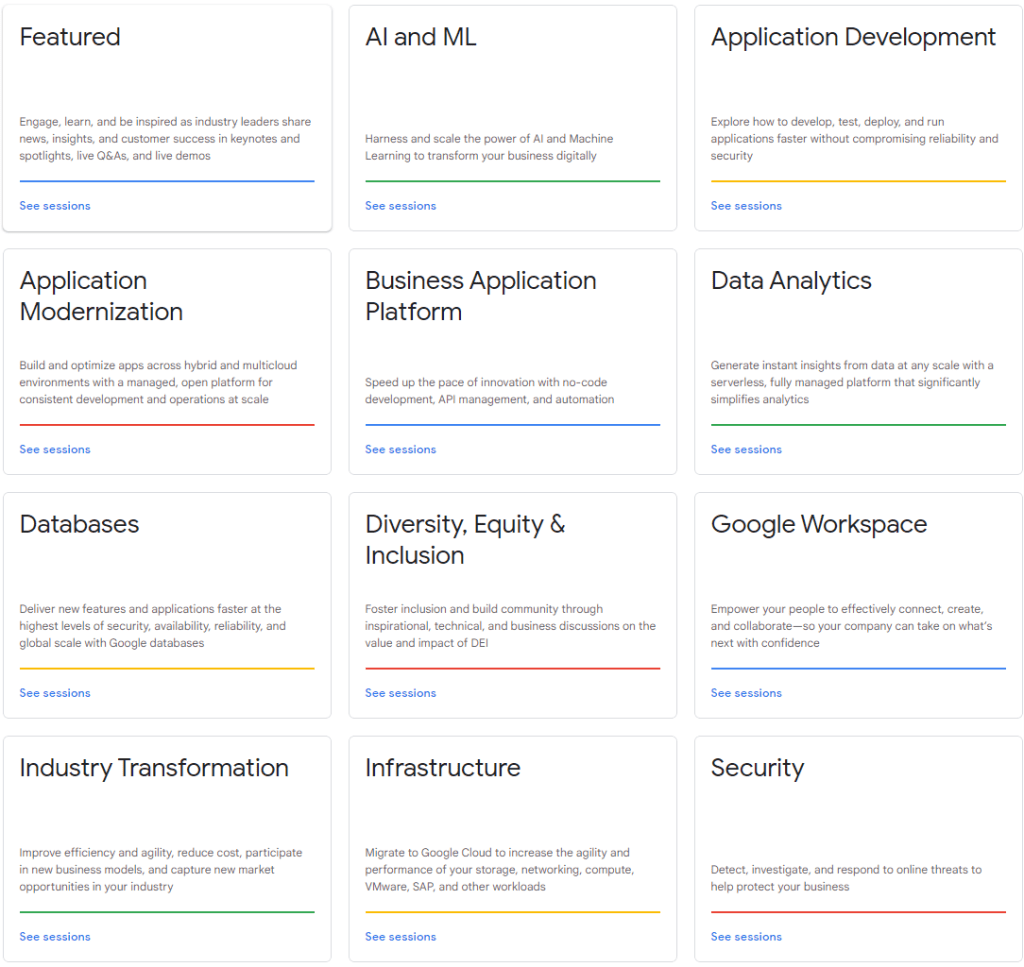
October 12-14, Google is hosting their Cloud Next conference. Registration for this conference is open now, and available at no cost. Google has made the session catalog available. The session categories include AI/Machine Learning, Application Development, Security, and more.
And last, if you have an interest in the USA’s developing responses to technology issues, this Thursday the Senate Committee on Commerce, Science, and Transportation is holding a hearing with Facebook’s head of safety over some recent reports published by the Wall Street Journal about the impact of it’s apps on younger audiences. The hearing (with live stream) will be Thursday, September 30, 2021 at 10:30am EDT. The livestream will be available at www.commerce.senate.gov.
Posts may contain products with affiliate links. When you make purchases using these links, we receive a small commission at no extra cost to you. Thank you for your support.
For reasons I’m sure are widely known, Google will be holding its annual I/O conference this year virtually. The conference will be held from 18-20 May, 2021. Registration is free and open to all at https://g.co/io. The schedule of sessions is expected to be posted before the month of April is over.
Today, July 29, 2020, the CEOs of four technology companies will meet virtually with a House subcommittee about their market power. Some have asserted that these companies have monopolies or near-monopolies. Time Cook of Apple, Mark Zuckerberg of Facebook, Sundar Pichai of Google, and Jeff Bezos of Amazon will be present. There was a push for Jack Dorsey of Twitter to attend from representative Jim Jordon of Ohio, but he is not expected to attend.
These companies are being investigated for their market dominance. For Apple, a key issue is that the only method of distribution to iOS devices is through the Apple App Store. While it is the case for a number of consumer devices that the device manufacturer is the only entity that can decide if an application will be available to the device (ex: Nintendo licensing games for the Switch, Sony for the Playstations, Microsoft for the Xbox) some entities have asserted that the arrangement is unfair. Most notably Spotify made a complaint about the revenue split terms for the Apple App Store and being disallowed from advertising other ways that a customer may purchase its service that do not involve Apple.
Amazon’s use of data that is has collected is in question. It’s combination of customer data, seller data, and its intelligence capabilities give it a significant advantage. Not only does Amazon sell items from third parties, it also produces its own products that compete with those providers. There is a question of it being fair.
For Facebook’s acquisition strategies are in question. And it also has a large advertising network that is being scrutinized.
Google, in addition to having the worlds most popular search engine, also has a wide advertising network. Google also gained the attention of regulators in the European Union because if its search engine giving preference to Google products for some types of searches.
Live-streaming of the hearing will be available on YouTube at the following starting at 12:00PM Eastern Time today, 29 July 2020.
Livestream/Replay
This isn’t the first hearing that the committee has had, but it will be the first one at which these CEOs have all been present. In previous hearings in which representatives from Facebook or Google have been present it hasn’t been unusual for questions to not focus on the investigation, but to also be on other topics of interest. In addition to questions on the competition practices, I expect there to be questioned on censorship, with the most recent well-known instance being the removal of a group that called themselves “American Frontline Doctors.” The group held a live stream on Monday that made claims of a cure for COVID-19, stating that masks offer no question, and made many other statements that contradict the advice of health organizations. The video was removed by Facebook, Twitter, and YouTube in addition to SquareSpace deciding to terminate their hosting agreement for the group’s site.
Previous hearings from the sub-committee are also available for viewing.




 j2i.net