I opened an old Direct3D program and tried recompiling it, only get the error LNK2001 Unresolved external symbol WKPDID_D3DDebugObjectName. This is obviously an error from a definition for an element missing. I checked the source code and I saw that the object of interest was defined in d3dcommon.h. Confusing at first, but I finally realized that for the object to be resolved by the linker I needed to include dxguid.lib in the project. There are a few ways to link to a library. I prefer to explicitly link in source code instead of linking in the project settings. In one of my sources files, I only needed to include the following.
#pragma comment(lib, "dxguid.lib")
I only need this file linked when I am compiling in debug mode. A conditional compilation statement wrapped around this will take care of making it conditionally linked.
With that change, the program compiles and the error has gone away!
For those curious, the D3D program in question is something I have appended in the C++ Application Base Class project. One day I intend to make a base class for a D3D program base class to go along with the D2D base class. The beginnings of my experimentation for it are within that project.
Posts may contain products with affiliate links. When you make purchases using these links, we receive a small commission at no extra cost to you. Thank you for your support.
In my previous installment of this series I was rebuilding a video game interface. The interface resembled my target, but did not have any text. How can I render text with Direct2D? The answer is: DirectWrite.
What is DirectWrite?
DirectWrite is a GPU accelerated text rendering API that runs on top of Direct2D. It originally shipped with Windows 7 and (as of the publishing date of this article) receives updates from Microsoft in the Windows 10 updates. It is a great solution for rendering text within a DXGI based program. Surfaces are generally dependent on the device. DirectWrite resources are device independent. There is no need to recreate them if the surface is lost.
Text Format
There is no default text style. When text is being rendered it must have a definite font, style, size, and weight. All of these text attributes are packaged in IDWriteTextFormat. If you have worked with CSS think of IDWriteTextFormat as being a style for text. In this interface you select the font face, weight, size, and text alignment.
I will discuss two ways to render a text string: DrawText and DrawTextLayout. The easier method of rendering a text string is to use ID2D1RenderTarget::DrawText. This method accepts a text format object and a bounding rectangle. It renders the text string at the location specified by the bounding rectangle. It also accepts optional arguments that affect text layout and metrics. This is the easiest of the two methods for rendering text, but it does not support having mixed styles within the same text string. For that you would need to use a text block rendered in IDWriteTextLayout with ID2D1RenderTarget::DrawTextLayout (discussed in the next section). Text rendered with this method will appear center-aligned to the bounding rectangle in which it is placed.
std::wstring test = TEXT("TEST");
D2D1_RECT_F textLocation{20,200,800,800};
_pRenderTarget->DrawTextW(
	test.c_str(), test.size(), //The text string and length
	_pDefaultFont.Get(),  //The font and style description
        &textLocation,  //The location in which to render the text
	_pBackgroundBrush.Get(),  //The brush to use on the text
	D2D1_DRAW_TEXT_OPTIONS_NONE,
	DWRITE_MEASURING_MODE_NATURAL
);
Text Layout
A text layout serves a similar function as a text block in that it is used for showing text. The primary difference is that a text block has a one-to-one relationship with what is rendered on the screen and a text layout (through the IDWriteTextLayout interface) can be rendered several times. If there were labels that were used repeatedly with the same text, they could be implemented by creating an IDWriteTextLayout object and rendering it several times.
Unlike text rendered with ID2D1RenderTarget::DrawText, text rendered with IDWriteTextLayout can have styling applied to specific ranges of letters within the text. If you need to mix text styles, use IDWriteTextLayout instead of using ID2D1RenderTarget::DrawText. Create a TextLayout initially using a text format that covers the majority of the text in your layout. Where deviations to your selected default should apply, create a DWRITE_TEXT_RANGE instance. DWRITE_TEXT_RANGE contains the index of the starting character for the new text styling and the number of characters to which it should be applied. Here are some of the functions for adjusting text styling.
When creating the IDWriteTextLayout a width and a height for the text area are needed. Content rendered within this rectangle will automatically be wrapped.
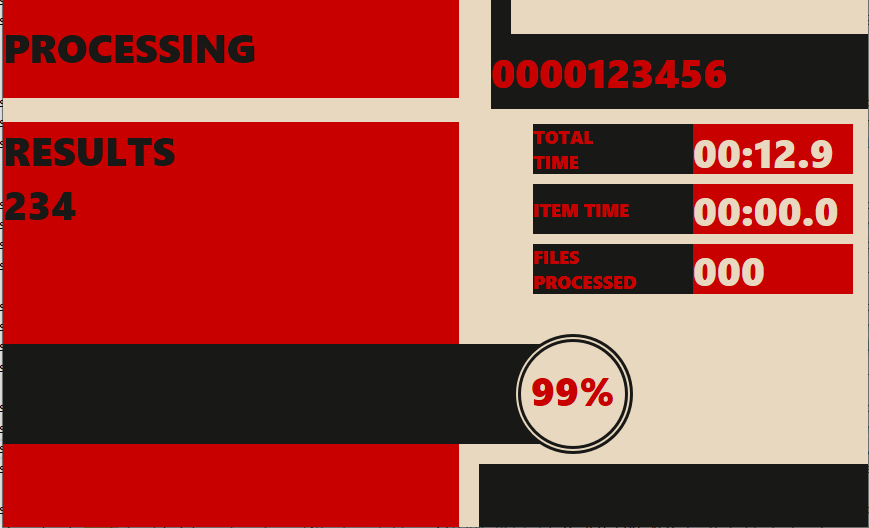
Where I left off, I had used Direct2D to render color to areas in which the interface will show information.
The next step is to apply text to the interface. This interface will ultimately be used for performing batch processing of some media files. The details and implementation of that processing are not shown here and are not important since this is only showing an interface. The text populating the interface in this example is for demonstrative purposes only.
As shown in creating the interface, I am making a list of shape types to render. In the call to OnRender() there is a case statement that will make the necessary calls depending on the next shape type in the list. Between the last post and this one I changed my shape representation to have a shape base class and subclasses instead of having a single struct with the additional data needed packaged in unioned elements.
I am using IDWriteTextLayout to render text instead of ID2D1RenderTarget::DrawText. Since DrawText centers the text within the bounding rectangle I could not get the layout to be what I wanted. Using IDwriteTextLayout in combination with layout options I was able to achieve the layout that I was looking for.
With the development of a hierarchy for the types of items that I am rendering, I am almost tempted at this point to just start defining a control hierarchy. While that would have utility it may also distract from the concepts being shown here. A control hierarchy may be written some other day. For now the hierarchy I am using for shapes is shown is this code.
The OnRender() method has now been modified to reflect the new struct hierarchy and now has additional code for rendering text.
switch ((*current)->shapeType)
{
	case ShapeType::ShapeType_Rectangle:
	{
		std::shared_ptr r = std::static_pointer_cast(*current);
		_pRenderTarget->FillRectangle(r->rect, brush.Get());
		break;
	}
	case ShapeType_Ellipse:
	{
		std::shared_ptr e = std::static_pointer_cast(*current);
		_pRenderTarget->FillEllipse(e->ellipse, brush.Get());
		break;
	}
	case ShapeType_Text:
	{
		std::shared_ptr t = std::static_pointer_cast(*current);
		if (t->textLayout)
		{
			ComPtr format = _pDefaultFont;
			//_pRenderTarget->DrawTextW(t->text.c_str(), t->text.size(), format.Get(), t->location, brush.Get());
			D2D1_POINT_2F p = { t->location.left, t->location.top };
			_pRenderTarget->DrawTextLayout(p, t->textLayout.Get(), brush.Get());
		}
		break;
	}
	default:
		break;
}
And now the UI looks more complete.
There are adjustments to be made with the margins on the text and positioning. Those are going to be ignored until other items are in place. One could spend hours making adjustments to positioning. I am holding off on small adjustments until the much larger items are complete.
The complete source code can be found in the following commit on Github.
There are a few places in the UI where I would like to have vertically rendered text. A 10 to 15 degree tilt has yet to be applied to the entire UI. I would also like to be able to display preview images from the items being processed. My next posts in this series will address: Displaying Images in Direct2D and Applying Transformations in Direct2D.







 j2i.net